web
You’re offline. This is a read only version of the page.
close
Skip to main content

Announcements

No record found.

News and Announcements icon
Community site session details

Community site session details

Session Id :
Finance | Project Operations, Human Resources, ...
Unanswered

Can't able to delete a task from a project

(0) ShareShare
ReportReport
Posted on by 75

Hello,

I can't able to delete a task(both parent and child) from task grid. Delete Task button is showing as grey out.

pastedimage1628485532179v2.png

also I have tried to delete from schedule api, it is showing below error:

Task deletion blocked due to constraint in Dynamics

There is only one record(Resource Assignment) related to task.
pastedimage1628485717050v3.png

Please let me know how can I delete unwanted task?

Thanks,

Vikas

I have the same question (0)
  • Juan Simon Profile Picture
    1,026 on at

    Hi Vikas,

    Normally there is a dependency preventing you from deleting the Task.

    Has any Bookable Resource been assigned and or summitted time against this task?

    In that case it locks exactly like you mentioned.

    Let us know if that helps.

    Juan Simon

  • Vikas P Profile Picture
    75 on at

    Hi Juan,

    Thanks for your quick reply.

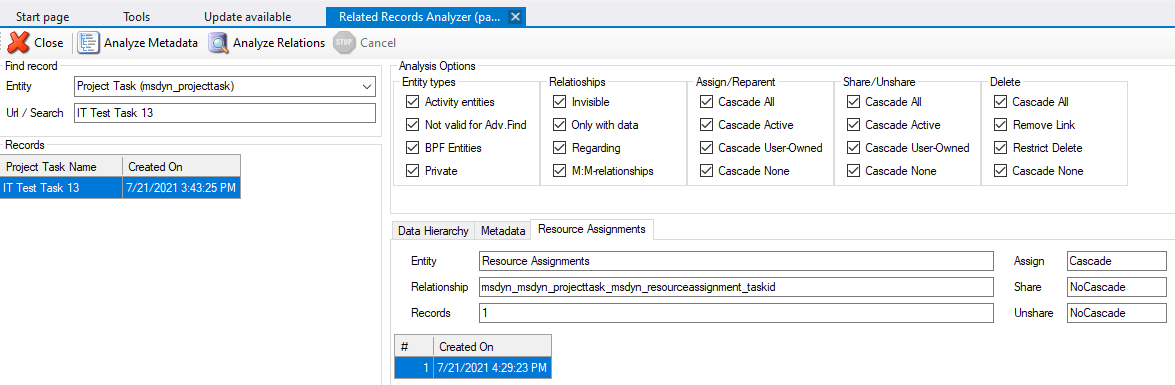
    I have verified task record dependency in Related Record Analyzer Xrmtoolbox tool and found only one Resource Assignment record against that task, for resource assignment record don't have assigned any team and bookable resource. There is no timesheet entry for this task. Still I am not able to delete from task grid.

    pastedimage1628580739249v2.png

    pastedimage1628581154198v3.png

    pastedimage1628580517091v1.png

    Thanks,

    Vikas

  • Juan Simon Profile Picture
    1,026 on at

    Hi Vikas,

    Have you guys customized this solution in any way?

    Do you have a contract associated with this Project?

    Consider trying these (if you have not yet):

    1) Do a hard refresh on your browser/Use a different browser (do you get the same behavior)?

    2) Have you made any changes to the Business Unit that the tasks were under it?

    3) If nothing else works, try copying this Project and renaming it to see if it does allow you to change it.

    4) Have you considered creating a new project and associating it with the existing Contract?

    Let us know if any of these help you.

Under review

Thank you for your reply! To ensure a great experience for everyone, your content is awaiting approval by our Community Managers. Please check back later.

Helpful resources

Quick Links

Introducing the 2026 Season 1 community Super Users

Congratulations to our 2026 Super Stars!

Meet the Microsoft Dynamics 365 Contact Center Champions

We are thrilled to have these Champions in our Community!

Congratulations to the April Top 10 Community Leaders

These are the community rock stars!

Leaderboard > Finance | Project Operations, Human Resources, AX, GP, SL

#1
Giorgio Bonacorsi Profile Picture

Giorgio Bonacorsi 797

#2
André Arnaud de Calavon Profile Picture

André Arnaud de Cal... 610 Super User 2026 Season 1

#3
Subra Profile Picture

Subra 534

Last 30 days Overall leaderboard

Product updates

Dynamics 365 release plans
