web
You’re offline. This is a read only version of the page.
close
Skip to main content

Notifications

Announcements

No record found.

Community site session details

Community site session details

Session Id :
Finance | Project Operations, Human Resources, ...
Suggested Answer

Disable custom FormMenuButtonControl on form

(0) ShareShare
ReportReport
Posted on by 209

Hi Community Experts,

I have a requirement where I need to disable a FormMenuButtonControl, it is a custom button coming from a different model.
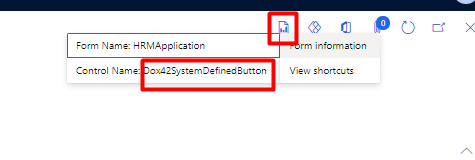
pastedimage1665994059305v3.png

pastedimage1665994112269v4.png

I need to disable it on the Applications form inside Human Resource module.

But I am unable to get this control in the event handler, I am writing this inside On_Activated event handler of form data source.
pastedimage1665993921539v1.png

But its returning an error that no such control exists on Form.

I tried with CoC as well, but its not working.
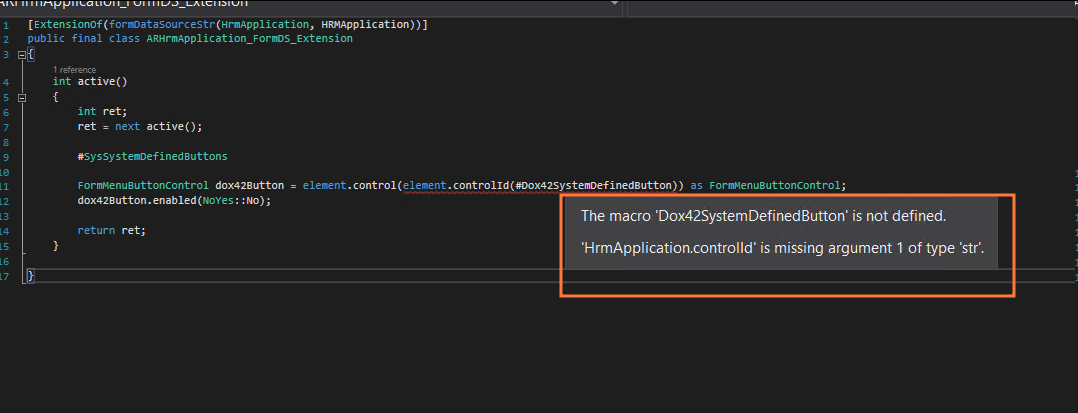
pastedimage1665994005323v2.png

Looking forward to usual helpful responses on it.

Best Regards

I have the same question (0)
  • Arunraj Rajasekar Profile Picture
    1,743 on at

    Have you included the other model where the menu item was created as a reference model in your model?

  • Martin Dráb Profile Picture
    237,807 Most Valuable Professional on at

    The first code snippet fails because no such control is available in the definition of HRMApplication form - it's added at runtime.

    In the second code snippet, you're referring to a macro that you haven't defined anywhere in your class. The standard macro (SysSystemDefinedButtons) can't contain custom controls.

  • alinawaz Profile Picture
    209 on at

    goshoom How can I check which Macro to refer here ?

    Its a different model altogether, I am not aware of its elements.

  • Suggested answer
    Martin Dráb Profile Picture
    237,807 Most Valuable Professional on at

    Maybe there is none - it's just your speculation that such a macro exists.

    Look into the model that adds Dox42SystemDefinedButton to see whether the developer hard-coded the name, used a macro or a constant.

    If you can't look into code, you can still look at model definitions to AOT, e.g. to know whether there is an AOT macro.

    If you don't find anything, create a constant by yourself.

  • GirishS Profile Picture
    27,827 Moderator on at

    Hi Chota Hukam,

    You can also create label id for control name and use it in your code. Like below.

    [FormDataSourceEventHandler(formDataSourceStr(FormName, TableName), FormDataSourceEventType::Activated)]
    public static void TableName_OnActivated(FormDataSource sender, FormDataSourceEventArgs e)
    {
        FormRun frun = sender.formRun();
        FormMenuButtonControl menuButton = frun.design().controlName("label Id You have created for the control") as FormMenuButtonControl;
        menuButton.visible(false);
        
    }

    Thanks,

    Girish S.

Under review

Thank you for your reply! To ensure a great experience for everyone, your content is awaiting approval by our Community Managers. Please check back later.

Helpful resources

Quick Links

Responsible AI policies

As AI tools become more common, we’re introducing a Responsible AI Use…

Neeraj Kumar – Community Spotlight

We are honored to recognize Neeraj Kumar as our Community Spotlight honoree for…

Leaderboard > Finance | Project Operations, Human Resources, AX, GP, SL

#1
Martin Dráb Profile Picture

Martin Dráb 664 Most Valuable Professional

#2
André Arnaud de Calavon Profile Picture

André Arnaud de Cal... 522 Super User 2025 Season 2

#3
Sohaib Cheema Profile Picture

Sohaib Cheema 303 User Group Leader

Last 30 days Overall leaderboard

Product updates

Dynamics 365 release plans



