web
You’re offline. This is a read only version of the page.
close
Skip to main content

Notifications

Announcements

No record found.

Community site session details

Community site session details

Session Id :
Microsoft Dynamics AX (Archived)

Facing installation Error while installing AOS of ax 2012!

(0) ShareShare
ReportReport
Posted on by 140

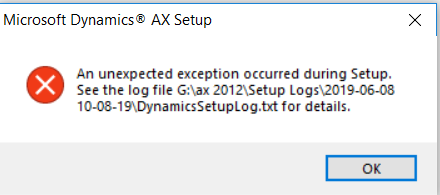
I was trying to install microsoft ax 2012. But during AOS installation i m facing trouble.  Below is the logged exception .  Searched all over the internet was not able to pin point the problem.


2019-06-06 12:17:11Z Performing a registry value version check for prerequisite 'Microsoft .NET Framework 3.5 Service Pack 1'.
2019-06-06 12:17:11Z Searching for a minimum version of '3.5.30729.1'.
2019-06-06 12:17:11Z Version found: '3.5.30729.4926'.
2019-06-06 12:17:11Z Check succeeded.
2019-06-06 12:17:11Z Performing a .NET version check for prerequisite 'Microsoft .NET Framework 4.5'.
2019-06-06 12:17:11Z Checking for the existence of the registry key 'HKEY_LOCAL_MACHINE\SoftWare\Microsoft\NET Framework Setup\NDP\v4\Full'.
2019-06-06 12:17:11Z Success
2019-06-06 12:17:11Z Searching for a minimum version of '4.0.30319.0'.
2019-06-06 12:17:11Z Version found: '4.7.3056.0'.
2019-06-06 12:17:11Z Check succeeded.
2019-06-06 12:17:11Z Checking for the existence of the registry key 'HKEY_LOCAL_MACHINE\SOFTWARE\Microsoft\.NetFramework\v4.0.30319\SKUs\.NETFramework,Version=v4.5'.
2019-06-06 12:17:11Z Success
2019-06-06 12:17:11Z Check succeeded.
2019-06-06 12:17:11Z Performing a domain account check for prerequisite 'Domain user account'.
2019-06-06 12:17:11Z Check succeeded.
2019-06-06 12:17:11Z Performing a local administrator check for prerequisite 'Local administrator'.
2019-06-06 12:17:11Z Check succeeded.
2019-06-06 12:17:11Z Performing a windows installer version check for prerequisite 'Microsoft Windows Installer'.
2019-06-06 12:17:11Z Searching for a minimum version of '3.0.0.0'.
2019-06-06 12:17:11Z Version found: '5.0.17134.765'.
2019-06-06 12:17:11Z Check succeeded.
2019-06-06 12:17:11Z Performing an OS version check for prerequisite 'Server operating system'.
2019-06-06 12:17:11Z Searching for a minimum version of '6.0.1.0' and a suggested version of '6.0.1.0'.
2019-06-06 12:17:11Z Version found: '6.2.9200.0'.
2019-06-06 12:17:11Z Check succeeded.
2019-06-06 12:17:11Z Success
2019-06-06 12:17:11Z Performing a service status check for prerequisite 'Windows Firewall service'.
2019-06-06 12:17:11Z Checking the status of the service 'MpsSvc'.
2019-06-06 12:17:11Z Success
2019-06-06 12:17:11Z Check succeeded.
2019-06-06 12:17:11Z Performing a .NET version check for prerequisite 'Microsoft .NET Framework 4.0'.
2019-06-06 12:17:11Z Checking for the existence of the registry key 'HKEY_LOCAL_MACHINE\SoftWare\Microsoft\NET Framework Setup\NDP\v4\Full'.
2019-06-06 12:17:11Z Success
2019-06-06 12:17:11Z Searching for a minimum version of '4.0.30319.0'.
2019-06-06 12:17:11Z Version found: '4.7.3056.0'.
2019-06-06 12:17:11Z Check succeeded.
2019-06-06 12:17:11Z Checking for the existence of the registry key 'HKEY_LOCAL_MACHINE\SOFTWARE\Microsoft\.NetFramework\v4.0.30319\SKUs\.NETFramework,Version=v4.0'.
2019-06-06 12:17:11Z Success
2019-06-06 12:17:11Z Check succeeded.
2019-06-06 12:17:11Z Performing a .NET version check for prerequisite 'Hotfix for Microsoft .NET Framework 4.0 (KB2390372)'.
2019-06-06 12:17:11Z Checking for the existence of the registry key 'HKEY_LOCAL_MACHINE\SoftWare\Microsoft\NET Framework Setup\NDP\v4\Full'.
2019-06-06 12:17:11Z Success
2019-06-06 12:17:11Z Searching for a minimum version of '4.0.30319.0'.
2019-06-06 12:17:11Z Version found: '4.7.3056.0'.
2019-06-06 12:17:11Z Check succeeded.
2019-06-06 12:17:11Z Performing an MSI package check for prerequisite 'Open XML SDK for Microsoft Office'.
2019-06-06 12:17:11Z Checking for installed MSI's with an upgrade code '{8444B290-5AF2-4551-BF92-629B96794528}'.
2019-06-06 12:17:11Z Searching for a minimum version of '2.0.5022.0'.
2019-06-06 12:17:11Z Version found: '2.0.5022.0'.
2019-06-06 12:17:11Z Success
2019-06-06 12:17:11Z Check succeeded.
2019-06-06 12:17:11Z Performing an MSI package check for prerequisite 'Microsoft SQL Server Native Client'.
2019-06-06 12:17:11Z Checking for installed MSI's with an upgrade code '{1D2D1FA0-E158-4798-98C6-A296F55414F9}'.
2019-06-06 12:17:11Z Searching for a minimum version of '11.0.2100.60'.
2019-06-06 12:17:11Z Version found: '11.0.2100.60'.
2019-06-06 12:17:11Z Success
2019-06-06 12:17:11Z Check succeeded.
2019-06-06 12:17:11Z Performing an MSI package check for prerequisite 'Microsoft Analysis Management Objects'.
2019-06-06 12:17:11Z Checking for installed MSI's with an upgrade code '{3FE6236A-7BC2-47FC-81C7-9C611A96D307}'.
2019-06-06 12:17:11Z Searching for a minimum version of '10.0.1600.60'.
2019-06-06 12:17:11Z Version found: '10.0.1600.60'.
2019-06-06 12:17:11Z Success
2019-06-06 12:17:11Z Check succeeded.
2019-06-06 12:17:11Z Performing an MSI package check for prerequisite 'Visual C++ 2010 Redistributable (x86)'.
2019-06-06 12:17:11Z Checking for installed MSI's with an upgrade code '{1F4F1D2A-D9DA-32CF-9909-48485DA06DD5}'.
2019-06-06 12:17:11Z Searching for a minimum version of '10.0.30319.0'.
2019-06-06 12:17:11Z Version found: '10.0.40219.0'.
2019-06-06 12:17:11Z Success
2019-06-06 12:17:11Z Check succeeded.
2019-06-06 12:17:11Z Performing an MSI package check for prerequisite 'Visual C++ 2010 Redistributable (x64)'.
2019-06-06 12:17:11Z Checking for installed MSI's with an upgrade code '{5B75F761-BAC8-33BC-A381-464DDDD813A3}'.
2019-06-06 12:17:11Z Searching for a minimum version of '10.0.30319.0'.
2019-06-06 12:17:11Z Version found: '10.0.40219.0'.
2019-06-06 12:17:11Z Success
2019-06-06 12:17:11Z Check succeeded.
2019-06-06 12:17:11Z Performing an MSI package check for prerequisite 'Visual C++ 2012 Redistributable (x86)'.
2019-06-06 12:17:11Z Checking for installed MSI's with an upgrade code '{4121ED58-4BD9-3E7B-A8B5-9F8BAAE045B7}'.
2019-06-06 12:17:11Z Searching for a minimum version of '11.0.61030.0'.
2019-06-06 12:17:11Z Version found: '11.0.61030.0'.
2019-06-06 12:17:11Z Success
2019-06-06 12:17:11Z Check succeeded.
2019-06-06 12:17:11Z Performing an MSI package check for prerequisite 'Visual C++ 2012 Redistributable (x64)'.
2019-06-06 12:17:11Z Checking for installed MSI's with an upgrade code '{EFA6AFA1-738E-3E00-8101-FD03B86B29D1}'.
2019-06-06 12:17:11Z Searching for a minimum version of '11.0.61030.0'.
2019-06-06 12:17:11Z Version found: '11.0.61030.0'.
2019-06-06 12:17:11Z Success
2019-06-06 12:17:11Z Check succeeded.
2019-06-06 12:17:11Z Performing an MSI package check for prerequisite 'Microsoft Visual C++ 2008 SP1 Redistributable (x86)'.
2019-06-06 12:17:11Z Checking for installed MSI's with an upgrade code '{AA783A14-A7A3-3D33-95F0-9A351D530011}'.
2019-06-06 12:17:11Z Searching for a minimum version of '9.0.30729.0'.
2019-06-06 12:17:11Z Version found: '9.0.30729.0'.
2019-06-06 12:17:11Z Success
2019-06-06 12:17:11Z Check succeeded.
2019-06-06 12:17:11Z Performing an MSI package check for prerequisite 'Microsoft Visual C++ 2008 SP1 Redistributable (x64)'.
2019-06-06 12:17:11Z Checking for installed MSI's with an upgrade code '{AA783A14-A7A3-3D33-95F0-9A351D530011}'.
2019-06-06 12:17:11Z Searching for a minimum version of '9.0.30729.0'.
2019-06-06 12:17:11Z Version found: '9.0.30729.0'.
2019-06-06 12:17:11Z Success
2019-06-06 12:17:11Z Check succeeded.
2019-06-06 12:17:13Z S231InstallPathEntry64
2019-06-06 12:17:20Z Property InstallPath32Bit set to: 'G:\ax'
2019-06-06 12:17:20Z S163ModelSqlDatabaseNameSelection
2019-06-06 12:17:22Z Property DbSqlServer set to: 'UserDnsDomain\AX'
2019-06-06 12:17:23Z Property DbSqlDatabaseName set to: 'MicrosoftDynamicsAX'
2019-06-06 12:17:24Z Property DbSqlModelStoreBaseline set to: 'MicrosoftDynamicsAXBaseline'
2019-06-06 12:17:24Z Property UpgradeDB set to: '0'
2019-06-06 12:17:24Z S200AosInstallPathAndAosInstanceNameEntry
2019-06-06 12:17:24Z Property AosPort set to: '2712'
2019-06-06 12:17:24Z Property AosNetTcpPort set to: '8201'
2019-06-06 12:17:24Z Property AosWsdlPort set to: '8101'
2019-06-06 12:17:30Z Property AosInstanceName set to: 'MicrosoftDynamicsAX'
2019-06-06 12:17:30Z Property AosPort set to: ''
2019-06-06 12:17:37Z Exception: System.Net.Sockets.SocketException

2019-06-06 12:17:37Z Message: No such host is known

2019-06-06 12:17:37Z FullText: System.Net.Sockets.SocketException: No such host is known
2019-06-06 12:17:37Z at System.Net.Dns.InternalGetHostByName(String hostName, Boolean includeIPv6)
2019-06-06 12:17:37Z at System.Net.Dns.GetHostByName(String hostName)
2019-06-06 12:17:37Z at Microsoft.Dynamics.Setup.Components.Aos.CheckIfPortInUse(String portType, String portNumberString)
2019-06-06 12:17:37Z at Microsoft.Dynamics.Setup.S200AosInstallPathAndAosInstanceNameEntry.S200AosInstallPathAndAosInstanceNameEntry_Next(Object sender, AxWizardPageNextEventArgs e)
2019-06-06 12:17:37Z at Microsoft.Dynamics.Setup.AxWizardPage.OkToContinue()
2019-06-06 12:17:37Z at Microsoft.Dynamics.Setup.MainForm.mainFormButtonNext_Click(Object sender, EventArgs e)
2019-06-06 12:17:37Z at System.Windows.Forms.Control.OnClick(EventArgs e)
2019-06-06 12:17:37Z at System.Windows.Forms.Button.OnMouseUp(MouseEventArgs mevent)
2019-06-06 12:17:37Z at System.Windows.Forms.Control.WmMouseUp(Message& m, MouseButtons button, Int32 clicks)
2019-06-06 12:17:37Z at System.Windows.Forms.Control.WndProc(Message& m)
2019-06-06 12:17:37Z at System.Windows.Forms.ButtonBase.WndProc(Message& m)
2019-06-06 12:17:37Z at System.Windows.Forms.Button.WndProc(Message& m)
2019-06-06 12:17:37Z at System.Windows.Forms.Control.ControlNativeWindow.WndProc(Message& m)
2019-06-06 12:17:37Z at System.Windows.Forms.NativeWindow.Callback(IntPtr hWnd, Int32 msg, IntPtr wparam, IntPtr lparam)

2019-06-06 12:17:37Z ==== Setup encountered an unhandled exception and could not be completed. For details see the previous messages in the log. ===

*This post is locked for comments

I have the same question (0)
  • André Arnaud de Calavon Profile Picture
    301,231 Super User 2025 Season 2 on at

    Hi Angelpriya,

    At what exact point in time do you get this error? Have you looked at Windows event logs and the Dynamics setup log files for possible more information? Can you share a screenshot with the setup application and the error message?

  • angelpriya Profile Picture
    140 on at

    Thanks for replying André Arnaud

    Right after clicking next in the below screen shot i got error.
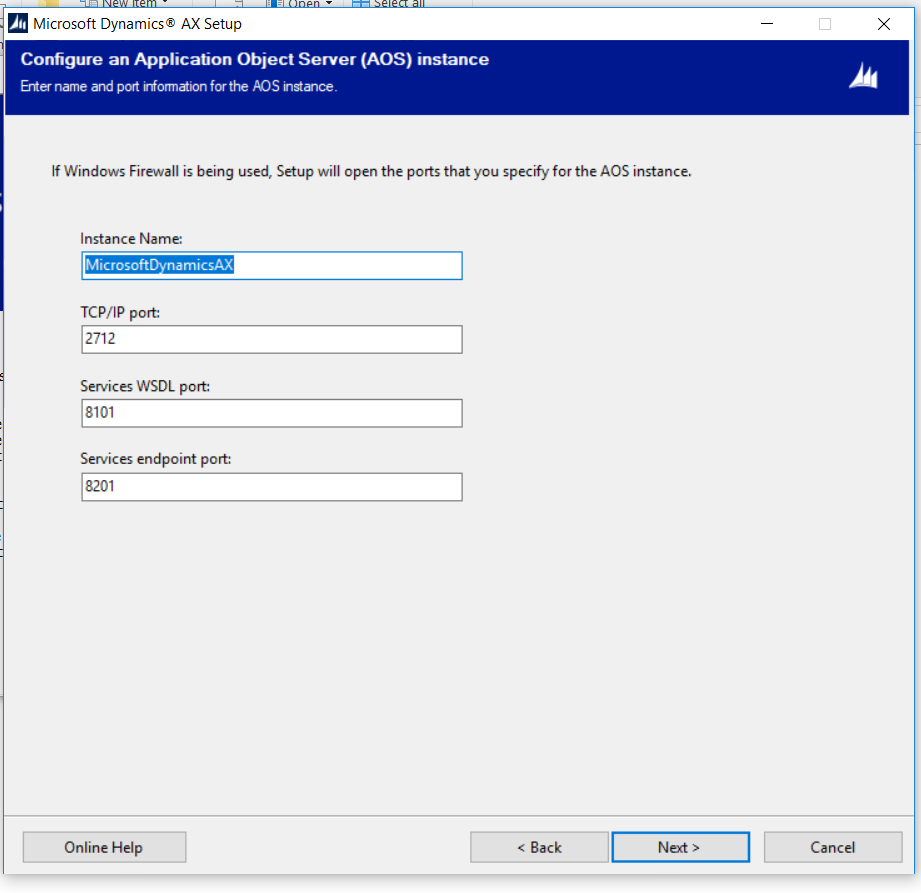
    5758.screen-shot-of-error.png

    5758.screen-shot-of-error.png

    Here is the dynamicsSetuplog file 

    2019-06-06 12:17:11Z Performing an MSI package check for prerequisite 'Visual C++ 2012 Redistributable (x86)'.

    2019-06-06 12:17:11Z Checking for installed MSI's with an upgrade code '{4121ED58-4BD9-3E7B-A8B5-9F8BAAE045B7}'.

    2019-06-06 12:17:11Z Searching for a minimum version of '11.0.61030.0'.

    2019-06-06 12:17:11Z Version found: '11.0.61030.0'.

    2019-06-06 12:17:11Z Success

    2019-06-06 12:17:11Z Check succeeded.

    2019-06-06 12:17:11Z Performing an MSI package check for prerequisite 'Visual C++ 2012 Redistributable (x64)'.

    2019-06-06 12:17:11Z Checking for installed MSI's with an upgrade code '{EFA6AFA1-738E-3E00-8101-FD03B86B29D1}'.

    2019-06-06 12:17:11Z Searching for a minimum version of '11.0.61030.0'.

    2019-06-06 12:17:11Z Version found: '11.0.61030.0'.

    2019-06-06 12:17:11Z Success

    2019-06-06 12:17:11Z Check succeeded.

    2019-06-06 12:17:11Z Performing an MSI package check for prerequisite 'Microsoft Visual C++ 2008 SP1 Redistributable (x86)'.

    2019-06-06 12:17:11Z Checking for installed MSI's with an upgrade code '{AA783A14-A7A3-3D33-95F0-9A351D530011}'.

    2019-06-06 12:17:11Z Searching for a minimum version of '9.0.30729.0'.

    2019-06-06 12:17:11Z Version found: '9.0.30729.0'.

    2019-06-06 12:17:11Z Success

    2019-06-06 12:17:11Z Check succeeded.

    2019-06-06 12:17:11Z Performing an MSI package check for prerequisite 'Microsoft Visual C++ 2008 SP1 Redistributable (x64)'.

    2019-06-06 12:17:11Z Checking for installed MSI's with an upgrade code '{AA783A14-A7A3-3D33-95F0-9A351D530011}'.

    2019-06-06 12:17:11Z Searching for a minimum version of '9.0.30729.0'.

    2019-06-06 12:17:11Z Version found: '9.0.30729.0'.

    2019-06-06 12:17:11Z Success

    2019-06-06 12:17:11Z Check succeeded.

    2019-06-06 12:17:13Z S231InstallPathEntry64

    2019-06-06 12:17:20Z Property InstallPath32Bit set to: 'G:\ax'

    2019-06-06 12:17:20Z S163ModelSqlDatabaseNameSelection

    2019-06-06 12:17:22Z Property DbSqlServer set to: 'UserDnsDomain\AX'

    2019-06-06 12:17:23Z Property DbSqlDatabaseName set to: 'MicrosoftDynamicsAX'

    2019-06-06 12:17:24Z Property DbSqlModelStoreBaseline set to: 'MicrosoftDynamicsAXBaseline'

    2019-06-06 12:17:24Z Property UpgradeDB set to: '0'

    2019-06-06 12:17:24Z S200AosInstallPathAndAosInstanceNameEntry

    2019-06-06 12:17:24Z Property AosPort set to: '2712'

    2019-06-06 12:17:24Z Property AosNetTcpPort set to: '8201'

    2019-06-06 12:17:24Z Property AosWsdlPort set to: '8101'

    2019-06-06 12:17:30Z Property AosInstanceName set to: 'MicrosoftDynamicsAX'

    2019-06-06 12:17:30Z Property AosPort set to: ''

    2019-06-06 12:17:37Z Exception: System.Net.Sockets.SocketException

    2019-06-06 12:17:37Z Message: No such host is known

    2019-06-06 12:17:37Z FullText: System.Net.Sockets.SocketException: No such host is known

    2019-06-06 12:17:37Z   at System.Net.Dns.InternalGetHostByName(String hostName, Boolean includeIPv6)

    2019-06-06 12:17:37Z   at System.Net.Dns.GetHostByName(String hostName)

    2019-06-06 12:17:37Z   at Microsoft.Dynamics.Setup.Components.Aos.CheckIfPortInUse(String portType, String portNumberString)

    2019-06-06 12:17:37Z   at Microsoft.Dynamics.Setup.S200AosInstallPathAndAosInstanceNameEntry.S200AosInstallPathAndAosInstanceNameEntry_Next(Object sender, AxWizardPageNextEventArgs e)

    2019-06-06 12:17:37Z   at Microsoft.Dynamics.Setup.AxWizardPage.OkToContinue()

    2019-06-06 12:17:37Z   at Microsoft.Dynamics.Setup.MainForm.mainFormButtonNext_Click(Object sender, EventArgs e)

    2019-06-06 12:17:37Z   at System.Windows.Forms.Control.OnClick(EventArgs e)

    2019-06-06 12:17:37Z   at System.Windows.Forms.Button.OnMouseUp(MouseEventArgs mevent)

    2019-06-06 12:17:37Z   at System.Windows.Forms.Control.WmMouseUp(Message& m, MouseButtons button, Int32 clicks)

    2019-06-06 12:17:37Z   at System.Windows.Forms.Control.WndProc(Message& m)

    2019-06-06 12:17:37Z   at System.Windows.Forms.ButtonBase.WndProc(Message& m)

    2019-06-06 12:17:37Z   at System.Windows.Forms.Button.WndProc(Message& m)

    2019-06-06 12:17:37Z   at System.Windows.Forms.Control.ControlNativeWindow.WndProc(Message& m)

    2019-06-06 12:17:37Z   at System.Windows.Forms.NativeWindow.Callback(IntPtr hWnd, Int32 msg, IntPtr wparam, IntPtr lparam)

    2019-06-06 12:17:37Z ==== Setup encountered an unhandled exception and could not be completed. For details see the previous messages in the log. ===

  • André Arnaud de Calavon Profile Picture
    301,231 Super User 2025 Season 2 on at

    Hi Angelpriya,

    Is there a firewall active other then Windows firewall which might block communication on the provided port numbers?

  • Hariharans87 Profile Picture
    3 on at

    Hi Andre,

    I am facing the same issue when i try to install only the AOS in hyper-V machine.

    Even i turned off the firewall.

    Any idea?

    Thanks,

    Hari

Under review

Thank you for your reply! To ensure a great experience for everyone, your content is awaiting approval by our Community Managers. Please check back later.

Helpful resources

Quick Links

Responsible AI policies

As AI tools become more common, we’re introducing a Responsible AI Use…

Neeraj Kumar – Community Spotlight

We are honored to recognize Neeraj Kumar as our Community Spotlight honoree for…

Leaderboard > 🔒一 Microsoft Dynamics AX (Archived)

#1
Priya_K Profile Picture

Priya_K 4

#1
Martin Dráb Profile Picture

Martin Dráb 4 Most Valuable Professional

#3
MyDynamicsNAV Profile Picture

MyDynamicsNAV 2

Last 30 days Overall leaderboard

Featured topics

Product updates

Dynamics 365 release plans