web
You’re offline. This is a read only version of the page.
close
Skip to main content

Notifications

Announcements

No record found.

Community site session details

Community site session details

Session Id :
Microsoft Dynamics AX (Archived)

No voucher created by the packing slip journal

(0) ShareShare
ReportReport
Posted on by

I post the packing slip journal for a sales order, but i cannot find any voucher when i click the "Vouchers" button on the packing slip journal form.

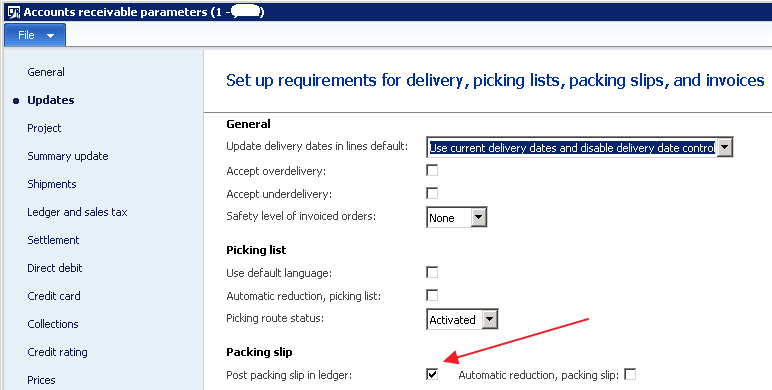
So check the account receivable parameters as below, the parameter "post packing slip in ledger" is checked.
4162.screenshot-4.png

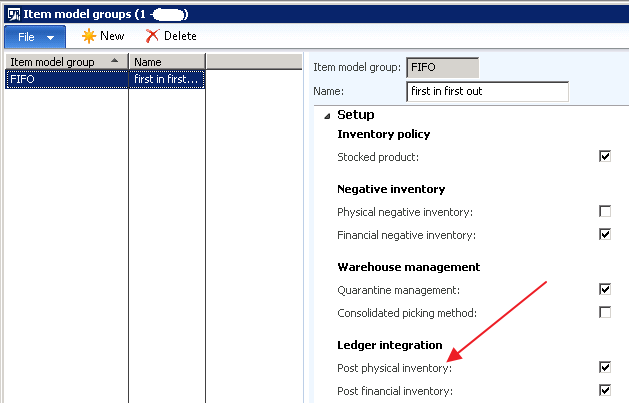
then i check the Item Module Group settings as below, the parameter "Post physical inventory" is also checked.
Not sure why the vouchers are not created.

Thanks.

*This post is locked for comments

I have the same question (0)
  • Suggested answer
    André Arnaud de Calavon Profile Picture
    300,911 Super User 2025 Season 2 on at

    Hi Jianrui,

    Please check if the voucher is pending in the form called Subledger journal entries not yet transferred. You can find this in GL > Inquiries.

    If there are pending transactions check the settings for the Batch transfer rules  on the General Ledger parameters. If the Transfer mode is set to scheduled batch, check if the batch job exists and is running.

  • Community Member Profile Picture
    on at

    [quote user="André Arnaud de Calavon"]

    Hi Jianrui,

    Please check if the voucher is pending in the form called Subledger journal entries not yet transferred. You can find this in GL > Inquiries.

    If there are pending transactions check the settings for the Batch transfer rules  on the General Ledger parameters. If the Transfer mode is set to scheduled batch, check if the batch job exists and is running.

    [/quote]

    Hi Andre,

    i have just checked the "Subledger journal entries not yet transferred", i can find nothing over there.

    and the "Transfer mode" is synchronize as below:

    anything else that may cause this issue ?

  • raelhefn Profile Picture
    on at

    ---

  • Community Member Profile Picture
    on at

    [quote user="Ramy EL Hefnawy"]

    Please try to following,

    Inventory Management --> Parameters --> General

    clear following checkbox:

    1. post estimates periodically;

    You should able to see a voucher after clear the box

    [/quote]

    Hi Ramy

    I'm using AX 2012 R3, i cannot find this setting on the "Inventory and warehouse management parameters"

    thanks.

  • Community Member Profile Picture
    on at

    Hello janrui,

    Did you check the item transaction? Does it have a cost amount?

    Inventory management/Inguiries/Transactions

  • Community Member Profile Picture
    on at

    [quote user="Carla@EPS"]

    Hello janrui,

    Did you check the item transaction? Does it have a cost amount?

    Inventory management/Inguiries/Transactions

    [/quote]

    Hi Carla

    i have just checked the transactions in the inventory module, both the "physical cost amount" and "financial cost amount" are blank, i only maintain the purchase price and sales price for that item. i purchase it from one vendor and sold it to a customer. and the inventory module for the item model group is "FIFO". so from my point of view the cost should be the purchase price, right ? please correct me

  • Verified answer
    André Arnaud de Calavon Profile Picture
    300,911 Super User 2025 Season 2 on at

    Hi Jianrui,

    Please check the Inventory model group. If Physical value is disabled, the cost of the items are only known when the Purchase invoices have been posted.

    You have to use the Inventory closing (or recalculation) to apply the costs afterwards based on FIFO.

  • Sagar Suman Profile Picture
    6,550 Super User 2025 Season 2 on at

    Hi jianrui ding,

    Its happening because you have not setup item cost price in the released product form in the manage cost fasttab.

  • Lidiya Kirilenko Profile Picture
    5 on at

    André Arnaud de Calavon, THANK YOU! You saved my life with this comment!

Under review

Thank you for your reply! To ensure a great experience for everyone, your content is awaiting approval by our Community Managers. Please check back later.

Helpful resources

Quick Links

Responsible AI policies

As AI tools become more common, we’re introducing a Responsible AI Use…

Neeraj Kumar – Community Spotlight

We are honored to recognize Neeraj Kumar as our Community Spotlight honoree for…

Leaderboard > 🔒一 Microsoft Dynamics AX (Archived)

#1
Martin Dráb Profile Picture

Martin Dráb 4 Most Valuable Professional

#1
Priya_K Profile Picture

Priya_K 4

#3
MyDynamicsNAV Profile Picture

MyDynamicsNAV 2

Last 30 days Overall leaderboard

Featured topics

Product updates

Dynamics 365 release plans
