web
You’re offline. This is a read only version of the page.
close
Skip to main content

Notifications

Announcements

No record found.

Community site session details

Community site session details

Session Id :
Microsoft Dynamics AX (Archived)

Select Sum Group By Key From Different Tables.

(0) ShareShare
ReportReport
Posted on by 1,214

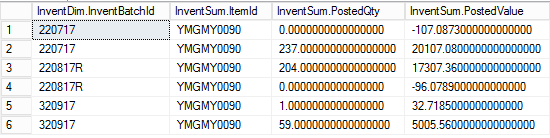
Hi. I'm building a View join InventSum & InventDim on InventSum.InventDimId == InventDim.InventDimId.

This is the query results.
4353.cost.png

As you can see, this query is filtered by ItemId = 'YMGMY0090'. For one itemId there's multiple InventBatchId.

In the view, I want to display a column that calculates sum(PostedValue) / sum(PostedQty). 

In this case, for batch number 32017, the calculation should return (5005.56 + 32.7185) / (59 + 1) = 83.9713.

How do I select sum(PostedValue) & sum(PostedQty) from InventSum table but group by InventBatchId from InventDim table?

I write this display method in InventDim table but it's getting random itemId instead of 'YMGMY0090' filtered when running this view:

public display Price unitCost()
{
    InventDim inventDim;
    InventSum inventsum;
    Price price;

    select sum(PostedValue), sum(PostedQty) from inventsum
        join this
        group by inventsum.ItemId, this.inventBatchId
        where inventsum.inventDimId == this.InventDimId;

        info(InventSum.ItemId);
        info(inventDim.inventBatchId);
        info(Num2Str(InventSum.PostedValue,0,5,1,3));
        info(Num2Str(InventSum.PostedQty,0,5,1,3));

        if(InventSum.PostedQty == 0)
        {
            price = 0;
        }
        else
        {
            price = InventSum.PostedValue / InventSum.PostedQty;
        }

    return price;
}

Thank You.

*This post is locked for comments

I have the same question (0)
  • Verified answer
    Chaitanya Golla Profile Picture
    17,225 on at

    Hi,

    You have a create a query with datasource as Inventsum & inventDim and perform required groupby and sum operations on it. Add a itemId range on datasource Inventsum. Then add this query as datasource to your view.

    Refer following links:

    (How to: Create a View Based on a Query [AX 2012])
    msdn.microsoft.com/.../aa558501.aspx

    (Walkthrough: Creating an AOT Query that has Group By and Having Nodes [AX 2012])
    https://msdn.microsoft.com/en-us/library/hh745337.aspx

    Please try the following code/display method:

    public display Price unitCost()
    {
        InventDim localinventDim;
        InventSum inventsum;
        Price price;
    
        select sum(PostedValue), sum(PostedQty) from inventsum
            join localInventDim
            group by inventsum.ItemId, localInventDim.inventBatchId
            where inventsum.inventDimId == localInventDim.InventDimId
    	&& localInventDim.InventDimId == this.inventDimId
    && inventSum.ItemId == this.itemId; info(InventSum.ItemId); info(inventDim.inventBatchId); info(Num2Str(InventSum.PostedValue,0,5,1,3)); info(Num2Str(InventSum.PostedQty,0,5,1,3)); if(InventSum.PostedQty == 0) { price = 0; } else { price = InventSum.PostedValue / InventSum.PostedQty; } return price; }
  • HAIRUL HAZRI Profile Picture
    1,214 on at

    Hi Chaitanya. Thanks for answering.

    But on line "&& inventSum.ItemId == this.itemId",

    InventDim table doesn't have ItemId field.

    Regards.

  • Verified answer
    Brandon Wiese Profile Picture
    17,788 on at

    The InventDim table is no place for such a method.

    InventDim can be referenced from many InventSum records and many ItemId's.  The whole approach is flawed by design.

  • HAIRUL HAZRI Profile Picture
    1,214 on at

    Hi Brandon.

    You're right. I write this method in InventSum table instead, and it works.

    Thanks.

  • HAIRUL HAZRI Profile Picture
    1,214 on at

    By the way Chaitanya, can you please explain to me why my query isn't working? What's actually happening on the :

    where inventsum.inventDimId == localInventDim.InventDimId

    && localInventDim.InventDimId == this.inventDimId

           && inventSum.ItemId == this.itemId;

    Why do we need to use two instances of both table? 

    Thank You.

  • Chaitanya Golla Profile Picture
    17,225 on at

    Hi,

    I missed the statement, that you have mentioned that display method is on InventDim table as I was thinking you placed it is on your view.

  • Brandon Wiese Profile Picture
    17,788 on at

    The "this.InventDimId" ties the query to the InventDimId of the current InventDim record, which was where the display method was attached.  That's why it was broken.  As you figured out, InventSum is far more appropriate.

  • Suggested answer
    Chaitanya Golla Profile Picture
    17,225 on at

    Hi,

    I don't feel we require display method. I created a query(as shown below) with group by on InventSum.ItemId and InventDim.InventBatchId with the sum on postedQty and postedValue from Inventsum.

    InventDim_2D00_View.jpg

    Added this query as datasource to the view(as shown below) & selected this fields on view and I am able to get the data. Please try this approach and let me know if anything is missing or unclear.

    InventDim_2D00_View.jpg

Under review

Thank you for your reply! To ensure a great experience for everyone, your content is awaiting approval by our Community Managers. Please check back later.

Helpful resources

Quick Links

Responsible AI policies

As AI tools become more common, we’re introducing a Responsible AI Use…

Neeraj Kumar – Community Spotlight

We are honored to recognize Neeraj Kumar as our Community Spotlight honoree for…

Leaderboard > 🔒一 Microsoft Dynamics AX (Archived)

#1
Martin Dráb Profile Picture

Martin Dráb 4 Most Valuable Professional

#1
Priya_K Profile Picture

Priya_K 4

#3
MyDynamicsNAV Profile Picture

MyDynamicsNAV 2

Last 30 days Overall leaderboard

Featured topics

Product updates

Dynamics 365 release plans



