I do not have access to an AX2012 but here is how it works in D365FO.
And btw, what you are trying to do is IMHO the best way of doing it. Create a Privilege that will EXCLUDE access and then assign two roles to a user, one that has everything they need plus extra and a second role that will exclude the access you do NOT want them to have from the first role.
How to create an “Excluding” role in D365FO and why you need to know this.
Have you ever been faced with the situation where your client wants to have a role that can do almost everything that one of the standard roles in D365FO, EXCEPT for a few privileges? In my example I have decided to use one Privilege, “LedgerJournalSetup”, which allows a user to create and maintain “Journal names”
I have had this scenario presented to me several times and searching online provides you with a few options, but they are not really good options IMHO. Why are they no good you may ask? Well, consider this scenario: the way most people go around the issue is to copy an existing role, say Accountant, and give the new role another name, say “ACME Accountant” (“ACME” being the client/project name and a Best Practice to use as a pre-fix to any changes you do to the system). Next you remove the privilege that you do not want the new role to have, in my example the Privilege “LedgerJournalSetup”. Then you test the new role and when it is working, you deploy your changes.
While this achieves the purpose, it is not a good way of dealing with the issue if you plan to keep your D365 current. By copying a standard role, you create a snapshot of what that role looked like at the time of copy, which is fine short term, but then the next update for D365 is available and you want to deploy it. How do you now account for updates to the original role (and believe me, they do happen)?
You can deal with this in a couple of different ways:
- One option is to delete your own role (“ACME Accountant”), copy the updated standard role into a new “ACME Accountant” role and then remove the privilege you do not want your Accountants to have. Go back and assign the “ACME Accountant” role to all your Accountants and while this approach would work, it does require time and effort.
- A second way to do this is to compare the updated role with the old version of the role and apply the changes to your “ACME Accountant” role. This approach would of course also work but it is also time consuming.
- A third option is leave your role “as-is” and run the risk that your Accountants are missing out on new cool functionality (yes, this happens too that MS release new cool features) introduced to the standard “Accountant” role.
But what if there was a fourth way of handling this that would not require a whole lot of re-work of your Role? Wouldn’t that be nice? Well …. There is another, and IMHO, much better way to handle the scenario. What you have to do is to create an “Excluding” role, for lack of a better description.
So, here is what you do:
- Create a new role “ACME Accountant Limited”
- Create new and add reference to a new duty “ACME Accountant Limited” (this step can be skipped if you are ok with assigning Privileges directly to a role, but that is not considered a Best Practice so don’t do that!)
- Create new and add reference to a new Privilege “ACME LedgerJournalSetup - Deny” that has the Display menu item “LedgerJournalSetup” in it. The trick here is that when you assign the “LedgerJournalSetup” to your new privilege, you specify that you want to DENY access to this entry point.
“- Deny” is my naming convention to make it easier to know what the Privilege does without having to open it up. You can make your own convention if you prefer.
- Now that you have created your “Excluding” Role, all you must do is to grant your Accountants the standard Accountant role AS WELL AS the new Excluding role “ACME Accountant Limited”, which will override the access to “LedgerJournalSetup” and thereby effectively remove this access for your Accountants.
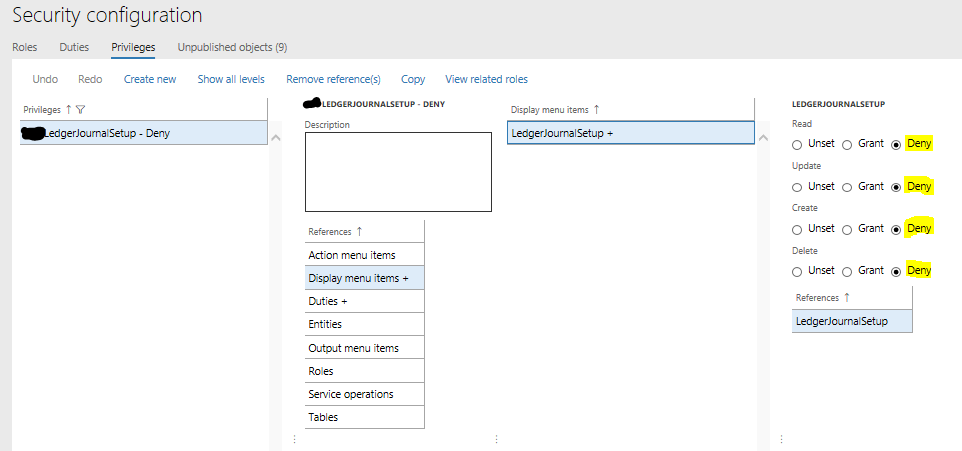
With this approach you achieve the following:
- You do not have a copy of a standard role.
- You do not have to re-create your role when the standard is update (well you actually do in the situation where you do not want your accountants to have access to new functionality introduced in the updated standard role)
- If you are OK with having your Accountants gaining access to the new functionality in the updated standard role, then you do not have to do anything.
- You have not made any changes to the standard role, which means that updates are easier to deploy.
I have not experimented with creating a Privilege that has “Grant” set but I would assume that it would do the opposite of “Deny”, namely override an “Exclusion”.
I hope you will find this little writeup valuable when you plan to setup security in D365FO.


