web
You’re offline. This is a read only version of the page.
close
Skip to main content

Notifications

Announcements

No record found.

Community site session details

Community site session details

Session Id :
Microsoft Dynamics AX (Archived)

Error When Open an xpo file from TFS using Microsoft Dynamics AX Client

(0) ShareShare
ReportReport
Posted on by 147

Hi,

Using Dynamics AX 2012 R3, TFS 2013 and Visual Studio 2013, I've recently started to deep knowledge about VCS in AX. Frankly, I dont have a big experience in version Control. So I start by setting up my model, Modify my Object (in this case Bank Class) , Check In Code and finally Synchronize. Untill now all seems good.

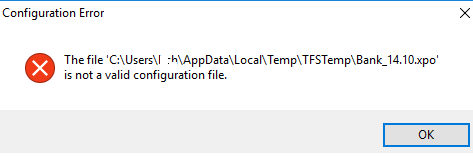
On the TFS Side, I find code changes. But when I want to open my xpo file from TFS using Microsoft Dynamics AX Client, this error displays :
Configuration-Error.png

I can not understand where is the problem. Thanks a lot for your answers!
Houda Chkoundali,

*This post is locked for comments

I have the same question (0)
  • Verified answer
    Vilmos Kintera Profile Picture
    46,149 on at

    I belive you are a bit confused about what an XPO file is. It is a human-readable text based representation of an AOT object.

    You cannot associate *.XPO files with the AX client, because the AX client can only process XPO files by importing it via the Import button in the AOT, or in the top menu bar.

    The AX client can only process *.AXC - AX Configuration files, which points to a specific AX AOS service instance. That is why the error message says that XPO is not a valid configuration file. Yes indeed, because AXC != XPO.

    You should change the file type association of *.XPOs to be opened by Notepad.exe instead of AX, or a text editor of your choice.

  • Houda Chkoundali Profile Picture
    147 on at

    Thanks a lot Vilmos I think I should make more efforts to understand how AX gets the objects (class,table,report,forms...) from TFS (objects wich are modified) .

    I'm looking for some tutorials for TFS on AX ... Could you please reccomend some??

  • Verified answer
    Vilmos Kintera Profile Picture
    46,149 on at

    No problem, there are a lot of good resources on the forum and in blogs. Take a look at these posts for example:

    community.dynamics.com/.../219914

    Also I could recommend the articles from Joris, he has been recruited by Microsoft to make improvements in this area for Dynamics 365 for Operations and that is how the VSTS/Build automation solution was born. Try the TFS-tagged articles on his blog:

    daxmusings.codecrib.com/.../TFS

    Martin also has couple of posts in the area, you should start with the older posts at the bottom of the page:

    http://dev.goshoom.net/en/tag/team-foundation-server-en/

    And here is mine:

    https://www.daxrunbase.com/tag/tfs/

  • Houda Chkoundali Profile Picture
    147 on at

    Many thanks for your help Vilmos.

Under review

Thank you for your reply! To ensure a great experience for everyone, your content is awaiting approval by our Community Managers. Please check back later.

Helpful resources

Quick Links

Responsible AI policies

As AI tools become more common, we’re introducing a Responsible AI Use…

Neeraj Kumar – Community Spotlight

We are honored to recognize Neeraj Kumar as our Community Spotlight honoree for…

Leaderboard > 🔒一 Microsoft Dynamics AX (Archived)

#1
Martin Dráb Profile Picture

Martin Dráb 4 Most Valuable Professional

#1
Priya_K Profile Picture

Priya_K 4

#3
MyDynamicsNAV Profile Picture

MyDynamicsNAV 2

Last 30 days Overall leaderboard

Featured topics

Product updates

Dynamics 365 release plans



