web
You’re offline. This is a read only version of the page.
close
Skip to main content

Notifications

Announcements

No record found.

Community site session details

Community site session details

Session Id :
Microsoft Dynamics AX (Archived)

Ax 2012 Query range in AOT Query object

(0) ShareShare
ReportReport
Posted on by 452

HI All,

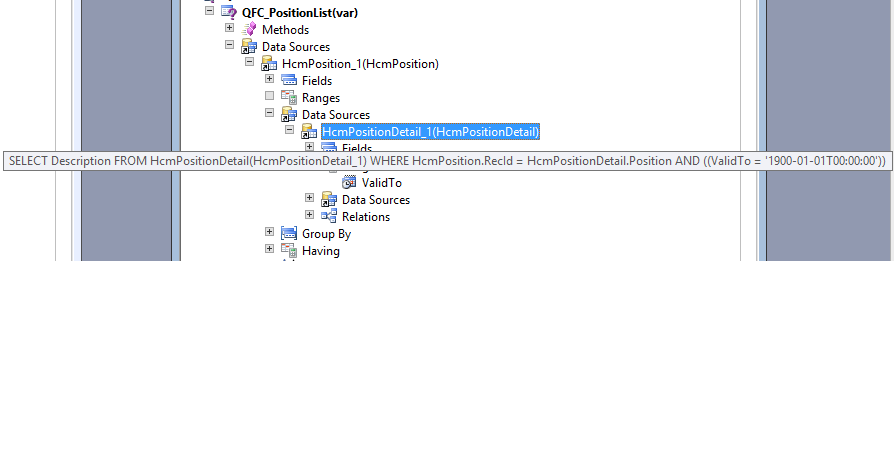
Hi have set this query range as per below image but the range value is showing as 1900-01-01

please let me know what I am missing, my requirement is to set valid time state range

2061.ax1.png

1423.AX.png

thanks

*This post is locked for comments

I have the same question (0)
  • Verified answer
    Martin Dráb Profile Picture
    237,948 Most Valuable Professional on at

    Your syntax is wrong - it would have to be (greaterThanUctDate(0)). If you forget the parenthesis, it's interpreted as a value and not a method to execute.

    Nevertheless trying to do something like that with fields for date-effective data looks suspicious to me. That's what the framework can already do for you (for example, notice the ValidTimeStateEnabled property on query).

  • Karunakaran nainar Profile Picture
    452 on at

    thanks Martin,

    But I am not able to find validTimestateEnabled Property in AOT query object

  • Suggested answer
    Martin Dráb Profile Picture
    237,948 Most Valuable Professional on at

    Sorry, my mistake. It's on views only.

    For queries, you don't get any properties, but can use methods like Query.validTimeStateDateRange().

  • Karunakaran nainar Profile Picture
    452 on at

    Thanks again,

    when I try set the view property

    it says

    "the query has no tables that are validtimestate tables "

  • Martin Dráb Profile Picture
    237,948 Most Valuable Professional on at

    Do you still have HcmPositionDetail in the query? It clearly is a validtimestate table.

  • Karunakaran nainar Profile Picture
    452 on at

    I have hcmpositiondedtail and few other validtimestate tables but still get this ,is it because my root table is "HCMPosition"

  • Community Member Profile Picture
    on at

    I get the same error when I created a view on HCMEmployment joined HCMDetail, HCMWorker... There are tables within the query that the view uses that do not have ValidTo and ValidFrom fields in place. I am guessing that if I had a simple view just over those tables alone that it would work.

    I would appreciate someone writing up or finding an article that discusses how to implement the ValidTimeState with Views and Queries in the AOT. Information in this area is lacking.

  • Martin Dráb Profile Picture
    237,948 Most Valuable Professional on at

    What exactly do you need in addition to documentation from Microsoft?

Under review

Thank you for your reply! To ensure a great experience for everyone, your content is awaiting approval by our Community Managers. Please check back later.

Helpful resources

Quick Links

Responsible AI policies

As AI tools become more common, we’re introducing a Responsible AI Use…

Neeraj Kumar – Community Spotlight

We are honored to recognize Neeraj Kumar as our Community Spotlight honoree for…

Leaderboard > 🔒一 Microsoft Dynamics AX (Archived)

#1
Martin Dráb Profile Picture

Martin Dráb 4 Most Valuable Professional

#1
Priya_K Profile Picture

Priya_K 4

#3
MyDynamicsNAV Profile Picture

MyDynamicsNAV 2

Last 30 days Overall leaderboard

Featured topics

Product updates

Dynamics 365 release plans