web
You’re offline. This is a read only version of the page.
close
Skip to main content

Notifications

Announcements

No record found.

Community site session details

Community site session details

Session Id :
Microsoft Dynamics AX (Archived)

OuterJoin behaves like an InnerJoin, what am I missing?

(0) ShareShare
ReportReport
Posted on by


Hello,

I have a problem with my query.
I try to create a View which contains specific DimensionValue in the column.
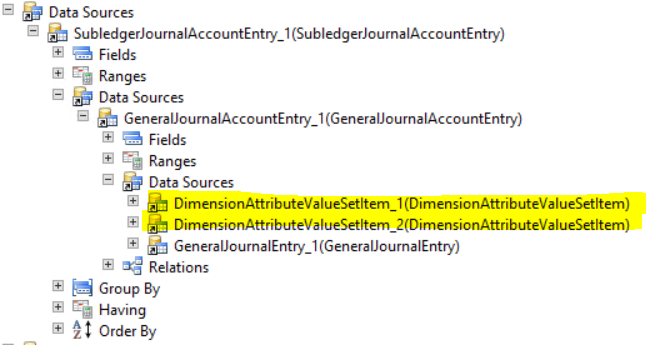
Since there could be empty values I have to use OuterJoin. DataSources with outerJoin property selected below.

4667.Przechwytywanie.PNG

So the problem is that I have less records when this datasources are enabled. But this is OuterJoin! It shouldn't have any impact on rows count! Right?

I heard that if I'm mixing innerJoins and outerJoins in the same datasource AX won't be working really good. Is this true? Any workarounds ?
Maybe there is another way to join particalur part of dimension in a view column.
I will be happy to hear any ideas.


Thanks in advance.

*This post is locked for comments

I have the same question (0)
  • Martin Dráb Profile Picture
    237,801 Most Valuable Professional on at

    Please look at the actual SQL query generated from your definition. If it doesn't make the problem clear, share it with us so we can review it. The picture alone doesn't say much.

    If I was you, I would also compare results of your queries to see which extra records are there. It may also help with the analysis.

  • Mea_ Profile Picture
    60,284 on at

    Another question is how did you check that it is returning less than should be ?

  • Verified answer
    Community Member Profile Picture
    on at

    So for some reason AX has a bad time working with OuterJoins.

    Looks like for AX there is no difference between NULL value and Empty Value. I'm not sure why, and I will appreciate if someone can explain me. 

    My issue has been resolved by adding computed column to a view that returns Empty Value in case of NULL.

    public server static str computedColumnWithEmpty()
    {
        tableName viewName = tableStr(MyView);
        ;
    
        return  SysComputedColumn::if(
                    SysComputedColumn::isNullExpression(
                        SysComputedColumn::comparisonField(viewName, identifierStr(dataSourceOne_1), fieldStr(TableName, DisplayValue))
                    ),
                    SysComputedColumn::returnLiteral(''),
                    SysComputedColumn::returnField(viewName, identifierStr(dataSourceTwo_1), fieldStr(TableName, DisplayValue))
                );
    }


  • Community Member Profile Picture
    on at

    I use Count(Recid). I hope this is a right way to find out how many records I have.

    I've resolved my issue, but thanks for reply anyway.

  • Community Member Profile Picture
    on at

    Thanks for reply!

    You were right, the SQL was not correct, solution of this issue I've posted in thread.

  • Martin Dráb Profile Picture
    237,801 Most Valuable Professional on at

    AX doesn't use null values at all (except a few special cases such as in table inheritances). It always uses the default value for the given data type, such as zero for numbers and the empty string for strings.

    I can't comment then problem you had in your view, because you didn't show it.

Under review

Thank you for your reply! To ensure a great experience for everyone, your content is awaiting approval by our Community Managers. Please check back later.

Helpful resources

Quick Links

Responsible AI policies

As AI tools become more common, we’re introducing a Responsible AI Use…

Neeraj Kumar – Community Spotlight

We are honored to recognize Neeraj Kumar as our Community Spotlight honoree for…

Leaderboard > 🔒一 Microsoft Dynamics AX (Archived)

#1
Martin Dráb Profile Picture

Martin Dráb 4 Most Valuable Professional

#1
Priya_K Profile Picture

Priya_K 4

#3
MyDynamicsNAV Profile Picture

MyDynamicsNAV 2

Last 30 days Overall leaderboard

Featured topics

Product updates

Dynamics 365 release plans