web
You’re offline. This is a read only version of the page.
close
Skip to main content

Notifications

Announcements

No record found.

Community site session details

Community site session details

Session Id :
Customer experience | Sales, Customer Insights,...
Suggested Answer

Timeline option greyed out in custom form in Model driven app

(0) ShareShare
ReportReport
Posted on by

I am not able to add timeline in the edited main forms.

It is showing greyed out.I could see timeline present in the forms of  Accounts entity.

I want it for my customised form of my custom entity.

I have the same question (0)
  • Wahaj Rashid Profile Picture
    11,321 on at

    Hi,

    Did you follow all steps mentioned in following article?

    docs.microsoft.com/.../set-up-timeline-control

    Also, please share your form and form configuration screenshots to understand the problem better.

    Thanks,

    Wahaj

  • Suggested answer
    Wahaj Rashid Profile Picture
    11,321 on at

    Hi,

    In order to use timeline control, please make sure to check the "Notes (includes attachments)" under the "Communication & Collaboration" section of the custom entity.

    notes_2D00_selection.png

    Once enabled, you should able to add timeline control (if you create a new form it will be added by default).

    Hopes this solves your problem.

    Best,

    Wahaj

    (mark verified if this helps)

  • Suggested answer
    LuHao Profile Picture
    40,892 on at

    Hi partner,

    As Wahaj said, we have to check two things.

    1. Whether "Notes (includes attachments)" has enabled for the entity.
    2. Whether this form already has a timeline.

    Go to Advanced Settings > Customzations > Custom the System, expand Entities, click the custom entity. Check if the "Notes (includes attachments)" has enabled, if not, select it and save.
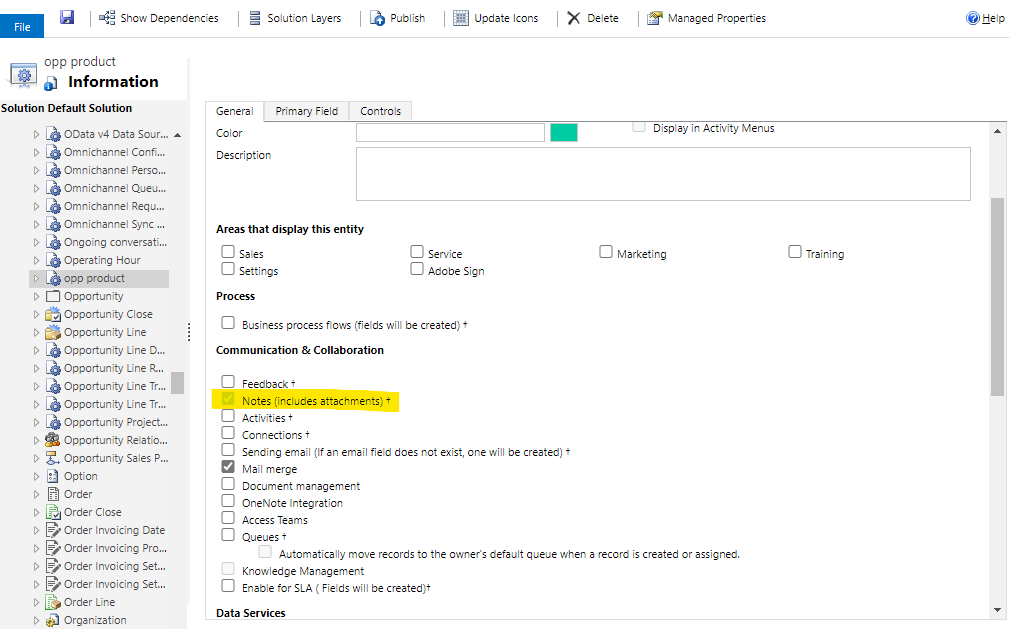
    pastedimage1594777765764v1.png

    If "Notes (includes attachments)" has enabled, then when you new a main form for this entity, the new form will have a timeline by default.

    In addition, you need to check if the form already has a timeline. Since a form can only have one timeline, if a form already have a timeline, then the timeline option greyed out.

  • LuHao Profile Picture
    40,892 on at

    Hi partner,

    Has the problem been solved? Any updates?

    Please click Yes under "Did this answer your question?" to close this thread.

    pastedimage1595317053904v1.png

    Thanks.  : ) 

Under review

Thank you for your reply! To ensure a great experience for everyone, your content is awaiting approval by our Community Managers. Please check back later.

Helpful resources

Quick Links

Responsible AI policies

As AI tools become more common, we’re introducing a Responsible AI Use…

Neeraj Kumar – Community Spotlight

We are honored to recognize Neeraj Kumar as our Community Spotlight honoree for…

Leaderboard > Customer experience | Sales, Customer Insights, CRM

#1
Tom_Gioielli Profile Picture

Tom_Gioielli 70 Super User 2025 Season 2

#2
Gerardo Rentería García Profile Picture

Gerardo Rentería Ga... 43 Most Valuable Professional

#3
Daniyal Khaleel Profile Picture

Daniyal Khaleel 32 Most Valuable Professional

Last 30 days Overall leaderboard

Product updates

Dynamics 365 release plans



