web
You’re offline. This is a read only version of the page.
close
Skip to main content

Notifications

Announcements

No record found.

Community site session details

Community site session details

Session Id :
Finance | Project Operations, Human Resources, ...
Answered

Workflow Email Notifications not working for some users

(0) ShareShare
ReportReport
Posted on by 120

Hi All,

Anyone know why workflow email notifications would work for some users and not work for other users?

Everything is setup correctly and the user options setups are similar for User 1 and User 2 but User 2 does not get email notifications when work items (purchase requisitions) are assigned to them for approval. They do get work items on the home page of the D365 environment and are able to action the items but they do not receive email notifications even though the 'send notifications in email' is set to 'yes' on the User options:
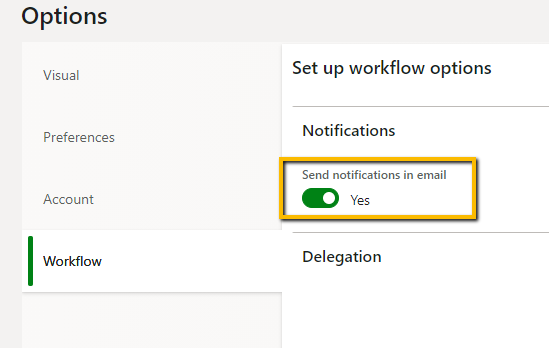
3618.pastedimage1603718756352v2.png

Furthermore, the 'Batch Email Sending Status' does not have any record for User 2 - only User 1 appears on the list to show that the email was sent:
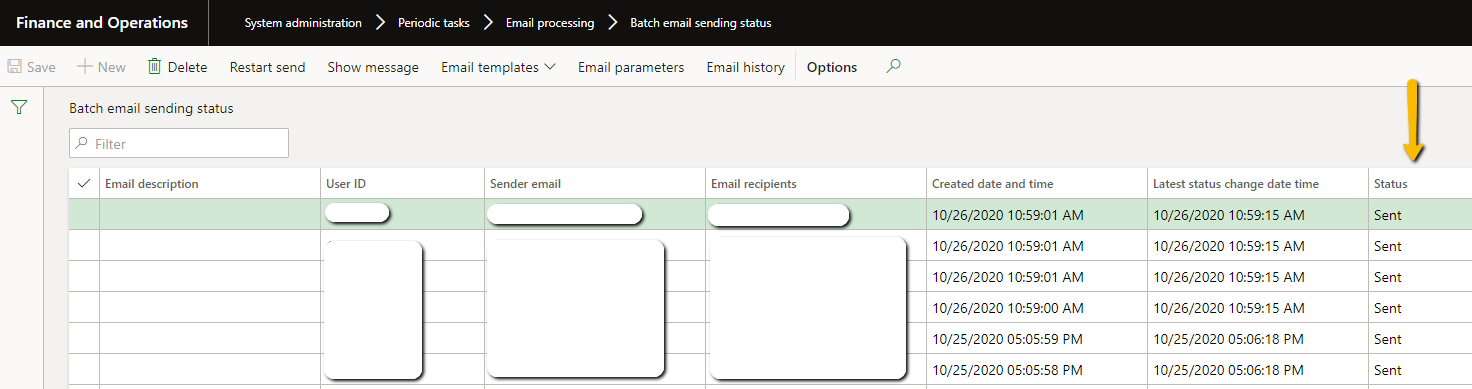
5611.pastedimage1603718495970v1.png

What could be the reason for other users to receive emails and others not while they are all in the same domain and have similar setups? how can I possibly fix the issue?

Please assist.

Thanks for your assitance.

Tpee

I have the same question (0)
  • Komi Siabi Profile Picture
    13,093 Most Valuable Professional on at

    Hi Tpee,

    Is the email address for User2 correct, I mean does it receive mails on a norm ?

  • Tpee Profile Picture
    120 on at

    Hi Komi,

    Correct - User 2 receives emails, we do communicate via email.

    We also tested the email from D365 on the below screen and it worked:

    pastedimage1603722625060v1.png

    The workflow work items however, are not getting sent to the User:

  • Komi Siabi Profile Picture
    13,093 Most Valuable Professional on at

    Kindly confirm that, the workflow contains an email template and the right emails addresses are specified on the user option for the users.

  • Tpee Profile Picture
    120 on at

    Hi Komi,

    Yes, email template confirmed and correct email addresses have been specified on the the user options.

    Like I said, emails are being received by other users while others do not receive emails.

  • Gunjan Bhattachayya Profile Picture
    35,423 on at

    Hi Tpee,

    Is the user disabled in the system? Please check under System admin > Users.

  • Tpee Profile Picture
    120 on at

    Hi Gunjan,

    The User is enabled - the User is able to perform every task in the system.

    The only thing they are not getting is email notifications for workflow items.

  • Gunjan Bhattachayya Profile Picture
    35,423 on at

    Hi Tpee,

    Have you tried sending a test mail to this mail Id for user2 From Email parameters form? You can check if mails are being sent to this user's email.

    pastedimage1603741311407v1.png

  • Verified answer
    André Arnaud de Calavon Profile Picture
    300,904 Super User 2025 Season 2 on at

    Hi Tpee,

    Do both user have the same or different default languages selected for the application? If they are different, check if the workflow setup has instructions and other messages in all languages used by several users.

  • Suggested answer
    Junaid Idrees Profile Picture
    on at

    Hi Tpee,

    Can you please try the following:

    1. Delete your User 2 from system

    2. Reimport the same user ID

    3. Go to User 2 "User options" Then go to Account section and can you make you have selected SMTP/Exchange in the "Email provider ID"

    4. Can you also make sure in 'Sender email' field and make sure the same as showing in 'Alias' field.

    5. Did you the check the Junk folder of User 2 .

  • Verified answer
    Ramit Paul Profile Picture
    22,797 Most Valuable Professional on at

    Hi,

    If the above suggestion doesn't work, you may check the language preference setup for the users.

    If the email template is having language suppose En-GB or EN-US, user having other than the same may not get emails.

Under review

Thank you for your reply! To ensure a great experience for everyone, your content is awaiting approval by our Community Managers. Please check back later.

Helpful resources

Quick Links

Responsible AI policies

As AI tools become more common, we’re introducing a Responsible AI Use…

Neeraj Kumar – Community Spotlight

We are honored to recognize Neeraj Kumar as our Community Spotlight honoree for…

Leaderboard > Finance | Project Operations, Human Resources, AX, GP, SL

#1
Martin Dráb Profile Picture

Martin Dráb 660 Most Valuable Professional

#2
André Arnaud de Calavon Profile Picture

André Arnaud de Cal... 549 Super User 2025 Season 2

#3
Sohaib Cheema Profile Picture

Sohaib Cheema 307 User Group Leader

Last 30 days Overall leaderboard

Product updates

Dynamics 365 release plans
