I noticed tonight that I had a larger number of needless Print archive records, i.e. PrintJobHeader, so I thought I would do some cleanup within the UX.
As I was deleting records, I wondered where the actual printed image (probably a PDF) was stored. I assumed DocuRef/DocuValue, but checked anyway. PrintJobHeader is a hidden table in the AOT, so I checked the SysPrintArchive form, which has a PrintJobHeader datasource, and surprisingly a delete() data source method. That method has the following code.
public void delete()
{
    DocuRef     docuRef;
    DocuValue   docuValue;
    RefRecId    docuRefId;
    SysWindowsAppReportsMapping reportsMapping;

    ttsbegin;
    select forupdate docuRef where docuRef.RefRecId == PrintJobHeader.RecId;
    if (docuRef)
    {
        docuRefId = docuRef.ValueRecId;
        // If print archive is archived to a file share, delete the archived file
        docuRef.delete();
        delete_from docuValue where docuValue.RecId == docuRefId;
        ttscommit;
    }

    ttsBegin;
    delete_from reportsMapping
        where reportsMapping.PrintJobHeaderRecId == PrintJobHeader.RecId &&
              reportsMapping.PrintJobHeaderDataAreaId == PrintJobHeader.dataAreaId;
    ttsCommit;
    super();
}
The thing to notice is the select forupdate statement where DocuRef.RefRecId == PrintJobHeader.RecId, followed shortly afterward by a delete.
That's right, just RefRecId. Not RefTableId. Not RefCompanyId. Just RefRecId.
Of course, there may be MANY records that share a given RefRecId, so how does it guarantee that it deletes the correct one?
Let's test that.
Here's a PrintJobHeader record that refers to 4 different DocuRef records, when joined by DocuRefId only.
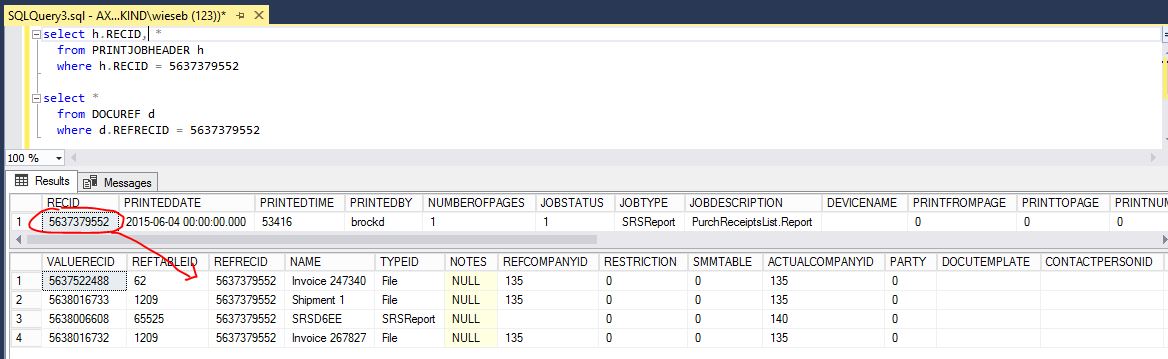
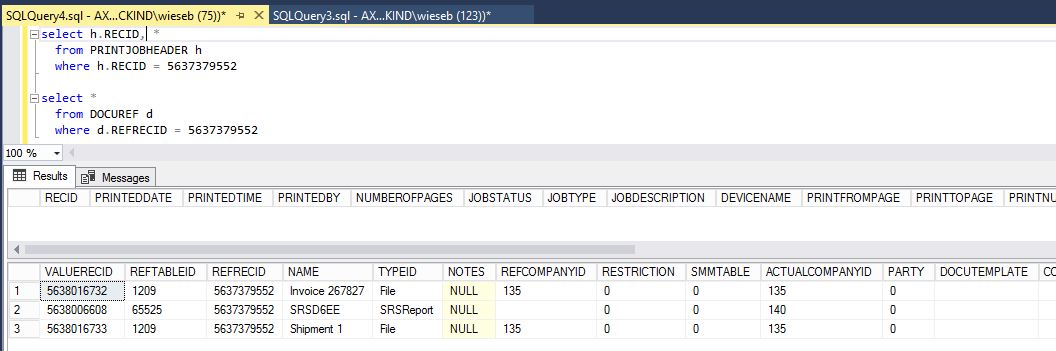
From the UX for SysPrintArchive, I deleted the PrintJobHeader record, and then found this.
Indeed, it deleted the WRONG DocuRef record. The one with RefTableId 65525 is properly related to PrintJobHeader, and it survives, and meanwhile a DocuRef record related to table 62 (CustInvoiceJour) is now deleted.
What a mind-numbingly stupid programmatic mistake and bug.


