web
You’re offline. This is a read only version of the page.
close
Skip to main content

Notifications

Announcements

No record found.

Community site session details

Community site session details

Session Id :
Finance | Project Operations, Human Resources, ...
Suggested Answer

M365 SharePoint Online - Microsoft Dynamics SL 2018 [mapped drive]

(0) ShareShare
ReportReport
Posted on by 5

Microsoft Dynamics SL 2018 is installed on Windows Server 2016 x64

SharePoint Online Document Library is mapped on Drive Z: and it can be found and access along with the local drive C: on "This PC"

On Microsoft Dynamics SL Application under System Administration > Attachment Configuration

The mapped drive is not available on "Existing Folder Location" but on other app it is available like Microsoft office word
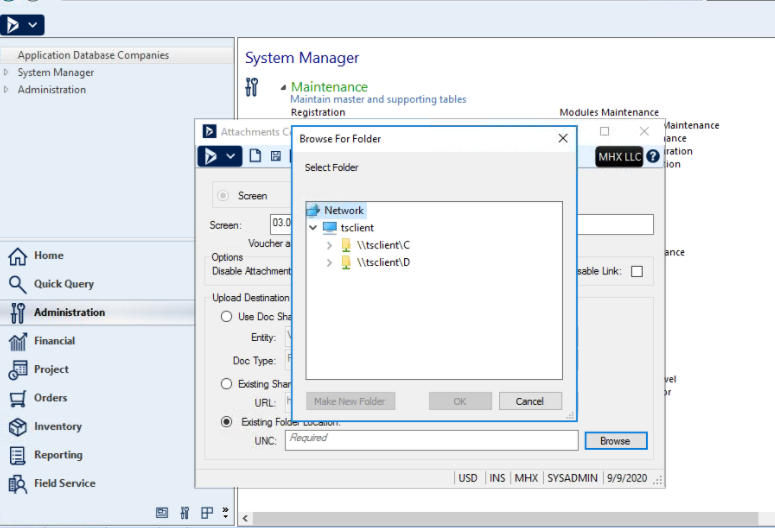
pastedimage1599687553089v2.png

Any Idea? anyone. thanks

I have the same question (0)
  • Suggested answer
    CFROTON Profile Picture
    4,710 on at

    Hello,

    Perhaps its an access rights issue? Can you add the Everyone Group to access?

    Can you type in the unc path?

    Best Regards,

    Jana MacDonald

    MS Dynamics Support

  • shidoni Profile Picture
    5 on at

    Hello Jana

    Thanks for your response. what particular access do you mean?

    The Partner who's working on that implementation is most likely, SL admin, the user account she use has full access to the SharePoint Document Library, she is also a local administrator on windows server 2016, she can mount the network mapped drive on "This PC", she can open it along with its content, and even other Microsoft application can see this mapped.

    Except this Microsoft Dynamics SL 2018 App. Please refer to the screenshot.

    Best Regards

    -Sid-

  • Suggested answer
    shidoni Profile Picture
    5 on at

    Hello Jana

    Our Dynamic SL is currently installed in Windows Server 2016. The original SharePoint Online team site is https://cloud-domain.sharepoint.com/sites/TechTeam/Shared%20Documents/Forms/AllItems.aspx

    Dynamic SL accepted a valid URL by removing the /Forms/AllItems.aspx of the document library "https://cloud-domain.sharepoint.com/sites/TechTeam/Shared%20Documents/"

    Now, the problem is that dynamic SL cannot upload an attachment to the SharePoint Document Library. SharePoint Online is already accessible using Internet Browser and we can upload a direct attachment to SharePoint via a browser which means this is not a permission issue. The account also has local administrator permission to windows server 2016.

    Does the SharePoint Online Site need to be locally mapped like a network drive so that SL can upload an attachment?  Any idea?

    Thanks

    Sid

  • CFROTON Profile Picture
    4,710 on at

    Hello Sid,

    If the Doc Conifig screen accepted the URL:

    "cloud-domain.sharepoint.com/.../"  it normally means it is a path to a valid SharePoint document library. Exactly what happens when they try to upload a doc in SL? Any errors?

    Best Regards,

    Jana MacDonald

  • shidoni Profile Picture
    5 on at

    9876.PNG

    Hi Jana

    After the Document Configuration accepted the SharePoint Library URL link.  the user tried to upload the attachment but did not work. There's an error message 9876 "An error has occurred while calling a Web Service" but WebClient service is automatic Start Type and Running status. We already tried uninstalling and reinstalling SPClient_x64 and then apply the SPClient_x64SP1 but still the same error.

    For us to map the SharePoint Online Site to the local network Drive of Windows Server 2016 where the SL is installed, We installed WebDav Redirector, which works for mapping the SharePoint Online into a network drive but SL stopped responding after that. Unfortunately, This feat messed up the SL Server probably incompatibility so we rollback but didn't fix the issue. Honestly, I'm not sure if we really need this part to map the drive since during the configuration of SL it already prompt for username and password of Office 365.

    The vendor reinstalls some of the modules and I think her customizations were deleted in her SL Folders. Not sure why and if that is related.

    Thanks

    Sid

  • Suggested answer
    CFROTON Profile Picture
    4,710 on at

    Dear Sid,

    You look to be in a supported version. I suggest you create a case in MS Support for the attachments configuration.

    The agent would need to be able to access the screens with you.

    Best Regards,

    Jana MacDonald

Under review

Thank you for your reply! To ensure a great experience for everyone, your content is awaiting approval by our Community Managers. Please check back later.

Helpful resources

Quick Links

Responsible AI policies

As AI tools become more common, we’re introducing a Responsible AI Use…

Neeraj Kumar – Community Spotlight

We are honored to recognize Neeraj Kumar as our Community Spotlight honoree for…

Leaderboard > Finance | Project Operations, Human Resources, AX, GP, SL

#1
Martin Dráb Profile Picture

Martin Dráb 611 Most Valuable Professional

#2
André Arnaud de Calavon Profile Picture

André Arnaud de Cal... 529 Super User 2025 Season 2

#3
Sohaib Cheema Profile Picture

Sohaib Cheema 285 User Group Leader

Last 30 days Overall leaderboard

Product updates

Dynamics 365 release plans



