web
You’re offline. This is a read only version of the page.
close
Skip to main content

Announcements

No record found.

News and Announcements icon
Community site session details

Community site session details

Session Id :
Microsoft Dynamics AX (Archived)
Answered

How do I hide/restrict a right-click option to delete a security role?

(0) ShareShare
ReportReport
Posted on by

I have created a Power User role which will have access to most things except the ability to maintain users.

I started by copying all roles, duties and privileges to the Power User role then went through removing those that were user maintenance related.

Lastly I have gone through the user maintenance forms and hidden all buttons that can create, edit or delete.

However, it is still possible to right-click on a user's role and select Remove (Edit and Add have been restricted and will show an error message in an InfoLog).
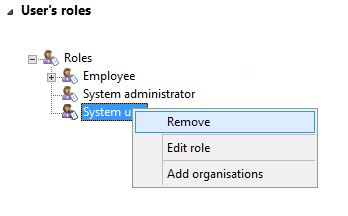
srole.JPG

How can I disable/dim the Remove option?

*This post is locked for comments

I have the same question (0)
  • Suggested answer
    André Arnaud de Calavon Profile Picture
    304,500 Super User 2026 Season 1 on at

    Hi AXatak,

    The tree control has a method where the context menu is build including the Remove option. When selecting this option, it will call the logic of the button control btnUserRoleRemove which is part of the action pane. This button is not a menu item, but a button control which is not being restricted.

    You have to implement changes on two places:

    1) Use the NeededPermission property to set manual control. This will cause the button to be not visible for roles, unless you add this form control on a privilege or security role. The system administrator will always see this button. Or add logic to hide this button on runtime.

    2) Change the logic in the context menu method 'showContextMenu' of the treeRoles control. Then you can add conditions when this button will be visible or not.

  • Community Member Profile Picture
    on at

    Hi André,

    Where do I find method showContextMenu?

  • André Arnaud de Calavon Profile Picture
    304,500 Super User 2026 Season 1 on at

    Hi AXatak,

    This is a method on the 'treeRoles' form control on the form SysUserInfoDetail like mentioned in my previous reply. It would be possible easier to find if you look in the DesignList items.

  • Community Member Profile Picture
    on at

    Sorry but I'm not familiar with what to change here.

    Appreciate if you can give me a hint:

    public int showContextMenu(int _menuHandle)

    {

       int hWnd = treeRoles.hWnd();

       int selection = 0;

       int selRemove, selEditTasksInRole;

       int selAddLE;

       TreeItemIdx selectedIdx = treeRoles.getFirstSelected();

       SysSecRole secRole;

       PopupMenu popupMenu;

       if (selectedIdx <= 0)

       {

           return 0;

       }

       secRole = tree.getData(treeRoles.getItem(selectedIdx));

       popupMenu = new PopupMenu(hWnd);

       selRemove               = popupMenu.insertItem("@SYS301894", false, !btnUserRoleRemove.enabled());//"Remove"

       popupMenu.insertBreak();

       selEditTasksInRole      = popupMenu.insertItem("@SYS327211", false, !btnUserRoleEditTasks.enabled());//"Edit Tasks in Role..."

       popupMenu.insertBreak();

       if( secRole.getName() != sysAdminRoleName)

       {

           selAddLE = popupMenu.insertItem("@SYS326596", false, !btnUserRoleEditTasks.enabled());

           popupMenu.insertBreak();

       }

       selection  = popupMenu.draw();

       switch (selection)

       {

           case selRemove:

               //secRole.removeFromSelectedUser();

               btnUserRoleRemove.clicked();

               break;

           case selEditTasksInRole:

               btnUserRoleEditTasks.clicked();

               break;

           case selAddLE:

               secRole.displayCompanySelectorDialog(element);

               break;

           default:

               return selection;

       }

       return 0;

    }

  • Verified answer
    André Arnaud de Calavon Profile Picture
    304,500 Super User 2026 Season 1 on at

    Hi AXatak,

    I can't do the work for you, but can give you hints only. The forum is not a place for outsourcing work ;). If you are not familiar with development, you have to find a developer which would be able to help you.

    The next line is inserting the remove button.

    selRemove               = popupMenu.insertItem("@SYS301894", false, !btnUserRoleRemove.enabled());//"Remove"

    It would be possible to have a condition with an "if" statement to let the form know if the button needs to be created or not. Like:

    if (<<some condition>>)

    {

       selRemove               = popupMenu.insertItem("@SYS301894", false, !btnUserRoleRemove.enabled());//"Remove"

    }

  • Community Member Profile Picture
    on at

    Thanks André, I added a loop to cycle through the roles held by the current user and then to only show the right-click options Delete and Edit if system administrator is one of those roles. You have been very helpful.

Under review

Thank you for your reply! To ensure a great experience for everyone, your content is awaiting approval by our Community Managers. Please check back later.

Helpful resources

Quick Links

Introducing the 2026 Season 1 community Super Users

Congratulations to our 2026 Super Stars!

Meet the Microsoft Dynamics 365 Contact Center Champions

We are thrilled to have these Champions in our Community!

Congratulations to the March Top 10 Community Leaders

These are the community rock stars!

Leaderboard > 🔒一 Microsoft Dynamics AX (Archived)

#1
CP04-islander Profile Picture

CP04-islander 26

#2
Michel ROY Profile Picture

Michel ROY 14

#3
imran ul haq Profile Picture

imran ul haq 8

Last 30 days Overall leaderboard

Featured topics

Product updates

Dynamics 365 release plans
