web
You’re offline. This is a read only version of the page.
close
Skip to main content

Notifications

Announcements

No record found.

Community site session details

Community site session details

Session Id :
Finance | Project Operations, Human Resources, ...
Unanswered

Tile count not correct when query has a date range

(0) ShareShare
ReportReport
Posted on by 50

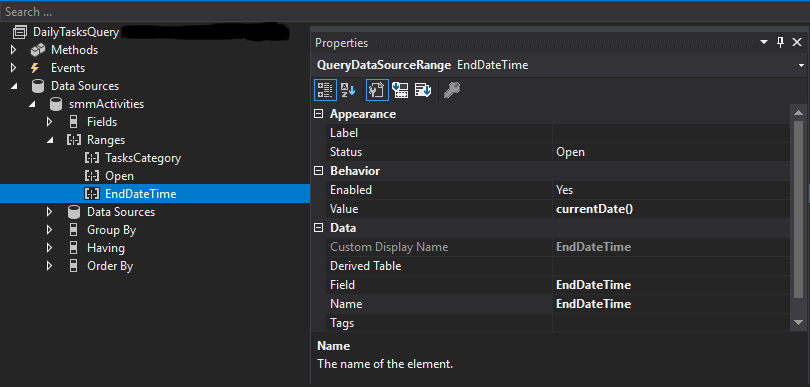
I have a tile on a custom workspace that is showing a count of the underlying list data. Both the tile and the underlying list are based on the same AOT query. The query has a range on it for a datetime field, but the count on the tile seems to ignore this date. If I click on the tile, the list is showing the correct amount of records so it just seems to be the tile that is affected.

Is this a known issue, or is there something else that needs to be done for dates to effect the count? The only other threads I could find on this issue were from 2018 and no resolution was ever posted.
tile_5F00_count_5F00_vs.png

I have the same question (0)
  • Martin Dráb Profile Picture
    237,882 Most Valuable Professional on at

    The values looks wrong to me - there should be extra parenthesses around the method: (currentDate()).

  • ChosenSilver Profile Picture
    50 on at

    Making this change does not seem to have corrected the issue. I currently have one record in the system that matches my Ranges and the count shows Zero on the tile, but if I click on the tile it takes me to the list with the one record showing.

    NOTE: Before making the change you suggested, the list was actually showing me Zero records when I clicked on the tile but looks to have been inserting a new record by default which I had been thinking was the one record I was expecting to see. The tile had been showing a count of 800. So it seems like your suggestion did actually fix a problem I didn't realize I had, but now the tile count shows Zero so the original issue is still unresolved.

Under review

Thank you for your reply! To ensure a great experience for everyone, your content is awaiting approval by our Community Managers. Please check back later.

Helpful resources

Quick Links

Responsible AI policies

As AI tools become more common, we’re introducing a Responsible AI Use…

Neeraj Kumar – Community Spotlight

We are honored to recognize Neeraj Kumar as our Community Spotlight honoree for…

Leaderboard > Finance | Project Operations, Human Resources, AX, GP, SL

#1
Martin Dráb Profile Picture

Martin Dráb 565 Most Valuable Professional

#2
André Arnaud de Calavon Profile Picture

André Arnaud de Cal... 450 Super User 2025 Season 2

#3
Sohaib Cheema Profile Picture

Sohaib Cheema 250 User Group Leader

Last 30 days Overall leaderboard

Product updates

Dynamics 365 release plans
