web
You’re offline. This is a read only version of the page.
close
Skip to main content

Notifications

Announcements

No record found.

Community site session details

Community site session details

Session Id :
Microsoft Dynamics AX (Archived)

Retrieve Data from AX 4.0

(0) ShareShare
ReportReport
Posted on by

Dear AX users,

I have used Microsoft GP earlier (more than 5 years ago) when it had "Smartlists" and it was a breeze to gather all vendor/customer/material data and then export them to excel for slice & dice.

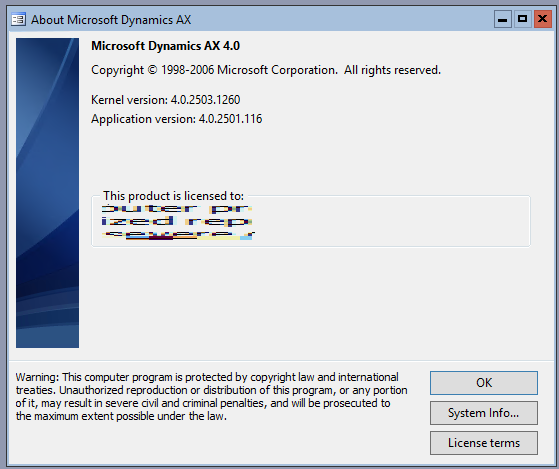
Now we have been assigned to a client who uses Dynamics AX 4.0 and I am unable to see the "Smartlist" (which I understand is no longer being offered) on the front-end. Also I do not see the Procurement or Sales module/icon in the left side navigation pane to look up vendors or customers.

I am tasked with pulling out all vendor/customer/material data from 1 JAN 2017 till yesterday, and I am not sure how to do it...Please help

Below is the screenshot for your reference...

pastedimage1564867992262v1.png 

pastedimage1564868209288v2.png

*This post is locked for comments

I have the same question (0)
  • Suggested answer
    Satish Panwar Profile Picture
    14,671 Moderator on at

    Hi Tariq,

    In AX4.0, procurement and sourcing module didn't exist. It was added by MS as the product evolved over the time.

    If you are looking for Vendors/Purchase orders etc., they are in Accounts Payable module.

    If you are looking for Customers / Sales orders etc., they are in Accounts Receivable module.

    This will help you review data from front end.

    Thanks,

    Satish Panwar

    Please take time to click 'Yes' against the answers that help you guide in right direction to help other community members.

  • André Arnaud de Calavon Profile Picture
    301,194 Super User 2025 Season 2 on at

    Hi Tariq,

    Satish is correct here. In AX2012, there was a split between accounting and operations menus for customers and vendors.

  • Community Member Profile Picture
    on at

    Hi Satish,

    Thanks for the quick reply. It is much appreciated.

    Kindly note: I am trying to view transaction data from 1 jan 2017 on till yesterday, such as PO's made for vendors, SO's for customers, material/products that have been ordered in the past two years, how can I pull this info from the front end?

    Because I am not sure which table in the Axapta database holds this master data.

  • André Arnaud de Calavon Profile Picture
    301,194 Super User 2025 Season 2 on at

    Hi Tariq,

    If you are looking for table names:

    Sales orders: SalesTable (and SalesLine)

    Purchase orders: PurchTable (and PurchLine)

    Products ordered last two years. In this case, you have to join the table InventTable (products) with the InventTrans (transactions). If you only need to know the Item number, you can forget about the InventTable.

  • Suggested answer
    Community Member Profile Picture
    on at

    Hi Andre,

    Thank you for your reply.

    As this Dynamics AX 4.0 is one of the earliest versions...it is not having the same functionality as the new.

    I would appreciate if you can list out the steps that are to be done, in order to pull/extract/retrieve data that we need to analyze.

    Using the existing AR & AP & Inventory management modules, the application is taking a long time in returning a query, and then shows an error message.

    I need to pull/extract/retrieve data for two countries: Sweden and Denmark for the following parameters:

    1. Vendors

    2. Customers

    3. BOM

    for the time period: 1 January 2017 till present.

    What would be the steps to be done??

  • Suggested answer
    Satish Panwar Profile Picture
    14,671 Moderator on at

    Hi Tariq,

    Information Andre provided above pertains to all versions so it's valid for AX4.0 as well. If you see something is wrong or if you can't find something, please explain in detail.

    Here are the steps for Vendors:

    1. You can try to personalize the form by right clicking the form say "Vendors" and then get all fields on one screen and then select all, copy and paste to excel.

    This may not work depending on volume of data. What you can do is extract data from SQL directly. "Select * from VendTable". review data with users and see what you are missing. Depending upon what you are missing, try to find the data in AX front-end and then try to determine the tables. once you know the table, find relations from AOT and then expand the query and then get data from SQL.

    2. For customers, it's CustTable.. same process as above.

    3. BOM's have multiple tables, so you need to find from user interface which tables are to be extracted.

    Hope this helps.

    Thanks,

    Satish Panwar

    Please take time to click 'Yes' against the answers that help you guide in right direction to help other community members.

  • André Arnaud de Calavon Profile Picture
    301,194 Super User 2025 Season 2 on at

    Hi Tariq,

    Can you tell how you did access the tables and which error you are getting now?

Under review

Thank you for your reply! To ensure a great experience for everyone, your content is awaiting approval by our Community Managers. Please check back later.

Helpful resources

Quick Links

Responsible AI policies

As AI tools become more common, we’re introducing a Responsible AI Use…

Neeraj Kumar – Community Spotlight

We are honored to recognize Neeraj Kumar as our Community Spotlight honoree for…

Leaderboard > 🔒一 Microsoft Dynamics AX (Archived)

#1
Martin Dráb Profile Picture

Martin Dráb 4 Most Valuable Professional

#1
Priya_K Profile Picture

Priya_K 4

#3
MyDynamicsNAV Profile Picture

MyDynamicsNAV 2

Last 30 days Overall leaderboard

Featured topics

Product updates

Dynamics 365 release plans