web
You’re offline. This is a read only version of the page.
close
Skip to main content

Announcements

No record found.

News and Announcements icon
Community site session details

Community site session details

Session Id :
Microsoft Dynamics CRM (Archived)

Cannot update field on the form

(0) ShareShare
ReportReport
Posted on by

Hi everybody.

I have a strange behavior on one form of one of the entry.

When i try to change value of one field  i receive this
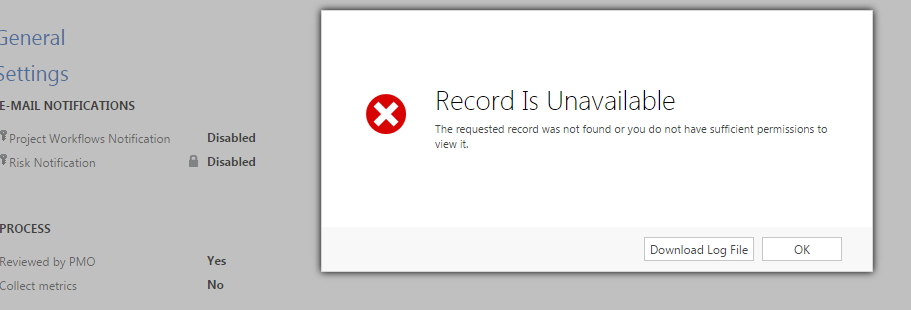
8078.Capture1.PNG

But log file contains completely different message "workflow With Id = XXX Does Not Exist" !!" When i looked at dependencies for this field a have some strange empty process ...
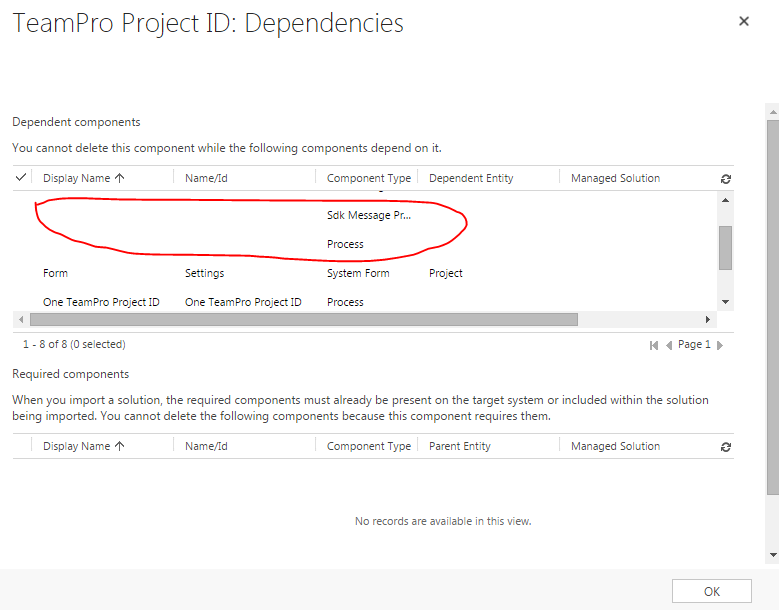
6431.Capture2.PNG

When i double click on it error page is shown.

Can somebody suggest me what is wrong and what to do ?

At the moment it seems for me that problem is in that empty process.

The only solution i see is to find that empty process in database and delete it ... (yes, i know it's bad solution but i don't know better one )

*This post is locked for comments

I have the same question (0)
  • Suggested answer
    Tobias Koller Profile Picture
    on at

    I had a similar (or same?) error "Record is unavailable" when I try to set the value of a lookup with an invalid/unknown Id to the reference.

    Is your described field a Lookup?

  • Community Member Profile Picture
    on at

    No, simple text field

  • Tobias Koller Profile Picture
    on at

    did you try to update another field?

    maybe you can share some code.

    Do you have any other "onload"-Scripts which are manipulating any field?

    you could also try to click on every lookup once to be sure every lookup-record is correct.

  • Community Member Profile Picture
    on at

    Yes, i can update other fields.

    There is not any javascript related with this field.

    What kind of shared code will be helpful ? It seems that issue is not in my code, but something inside CRM

  • Tobias Koller Profile Picture
    on at

    which entity and field do you try to update?

    Which CRM-Version are you using?

    do you have any plugins running on this entity?

  • Community Member Profile Picture
    on at

    custom entity

    2015 version of CRM

    yes, i have a few plugins for this entity, but they don't cause this issue(look at error message in log file)

  • Verified answer
    Community Member Profile Picture
    on at

    I just found a solution.

    1. Get the worflowId which is mentioned in log error file.

    2.Find all references to this Id in the whole database

    3.SQL  script found 2 references in the  [dbo].[SdkMessageProcessingStepBase].[Configuration]

    4.Delete them

    Everything works fine after that

  • Community Member Profile Picture
    on at

    Tobias, i am very thankful to you for your attention and trying to help. Good luck for you.

    I posted my solution above.

  • Tobias Koller Profile Picture
    on at

    Glad you could finally fix it ;)

Under review

Thank you for your reply! To ensure a great experience for everyone, your content is awaiting approval by our Community Managers. Please check back later.

Helpful resources

Quick Links

Introducing the 2026 Season 1 community Super Users

Congratulations to our 2026 Super Stars!

Meet the Microsoft Dynamics 365 Contact Center Champions

We are thrilled to have these Champions in our Community!

Congratulations to the March Top 10 Community Leaders

These are the community rock stars!

Leaderboard > 🔒一 Microsoft Dynamics CRM (Archived)

Last 30 days Overall leaderboard

Featured topics

Product updates

Dynamics 365 release plans



