web
You’re offline. This is a read only version of the page.
close
Skip to main content

Announcements

News and Announcements icon
Community site session details

Community site session details

Session Id :
Microsoft Dynamics CRM (Archived)

Business Rules

(0) ShareShare
ReportReport
Posted on by

Hi Guys,

I have raised a question yesterday regards to fields notification. However I am still having some difficulties to set up an notification method based on 2 field values.

I can set business rule but it only allows me to do this for only one entity.

The notification i am trying to do is for claims form where information is joined from several entities. 

Is there anything else you could guys suggest or there is a way to make it work using business rules.

Please see screen shot attached

.Business-Rule.jpg
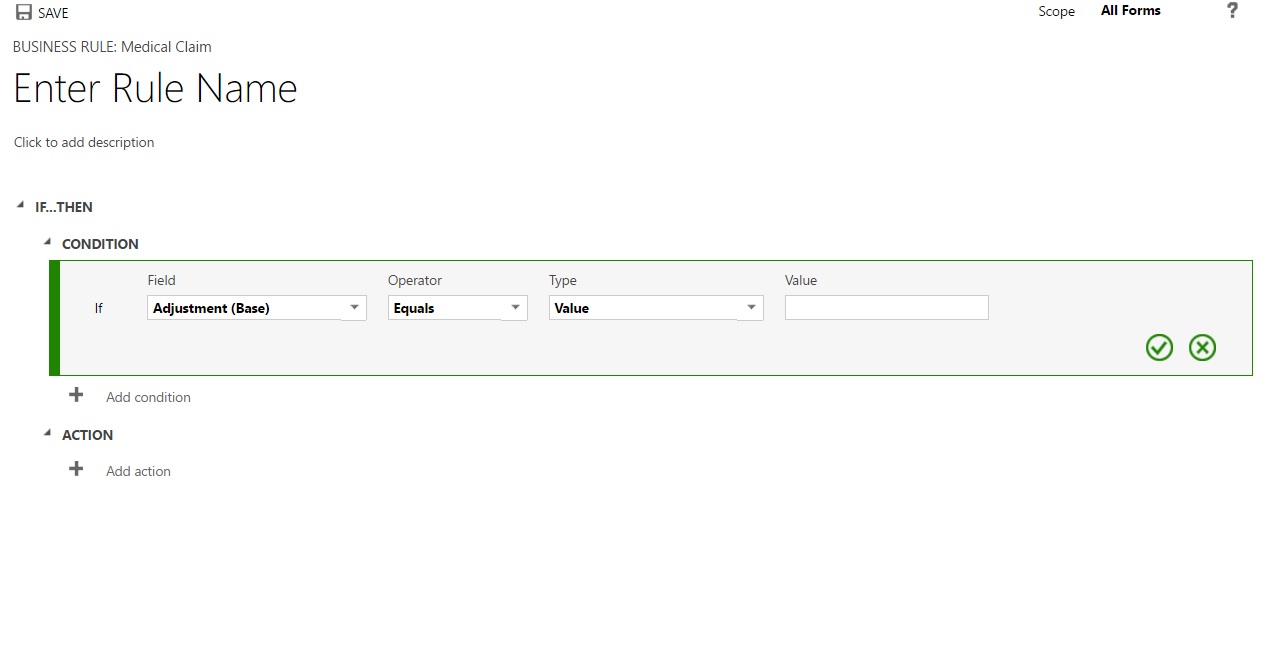
Many Thanks

*This post is locked for comments

I have the same question (0)
  • Suggested answer
    razdynamics Profile Picture
    17,308 User Group Leader on at

    Hi Thanks for reaching out to the Dynamics community, Business Rules operate at entity Form level so you would need to create a business rule for each entity, however you can perform notifications using Workflows Synchronous Workflows also anterocrm.com/real-time-synchronous-workflows-to-display-alerts-microsoft-dynamics-crm-2013

    Please provide more information about your exact requirements so I can help you further :)

    Best Wishes, Raz

  • Community Member Profile Picture
    on at

    Thanks for your reply,

    What I am trying to do is to notify user if there is a potential error whiles creating a new claim.

    Our claims form is fed from 4 different forms, so in claims form I want:

    i.e

    Member - Members List (form)

    Provider - All providers (form)

    ..

    All these are in Claims form.

    I want 1 field from members and 1 field from providers to check if data match, if not give notification.

    Provider city should match with member city.

    Many Thanks

  • Verified answer
    HenryLamborn1 Profile Picture
    120 on at

    Hi Ras,

    It sounds like you should be approaching this with a Synchronous Workflow rather than business rules. You can create a workflow that is triggered by when this data is entered on your claims form and use a check condition that sees if value X(member city) equals value Y (provider city). If it does not, stop the workflow with a canceled status and display a message to inform the end user

Under review

Thank you for your reply! To ensure a great experience for everyone, your content is awaiting approval by our Community Managers. Please check back later.

Helpful resources

Quick Links

Season of Sharing Community Challenge Launch!

Jump in, show your community spirit, and win prizes!

Women in Power Builds Momentum

Expanding mentorship, skilling, and AI innovation

Congratulations to the May Top 10 Community Leaders

These are the community rock stars!

Leaderboard > 🔒一 Microsoft Dynamics CRM (Archived)

#1
ScottDurow Profile Picture

ScottDurow 2

#2
GJones Profile Picture

GJones 1

Last 30 days Overall leaderboard

Featured topics

Product updates

Dynamics 365 release plans



