web
You’re offline. This is a read only version of the page.
close
Skip to main content

Notifications

Announcements

No record found.

Community site session details

Community site session details

Session Id :
Finance | Project Operations, Human Resources, ...
Suggested Answer

Management Reporter DM not updating

(0) ShareShare
ReportReport
Posted on by 15

Hi,

I have few questions regarding MR.

Management reporter 2012 CU16 (2.12.16000.17)

1. Generating report way too slow in user PC.

we have this client that they are complaining about how slow MR is.

Esp when they tried to generate TB report, on their PC. I tried to generate TB report in server it will take only 5 to 7 mins (for me its pretty fast since their account and transaction within a year is over 1mill )

but when user tried to generate on their PC with same range filter it will takes 7 to 10 mins sometime more than 10 mins.

2. Datamart didn't update.regularly

our client management reporter did not update regularly, and we have to rebuild it at least once or two EVERY MONTH. which is not very much efficient and the integrate run for a whole day.

which is their report will have to delay one day after.

whenever we checked the integration and data mart log, there is no error or warning. but when we checked event viewer there are warning 

The Connection to Microsoft Dynamics GP Database Failed
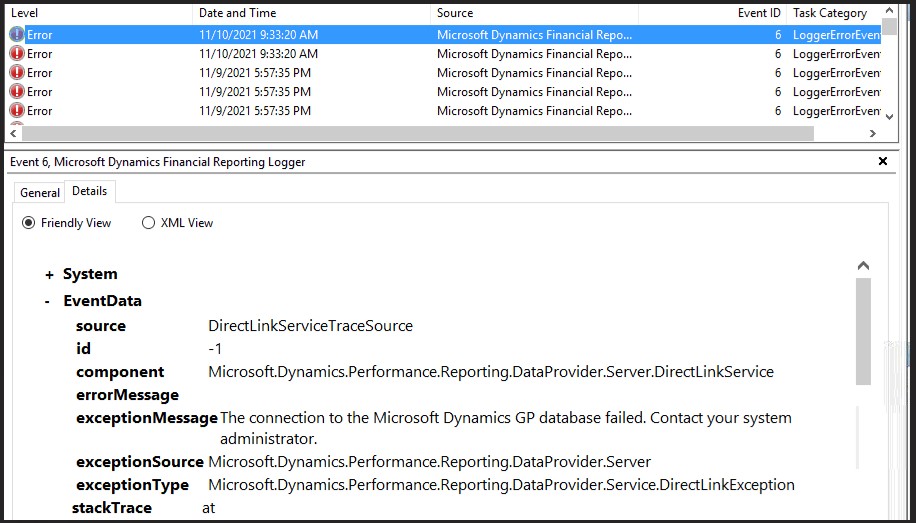
Screenshot-2021_2D00_11_2D00_10-191056.jpg

we tried to Update dynamics credentials and change database tracking, also restart the services.

but nothing came in return, as last resource we rebuild datamart, but sometimes it didn't update either.

does anyone have idea how this happened? or maybe encounter same problem as ours?

or any idea how to resolve the case?

I want to make sure first, before I submit this case to microsoft. 

Thanks Before

Categories:
I have the same question (0)
  • Robert Yao Profile Picture
    492 on at

    It is always pain to use DM in MR although Microsoft claimed it improved a lot recently, we dropped DM completely and only use classical, it may be a little slow but always correct in result. Here are some of my suggestions in MR:

    1. Have a dedicated MR server if you don't have one, never share MR with SQL server

    2. Add more memory you can to SQL server which host ManagementReporter database

    3. Schedule TB reports or some other important reports to be run in a night time, end user only need to see the published result

    4. Run a SQL script weekly to reduce the number of copies in MR repository

    5. Compact MR database if it grows too quickly

    Hope those tips can help

    Rob

  • Suggested answer
    Derek Albaugh Profile Picture
    on at

    Performance on Management Reporter can be different things.

    The first, of course, is to make sure the system requirements for MR are being met.

    For the smallest database group, we recommend 32GB RAM for the SQL server and 16GB RAM for the MR server. If the MR services are deployed directly on the SQL server, this combines for a recommended total of 48GB RAM.

    Also, is it just MR that is slow or everything on the system slow, such as launching SQL Server Mgmt Studio, trying to do something in Dynamics GP, etc.?

    If the slowness is happening when just clicking around MR, that means that either the network is slow or the MR server is struggling. Most processing is done on the MR server.

    For report generation, normally using Legacy is notoriously slower than using data mart, though that can be different depending on the customer, as Robert mentioned.

    There can still be slowness when generating reports with data mart when there is a lot of data. Try setting the detail level of the report to Financial instead of Financial & Account or Financial, Account, & Transaction. Currency translation and AA both take longer to load. Look to see what they are pulling in the column layout. Do they have multiple years of 1:12 PERIODIC columns? If so, that is a ton of data.

    We'd also want to check to see if the performance hit is seen on all machines generating MR reports or just some reports, to rule out the issue being something more with networking, no different than with Dynamics GP reports and performance issues when we would test with GP installed directly on the SQL Server to see if the performance issue remains or not, to determine whether it is an issue with GP or the report, or more the network.

    I'd start with the above and see what that shows us.

    Thanks

  • Robert Yao Profile Picture
    492 on at

    Derek,

    Is there still an issue in MR DM accuracy in MR CU16? I quit using DM since RU4 because customers complained about the number in MR did not match in GP. It seems to me to use Classical Adapter is a safe choice if you don't have too much of data in SQL, I would prefer to schedule TB detail type of report to be run over night. It is just my opinion.

    Thanks,

    Rob

  • Michael O'Donnell Profile Picture
    355 on at

    Make sure your GP databases are fully optimized. Setup a SQL maintenance plan to: Rebuild Index, Reorgranize Index, Update statistics - this might improve the response time when running the report and fix your other issues as well.  

Under review

Thank you for your reply! To ensure a great experience for everyone, your content is awaiting approval by our Community Managers. Please check back later.

Helpful resources

Quick Links

Responsible AI policies

As AI tools become more common, we’re introducing a Responsible AI Use…

Neeraj Kumar – Community Spotlight

We are honored to recognize Neeraj Kumar as our Community Spotlight honoree for…

Leaderboard > Finance | Project Operations, Human Resources, AX, GP, SL

#1
Martin Dráb Profile Picture

Martin Dráb 660 Most Valuable Professional

#2
André Arnaud de Calavon Profile Picture

André Arnaud de Cal... 549 Super User 2025 Season 2

#3
Sohaib Cheema Profile Picture

Sohaib Cheema 307 User Group Leader

Last 30 days Overall leaderboard

Product updates

Dynamics 365 release plans



