web
You’re offline. This is a read only version of the page.
close
Skip to main content

Notifications

Announcements

No record found.

Community site session details

Community site session details

Session Id :
Customer experience | Sales, Customer Insights,...
Answered

Field Mapping

(0) ShareShare
ReportReport
Posted on by 8

Hi, 

Created new Field mapping for a two option set field between Lead->Contact. 

Problem is that for existing records it is not going to work since all Lead records are inactive and do not carry any default value and hence all existing contacts value is blank as well and is prompting  to save the record. 

Is there a quick way to default and save all these existing contact records with the right value. 

Thanks,

PS

I have the same question (0)
  • Verified answer
    LuHao Profile Picture
    40,892 on at

    Hi partner,

    We will use the on-demand workflow and the "Bulk Workflow Execution" tool of XrmToolBox to update contacts in bulk.

    First refer to these two documents to know how to create a workflow.

    https://docs.microsoft.com/en-us/dynamics365/customerengagement/on-premises/customize/workflow-processes

    https://crmbook.powerobjects.com/system-administration/processes/workflows/

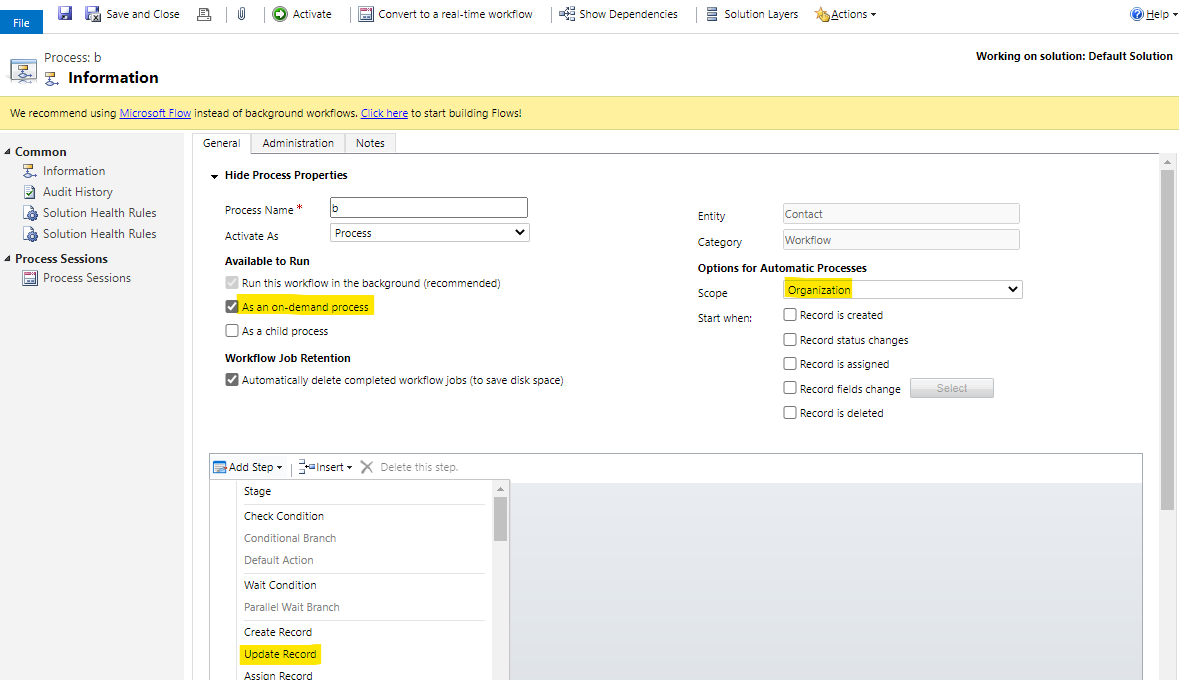
    Create such a workflow.

    Check As an on-demand process, select Scope as Organization. Add Step: Update Record.
    pastedimage1583149793466v1.png

    Select Update: Contact. Click Set Properties

    First select a value of two option set field, then at Form Assistant, select Originating Lead (Lead), then select lead's two option set field, then OK.

    pastedimage1583150036863v3.png

    Activate this workflow.

    If there are many existing contacts that need to be updated in your environment, then we need to use the "Bulk Workflow Execution" tool of XrmToolBox to update all contacts at once.

    This is the download page for XrmToolBox: https://www.xrmtoolbox.com/

    After downloading and unzipping it, open XrmToolBox.exe.

    Install Bulk Workflow Execution in the tool library. Connect to your D365 organization.

    With Bulk Workflow Execution open, select the workflow and the contact view. Click Validate Query first, and then click Start Workflows.

    In this way, all contacts in this view will be updated according to the selected workflow.

  • PS10 Profile Picture
    8 on at

    Hi,

    I was doing import/Export to solve the issue but your solution is better and easier, but i was hoping that using your solution it will also help me with the below two related issues:

    1)Since this mapping field is expected to have a value, all existing Contact records are showing unsaved changes and after clicking save one time record works just fine as expected, but ideally when i am updating this option set all records should remain in saved state. Is there a way to bulk save these records?

    2) Workflow is not allowing me to update the option set which is read only on the form, is that a restriction? If yes, then i will have to go back to my import method for this two option set field.

    Thanks,

    PS

  • LuHao Profile Picture
    40,892 on at

    Hi partner,

    I would recommend you post both issues as separate threads.

    This will allow other experts to participate in the discussiona and it will also facilitate forum users to navigate to precise threads.

  • LuHao Profile Picture
    40,892 on at

    Hi partner,

    On your second question.

    Yes, if the field is set to read-only on the form, it will not allow updates in th workflow.

    So I would recommend you first remove this field form the form, then run the on-demand workflow for records of the view, finally add this field back on the form after successful execution.

Under review

Thank you for your reply! To ensure a great experience for everyone, your content is awaiting approval by our Community Managers. Please check back later.

Helpful resources

Quick Links

Responsible AI policies

As AI tools become more common, we’re introducing a Responsible AI Use…

Neeraj Kumar – Community Spotlight

We are honored to recognize Neeraj Kumar as our Community Spotlight honoree for…

Leaderboard > Customer experience | Sales, Customer Insights, CRM

#1
Tom_Gioielli Profile Picture

Tom_Gioielli 83 Super User 2025 Season 2

#2
Gerardo Rentería García Profile Picture

Gerardo Rentería Ga... 49 Most Valuable Professional

#3
#ManoVerse Profile Picture

#ManoVerse 40

Last 30 days Overall leaderboard

Product updates

Dynamics 365 release plans



