web
You’re offline. This is a read only version of the page.
close
Skip to main content

Notifications

Announcements

No record found.

Community site session details

Community site session details

Session Id :
Microsoft Dynamics AX (Archived)

Batch Processing does't working

(0) ShareShare
ReportReport
Posted on by

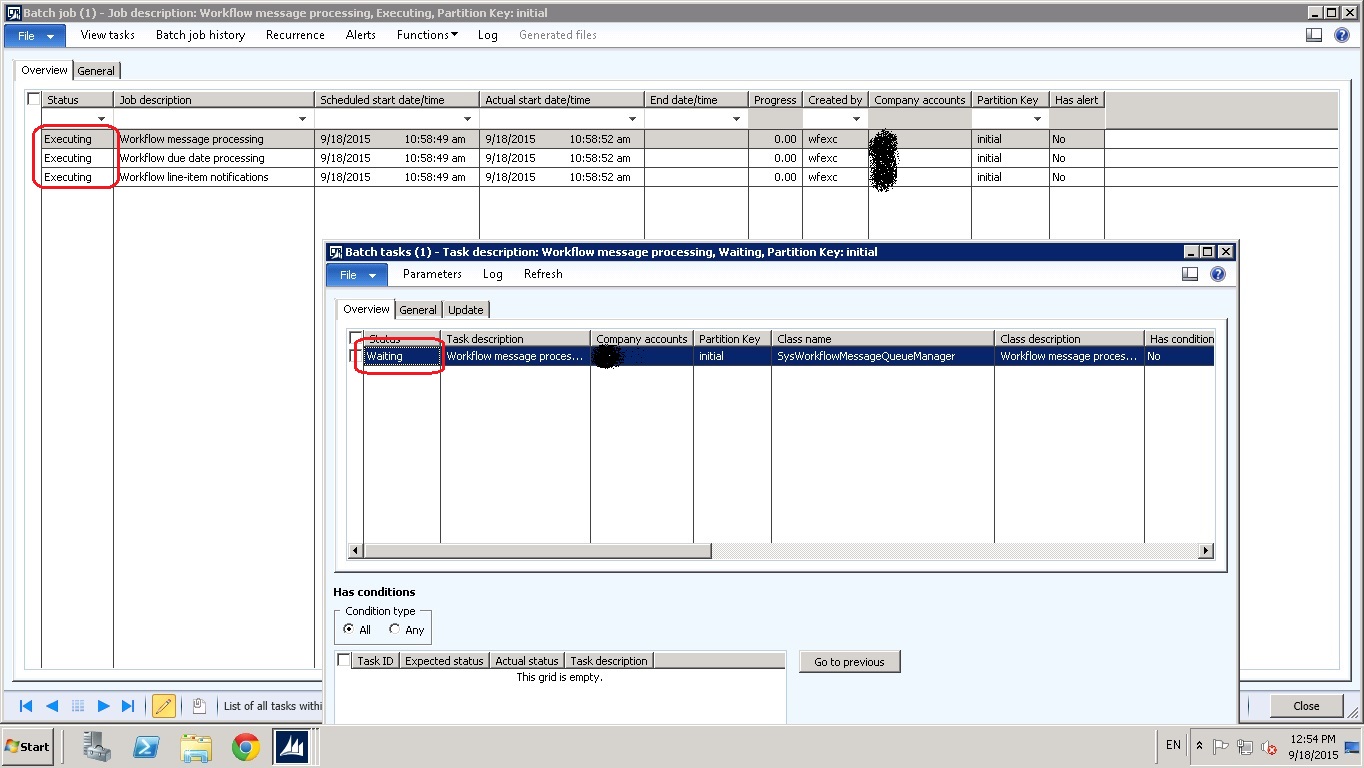
8080.batch.jpg

Batch Jobs are not working properly. for example, when Purchase requisition workflow starts it doesn't goes to the next activity, and batch jobs looks like it is on Prnt Scr. it doesn't change status from executing to waiting and e.c.

*This post is locked for comments

I have the same question (0)
  • Martin Dráb Profile Picture
    237,959 Most Valuable Professional on at

    Please give us more information. Does it happen for all batch jobs?

    Did it work before? If not, how did you install the environment? If it did, what has changed? Didn't you restore data from another environment?

  • Community Member Profile Picture
    on at

    Yes it happens for all batch jobs. yes all batch jobs  worked before without any problem. We have made windows cumulative update on server. After update, server didn't start.

    And we had to copy all database to new server.  Since then batch jobs doesn't work.

  • Suggested answer
    Martin Dráb Profile Picture
    237,959 Most Valuable Professional on at

    The migration to new server is likely the problem. If you switch to General tab and check the value of AOS instance name, you'll likely see the old server name there. The task waits for the old server to pick it up.

    You'll have to update the field (Batch.ServerId) to the new server.

  • Community Member Profile Picture
    on at

    We have already checked AOS name  

    This is the error :

    Object Server 01:  The database reported (session 2 (-AOS-)): [Microsoft][SQL Server Native Client 11.0][SQL Server]Internal Query Processor Error: The query

    processor encountered an unexpected error during execution (HRESULT = 0x80040e19).. The SQL statement was: "UPDATE BATCH SET STATUS=?,MODIFIEDDATETIME=?,RECVERSION=? WHERE ((STATUS=?) AND (CONSTRAINTTYPE=?)) AND EXISTS (SELECT 'x' FROM BATCHJOB T2 WITH ( READCOMMITTEDLOCK) WHERE ((T2.STATUS=?) AND (BATCH.BATCHJOBID=T2.RECID)) AND NOT (EXISTS (SELECT 'x' FROM BATCHCONSTRAINTS T3 WITH ( READCOMMITTEDLOCK) WHERE EXISTS (SELECT 'x' FROM BATCH T4 WITH ( READCOMMITTEDLOCK) WHERE (((T3.DEPENDSONBATCHID=T4.RECID) AND (T3.BATCHID=BATCH.RECID)) AND ((((T4.STATUS<>?) AND (T4.STATUS<>?)) OR ((T3.EXPECTEDSTATUS=?) AND (T4.STATUS=?))) OR ((T3.EXPECTEDSTATUS=?) AND (T4.STATUS=?))))))))"

  • Martin Dráb Profile Picture
    237,959 Most Valuable Professional on at

    Which "the" error? Where did you get it? When and how often does it occur?

    Your message says that there was some error during execution of the query - please find what error it was.

    Please realize that we can't help you without information and at least I can't read you mind. If you need help, you have to do your part first.

  • Community Member Profile Picture
    on at

    thank u

    after change SQL server, All Batch job stopped.

    in Windows Logs>Event Viewer errors

    Object Server 01:  The database reported (session 2 (-AOS-)): [Microsoft][SQL Server Native Client 11.0][SQL Server]Internal Query Processor Error: The query

    processor encountered an unexpected error during execution (HRESULT = 0x80040e19).. The SQL statement was: "UPDATE BATCH SET STATUS=?,MODIFIEDDATETIME=?,RECVERSION=? WHERE ((STATUS=?) AND (CONSTRAINTTYPE=?)) AND EXISTS (SELECT 'x' FROM BATCHJOB T2 WITH ( READCOMMITTEDLOCK) WHERE ((T2.STATUS=?) AND (BATCH.BATCHJOBID=T2.RECID)) AND NOT (EXISTS (SELECT 'x' FROM BATCHCONSTRAINTS T3 WITH ( READCOMMITTEDLOCK) WHERE EXISTS (SELECT 'x' FROM BATCH T4 WITH ( READCOMMITTEDLOCK) WHERE (((T3.DEPENDSONBATCHID=T4.RECID) AND (T3.BATCHID=BATCH.RECID)) AND ((((T4.STATUS<>?) AND (T4.STATUS<>?)) OR ((T3.EXPECTEDSTATUS=?) AND (T4.STATUS=?))) OR ((T3.EXPECTEDSTATUS=?) AND (T4.STATUS=?))))))))"

Under review

Thank you for your reply! To ensure a great experience for everyone, your content is awaiting approval by our Community Managers. Please check back later.

Helpful resources

Quick Links

Responsible AI policies

As AI tools become more common, we’re introducing a Responsible AI Use…

Neeraj Kumar – Community Spotlight

We are honored to recognize Neeraj Kumar as our Community Spotlight honoree for…

Leaderboard > 🔒一 Microsoft Dynamics AX (Archived)

#1
Martin Dráb Profile Picture

Martin Dráb 4 Most Valuable Professional

#1
Priya_K Profile Picture

Priya_K 4

#3
MyDynamicsNAV Profile Picture

MyDynamicsNAV 2

Last 30 days Overall leaderboard

Featured topics

Product updates

Dynamics 365 release plans



