web
You’re offline. This is a read only version of the page.
close
Skip to main content

Notifications

Announcements

No record found.

Community site session details

Community site session details

Session Id :
Customer experience | Sales, Customer Insights,...
Answered

i have created js script in dynamics 365 when we click on button on select of record it will create record in other table but im unable to copy status choice column and Roitext text column to another table column

(0) ShareShare
ReportReport
Posted on by 102

i have created js script in dynamics 365 when we click on button on select of record it will create record in other table

the table is creating and also im able to copy the primary column but im unable to copy sstatus choice column and Roitext text column to another table column

I have two tables "Pre Approval Header" and "Claim Header" , once record is created in Pre Approval Header table , i want to copy two fields Primary column and status choice column and Roitext text column to the Claim header table using JS script.
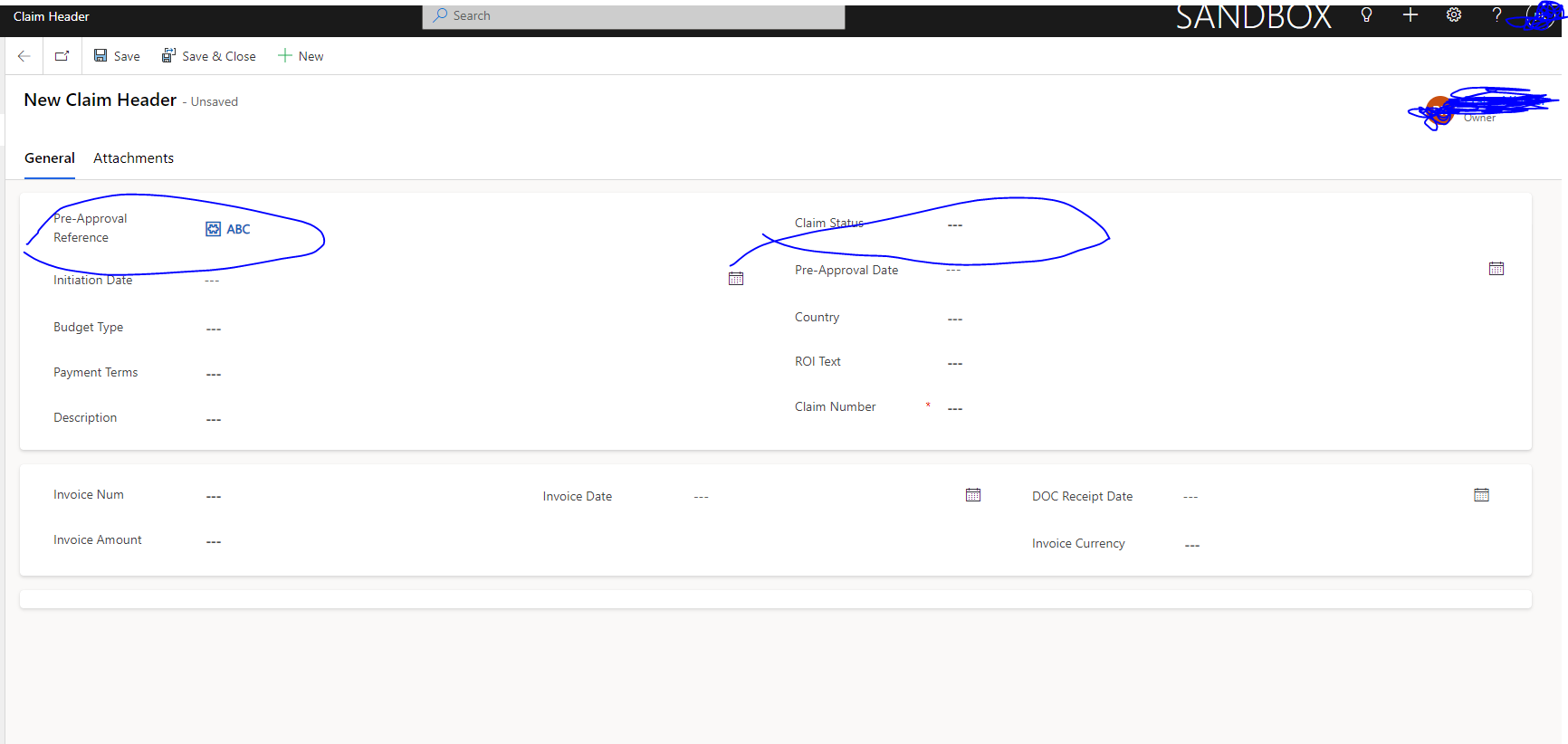
Image

When i click on "Claim Create" button i added using ribbon workbech, it will create new record in  Claim header

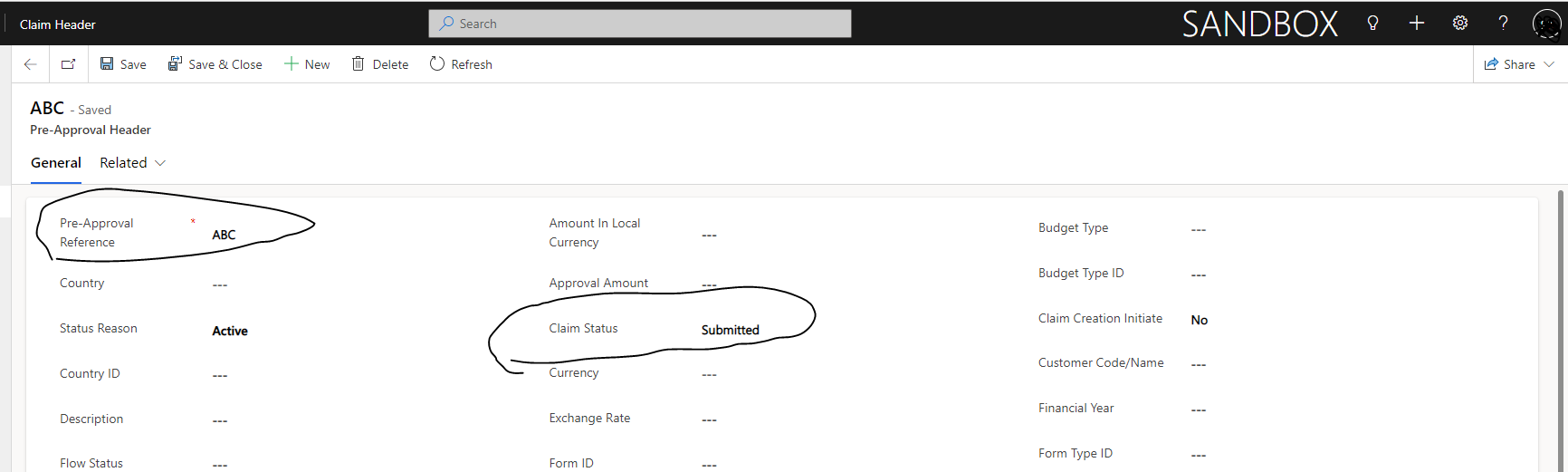
Image'

Image

In Claim header table, i was able to copy the Primary column "Pre approval Refrence"  to the Cliam header table, but status column is not copied.

want to know, how to copy status choice column and Roitext text column too, below is the code i used to copy Primary column " Pre approval refrence"

function enableclaimcreate(SelectedControl)
{
     var returnflag = true;
     return returnflag;
    
}

function onclickinitiateClaim(SelectedControl)
{
    var selectedRow = SelectedControl.getGrid().getSelectedRows().get(0).getData().getEntity();
     selectedRow._attributes._collection.cs_claimcreationinitiate.setValue(true);    
     var Roitext = selectedRow._attributes._collection.cs_roitext.getValue();
     var status  = selectedRow._attributes._collection.cs_claimstatus.getValue();

var entityFormOptions = {};
    entityFormOptions["formId"] = "1533E4B3-5087-ED11-81AD-002248175B80";
    entityFormOptions["entityName"] = "cs_claimrecordheader";

    entityFormOptions["windowPosition"] = 1;
    entityFormOptions["navbar"] = "entity";

    // Set default values 
    var formParameters = {};
    formParameters["cs_preapprovalreference"]=selectedRow.getEntityReference();
    formParameters["cs_claimstatus"] = status;
formParameters["cs_roitext"] = Roitext ;
       Xrm.Navigation.openForm(entityFormOptionsformParameters).then(
        function (success) {
            console.log(success);
        },
        function (error) {
            console.log(error);
        });
}
I have the same question (0)
  • pskateel Profile Picture
    102 on at

    I want to create a copy of status column to another column using js script in dynamics 365 when we click on button on select of record 

    I have two tables "Pre Approval Header" and "Claim Header" , once record is created in Pre Approval Header table , i want to copy two fields Primary column and status to the Claim header table using JS script.

    pastedimage1673429995281v2.png

    When i click on "Claim Create" button i added using ribbon workbech, it will create new record in  Claim header

    pastedimage1673429805517v1.png'

    pastedimage1673430292663v4.png

    In Claim header table, i was able to copy the Primary column "Pre approval Refrence"  to the Cliam header table, but status column is not copied.

    want to know, how to copy status column too, below is the code i used to copy Primary column " Pre approval refrence"

    function enableclaimcreate(SelectedControl)
    {
    var returnflag = true;
    return returnflag;
    }

    function onclickinitiateClaim(SelectedControl)
    {
        var selectedRow = SelectedControl.getGrid().getSelectedRows().get(0).getData().getEntity();
         selectedRow._attributes._collection.cs_claimcreationinitiate.setValue(true);    
         var Roitext = selectedRow._attributes._collection.cs_roitext.getValue();
         var status  = selectedRow._attributes._collection.cs_claimstatus.getValue();

    var entityFormOptions = {};
        entityFormOptions["formId"] = "1533E4B3-5087-ED11-81AD-002248175B80";
        entityFormOptions["entityName"] = "cs_claimrecordheader";

        entityFormOptions["windowPosition"] = 1;
        entityFormOptions["navbar"] = "entity";

        // Set default values 
        var formParameters = {};
        formParameters["cs_preapprovalreference"]=selectedRow.getEntityReference();
        formParameters["cs_claimstatus"] = status;
    formParameters["cs_roitext"] = Roitext ;
           Xrm.Navigation.openForm(entityFormOptionsformParameters).then(
            function (success) {
                console.log(success);
            },
            function (error) {
                console.log(error);
            });
    }
  • Amit Katariya007 Profile Picture
    10,409 Super User 2025 Season 2 on at

    You have to provide Entity data or we can say data for claim header.

    refer below article where we are providing various other details in "parameters" variable. In your case it will be part of entityFormOptions variable.

    learn.microsoft.com/.../set-field-values-using-parameters-passed-form

    carldesouza.com/.../

    Thank You,

    Amit Katariya

  • pskateel Profile Picture
    102 on at

    im not sure what excatly im supposed to add, i just want to update one status field, im able to update primary column

  • Amit Katariya007 Profile Picture
    10,409 Super User 2025 Season 2 on at

    Can you provide me logical names of those 2 fields which are present on the claim header form.

  • pskateel Profile Picture
    102 on at

    claim header form LOGICAL NAME

    Pre Approval Reference    -  cs_preapprovalreference

    status                                 - cs_claimstatus

  • Suggested answer
    a33ik Profile Picture
    84,331 Most Valuable Professional on at

    Hello,

    What are the types for "Roitext" and "Status"? And one more thing - if a particular field is not present in the grid - the value of it won't be available for getting it the way you use.

  • pskateel Profile Picture
    102 on at

    Roitext is Text type field

    status is choice type field

    this two fields are not present in the grid, so is there any other way to get this values?

  • a33ik Profile Picture
    84,331 Most Valuable Professional on at

    I would recommend using Xrm.WebApi.retrieveRecord to get values of fields since you have selected record id in your code.

  • Verified answer
    Amit Katariya007 Profile Picture
    10,409 Super User 2025 Season 2 on at

    Hey Buddy,

    I looked into your code and implemented a new code using an example. you can revise your code by referring below snippet.

    I have My custom button on the Opportunity entity and will create a "First" entity record when we will click on the button. Below JS will populate opportunity lookup and its status on the First entity record and redirect it to the new record.

    pastedimage1673617398349v1.png

    pastedimage1673617429550v2.png

    function createFirstRecord(SelectedControl)
    {
        var selectedRow = SelectedControl.getGrid().getSelectedRows().get(0).getData().getEntity();
        var entityFormOptions = {};
    
        var recordId = SelectedControl.getGrid().getSelectedRows().get(0).getData().getEntity().getId();
        var record = {};
    
        Xrm.WebApi.online.retrieveRecord("opportunity", "" recordId, "?$select=statecode,statuscode").then(
            function success(result) {
                console.log(result);
                // Columns
                var opportunityid = result["opportunityid"]; // Guid
                var statecode = result["statecode"]; // State
                var statecode_formatted = result["statecode@OData.Community.Display.V1.FormattedValue"];
                var statuscode = result["statuscode"]; // Status
                var statuscode_formatted = result["statuscode@OData.Community.Display.V1.FormattedValue"];
    
                var record = {};
                record["ak_Opportunity@odata.bind"] = "/opportunities(" opportunityid ")"; // Lookup
                record.ak_opportunitystatus = statuscode_formatted; // Text
    
                Xrm.WebApi.online.createRecord("ak_first", record).then(
                    function success(result) {
                        var newId = result.id;
                        var entityFormOptions = {};
                        entityFormOptions["entityName"] = "ak_first";
                        entityFormOptions["entityId"] = newId;
    
                        // Open the form.
                        Xrm.Navigation.openForm(entityFormOptions).then(
                            function (success) {
                                console.log(success);
                            },
                            function (error) {
                                console.log(error);
                            });
                    },
                    function(error) {
                        console.log(error.message);
                    }
                );
            },
            function(error) {
                console.log(error.message);
            }
        );
    }
     

    As you can see we will start with our function and will pass the Selected Control from ribbon.

    Then we will get the GUID of first selected record using line number 6. As we have GUID of the record we will get all the details which we will need like status and status code of opportunity(refer line no 9).

    Then once I have the record, we will create first record by passing the GUID and status of opportunity (refer line no 19 to 24).

    once "First" entity record created, we will redirect from opportunity form to the newly created record using GUID and openform API(line no 31).

    I have saw your code and there is a issue and the issue is that you don't have status and Pre Approval Reference field on the view and because of that your below code will not work.

    var Roitext = selectedRow._attributes._collection.cs_roitext.getValue();
    var status  = selectedRow._attributes._collection.cs_claimstatus.getValue();

    To resolve that you can use retrieveRecord API's(refer line no 9.). In my case it will return opportunity statuscode and statecode.

    once you have the data you can pass it to the your parameter object.

    Thank you,

    Amit katariya

  • Suggested answer
    Amit Katariya007 Profile Picture
    10,409 Super User 2025 Season 2 on at

    Hello pskateel,

    It is a request please don't create duplicate posts. I have already provided the solution please refer that.

    community.dynamics.com/.../i-want-to-create-a-copy-of-status-column-to-another-column-using-js-script-in-dynamics-365-when-we-click-on-button-on-select-of-record-i-was-able-to-copy-primary-column-using-below-code

    Thank You,

    Amit Katariya.

Under review

Thank you for your reply! To ensure a great experience for everyone, your content is awaiting approval by our Community Managers. Please check back later.

Helpful resources

Quick Links

Responsible AI policies

As AI tools become more common, we’re introducing a Responsible AI Use…

Neeraj Kumar – Community Spotlight

We are honored to recognize Neeraj Kumar as our Community Spotlight honoree for…

Leaderboard > Customer experience | Sales, Customer Insights, CRM

#1
Tom_Gioielli Profile Picture

Tom_Gioielli 108 Super User 2025 Season 2

#2
Jimmy Passeti Profile Picture

Jimmy Passeti 50 Most Valuable Professional

#3
Gerardo Rentería García Profile Picture

Gerardo Rentería Ga... 49 Most Valuable Professional

Last 30 days Overall leaderboard

Product updates

Dynamics 365 release plans