web
You’re offline. This is a read only version of the page.
close
Skip to main content

Notifications

Announcements

No record found.

Community site session details

Community site session details

Session Id :
Finance | Project Operations, Human Resources, ...
Suggested Answer

Identification of Data Columns in Data Lake from the Web UI

(0) ShareShare
ReportReport
Posted on by 5

We've recently implemented a ADLS Gen 2 data lake with our D365 FO instance, data is exporting correctly, and ingesting into Snowflake as an external stage - not using ADF or Synapse at this stage, although may look at this in the future for incremental loads to Snowflake.

I've previously used Data Entities & BYOD database so the data isn't completely foreign to me, however, I'm struggling to understand how to identify data from the web UI in the database.

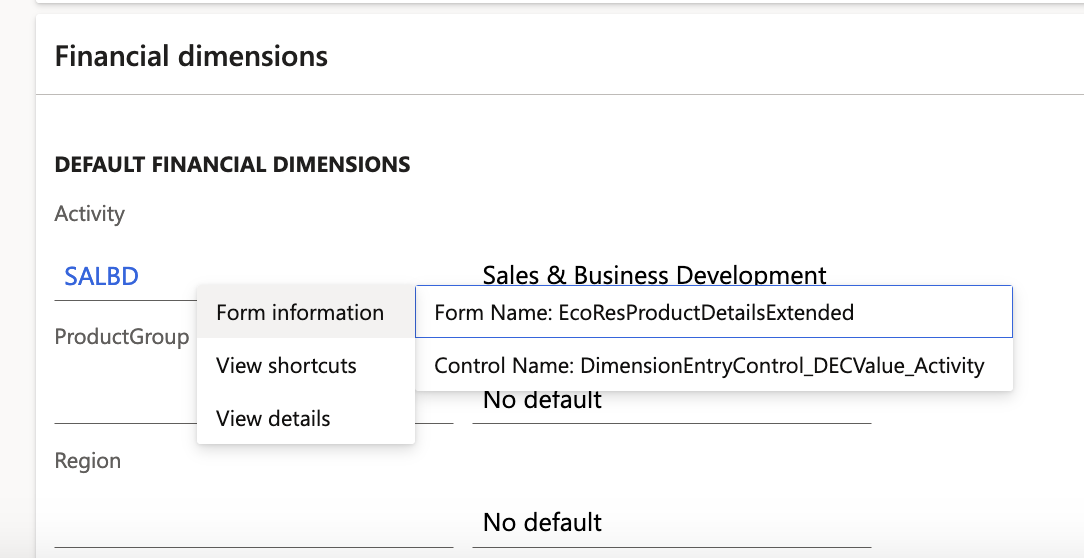
For example, we have 3 GL Financial Dimensions configured, with values for each. They relate to items through the Released products menu, however, after countless days of searching and pulling in every single table through Export to Data Lake I cannot seem to find where this data is located. All resources I've found seem to go as far as setting up the Data Lake, not how to consume the data.

The table "EcoResProductDetailsExtended" is not listed in the "Export to Data Lake" menu. What am I missing here?

To help me in the future, are there any easy-to-use resources online?

I understand there is Alex Meyer's table associations, but that doesn't really help me identify where the data is actually located, only the relationships between the tables.

Thanks in advance for the help!
pastedimage1666834755607v1.png

I have the same question (0)
  • Suggested answer
    jasonc99 Profile Picture
    5 on at

    For anyone else having the same issues, I found this Chrome extension extremely valuable. I wasn't able to use the table browser with Production env, but could with UAT. It was easy to quickly check the data in each table. It also gave me the Form name that was used, to limit the search even further, I was able to quickly find the relevant tables. Then with the use of Alex Meyer's relationship tool, I was sorted!

    dynamics-tips.com/.../

    Not 100% quite what I was after, but came close.

  • Suggested answer
    nunomaia Profile Picture
    25 Moderator on at

    If you click on "Form Name" it will display base SQL Query for that form. Is not perfect, but it displays base table name

    For example, to form that you mentioned, you can see that base table is InventTable. Some times, I have to open visual studio to find out all the tables that supports a form.

    pastedimage1666946151326v1.png

  • jasonc99 Profile Picture
    5 on at

    Thanks nunomaia

    I was aware of that, although base it's a select asterisk, it wasn't overly clear.

    Do you know of any resources to help me setup Visual Studio? Or is this on the Development VM? Or is this something you can setup locally?

  • nunomaia Profile Picture
    25 Moderator on at

    I use visual studio from a dev machine.

    Is not complex, but of course there is a learning curve

  • jasonc99 Profile Picture
    5 on at

    Thank you - I will need to look into a learn how to use VS on the dev machine.

  • Suggested answer
    nunomaia Profile Picture
    25 Moderator on at

    Also in a Dev VM, take a look on SQL Views, it helps understating where fields are mapped in tables. You should get a view for each entity.

Under review

Thank you for your reply! To ensure a great experience for everyone, your content is awaiting approval by our Community Managers. Please check back later.

Helpful resources

Quick Links

Responsible AI policies

As AI tools become more common, we’re introducing a Responsible AI Use…

Neeraj Kumar – Community Spotlight

We are honored to recognize Neeraj Kumar as our Community Spotlight honoree for…

Leaderboard > Finance | Project Operations, Human Resources, AX, GP, SL

#1
André Arnaud de Calavon Profile Picture

André Arnaud de Cal... 456 Super User 2025 Season 2

#2
Martin Dráb Profile Picture

Martin Dráb 429 Most Valuable Professional

#3
BillurSamdancioglu Profile Picture

BillurSamdancioglu 239 Most Valuable Professional

Last 30 days Overall leaderboard

Product updates

Dynamics 365 release plans



