web
You’re offline. This is a read only version of the page.
close
Skip to main content

Notifications

Announcements

No record found.

Community site session details

Community site session details

Session Id :
Microsoft Dynamics AX (Archived)

AX 2012 - number sequence does not work (projects)

(0) ShareShare
ReportReport
Posted on by

Hello,

I have problem with automatic numbering - seems that:

- when creating new project, Project ID is not being automatically assigned:
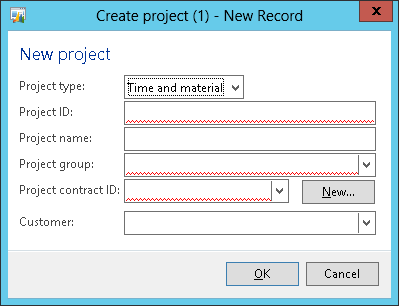
7608.12.png

- I've checked how it looks in numbering sequence for projects, and there is seems ok:
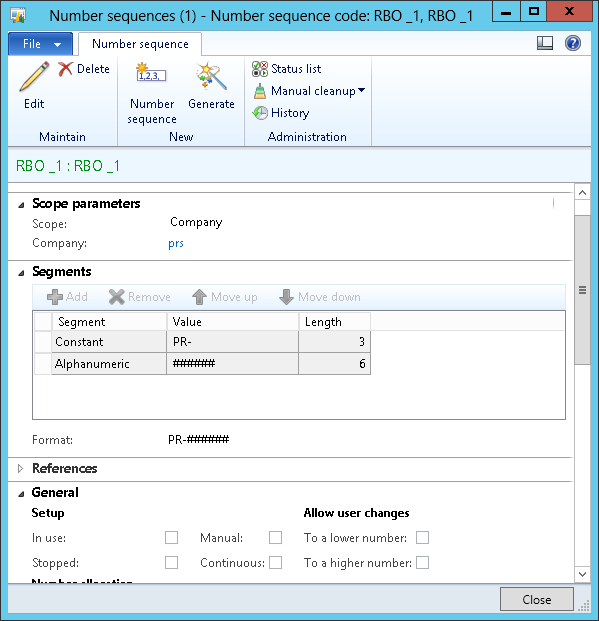
5444.13.png

- RBO_1 has no 'manual' checked, and this sequence defined as to be used for 'Project ID' field:
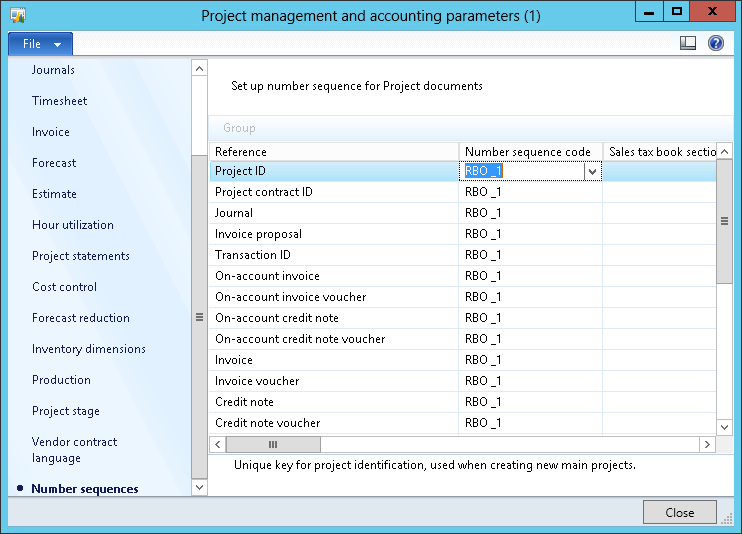
- unfortunatelly, still - when trying to create new project (first picture above), number for 'Project ID' is not being automatically generated :(

Tried to mark 'manual' and clear it again - no result; tried also to regoot server - unfortunately also not any change. Could anyone advice where the problem may be?

regards

Tomasz

*This post is locked for comments

I have the same question (0)
  • Community Member Profile Picture
    on at

    Hi,

    I face the same problem.

    Have you solve this problem?

  • Suggested answer
    5400 Profile Picture
    7,162 on at

    Number sequence is getting assign from below else code, please check scope is correct or not in your number sequence setup and I assuming, u did not change any dataType in EDt.

    \Forms\ProjTableCreate\Data Sources\ProjTable\Methods\create

    void create(boolean append = false)

    {

       super(append);

       if (projTable.ParentId)

       {

           projTable.formMethodDataSourceCreate(element,projTable_DS,projTable.ParentId);

       }

       else

       {

           element.numberSeqFormHandler().formMethodDataSourceCreate();

       }

    }

  • 5400 Profile Picture
    7,162 on at

    One more think project reference is missing in your number sequnce setup. Please add the ref.

  • Community Member Profile Picture
    on at

    Hi Bhaskar Roy,

    I have already set up the project reference in the number sequence set up as what Tomek Serwanski did.

    And I also have check on the AOT table as below:

    Project-_2D00_-Number-Sequences-ID.png

    Below my number sequences set up:

    Project-_2D00_-Number-Sequences-ID.png

    And below the error message:

    Project-_2D00_-Error-Message-Create.png

    Do you have any clues where do I missed?

    M.H.

  • 5400 Profile Picture
    7,162 on at

    Please show me your number sequence reference tab page details.

  • Community Member Profile Picture
    on at

    Detail number sequences as below:

    5852.Number-Sequences-_2D00_-Project-ID-_2D00_-Detail-1.png

    4314.Number-Sequences-_2D00_-Project-ID-_2D00_-Detail-2.png

  • André Arnaud de Calavon Profile Picture
    301,020 Super User 2025 Season 2 on at

    Hi M. Hasan,

    Is the company with the projects also '1100'? If not, the wrong number sequence is setup.

  • Suggested answer
    5400 Profile Picture
    7,162 on at

    I don’t know your data consistency. I can tell you some work around to solve the issue as below

    Projid data type is “440”, please create one line in number sequence reference table with DataType recid is nothing but with projID(“440”) filtration. Mapped the number sequence recid as per your new number and also attached your scope recid which u have created as per company.  

    It should work. Please check and confirm.

  • Community Member Profile Picture
    on at

    Yes the company is 1100 too

  • Community Member Profile Picture
    on at

    Hi Bhaskar,

    Should I create this line from visual studio (direct line in table) or I could use standard transaction in AX?.

    Could you define the step by step for this?

    I am still very new to AX.

    Many Thanks,

    M.H.

Under review

Thank you for your reply! To ensure a great experience for everyone, your content is awaiting approval by our Community Managers. Please check back later.

Helpful resources

Quick Links

Responsible AI policies

As AI tools become more common, we’re introducing a Responsible AI Use…

Neeraj Kumar – Community Spotlight

We are honored to recognize Neeraj Kumar as our Community Spotlight honoree for…

Leaderboard > 🔒一 Microsoft Dynamics AX (Archived)

#1
Priya_K Profile Picture

Priya_K 4

#1
Martin Dráb Profile Picture

Martin Dráb 4 Most Valuable Professional

#3
Ali Zaidi Profile Picture

Ali Zaidi 2

Last 30 days Overall leaderboard

Featured topics

Product updates

Dynamics 365 release plans



