Hi, I am migrating a couple of classes using Dynamics 365 FO (Application version: 7.3 Platform version: update 12). But I got stuck with an important piece of code, even when I already tried different solutions answered on different posts in this community related with the class AxdDimensionUtil.
What Am I trying to do?
I am trying to create a new "LedgerDimension" and set it in the LedgerJournalTrans.LedgerDimension field while I create a new record of the LedgerJournalTrans Table. This new LedgerDimension must be created from a MainAccount and using the DimensionCombination of an offsetLedgerDimension (without its MainAccount).
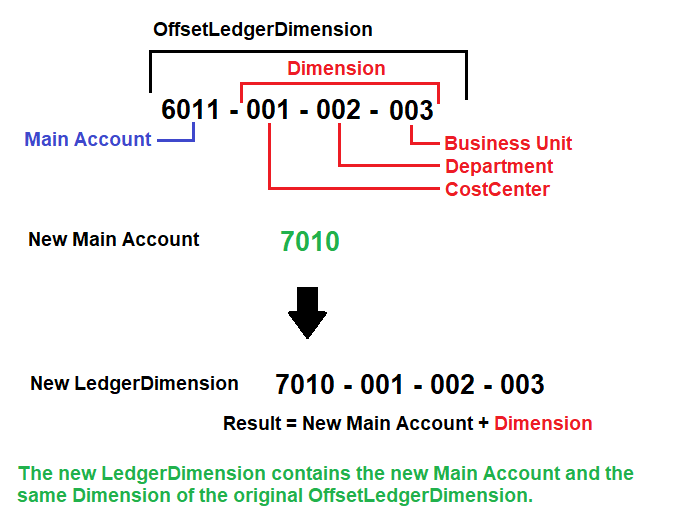
Background
In Dynamics AX 2012 R3 the solution was simple using the AXdDimensionUtil class and the method getLedgerAccountId(), but now in Dynamics 365 this class is obsolete.
My original code in Dynamics 2012 was:
container01 = AxdDimensionUtil::getLedgerAccountValue(offsetLedgerDimension); // get a LedgerDimension in a container
container02 = AxdDimensionUtil::getLedgerAccountValue(ledgerDimensionAccount); // get the main account
container01 = conPoke(container01, 2, conPeek(container02, 2)); // substitute de main account in the original LedgerDimension

ledgerJournalTrans.LedgerDimension = AxdDimensionUtil::getLedgerAccountId(container01); // create the new LedgerDimension
Today
In Dynamics 365... I used the LedgerDimensionFacade class and...
I could obtain the RecId of the MainAccount contained in a LedgerDimensionAccount field using the following method and returning a MainAccount.RecId :
LedgerDimensionFacade::getMainAccountIdFromLedgerDimension( LedgerDimensionAccount ) );
and the RecId of the DimensionCombination contained in the OffsetLedgerDimension using the following method and returning a DimensionAttributeValueSet.RecId :
LedgerDimensionFacade::getDefaultDimensionFromLedgerDimension( OffsetLedgerDimension );
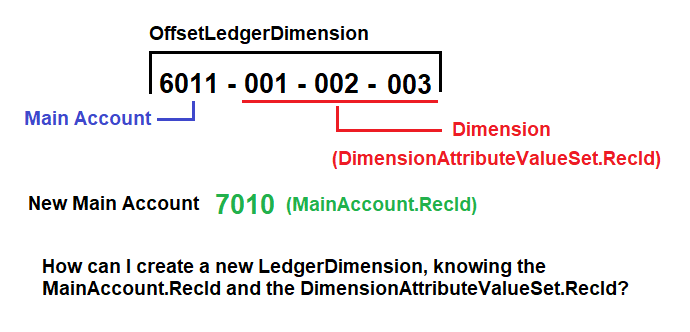
So finally, How can I achieve this? Am I complicating myself the way I'm doing it? Do you guys have a solution or example for this? Greetings


