web
You’re offline. This is a read only version of the page.
close
Skip to main content

Announcements

News and Announcements icon
Community site session details

Community site session details

Session Id :
Small and medium business | Business Central, N...
Suggested Answer

In Automatic Ext. Text in Navision 2018

(0) ShareShare
ReportReport
Posted on by 662

Hi Community,

I would like to ask in Automatic Ext. Text, there are a few fields which I'm not sure why is it there. Hope to receive advise.
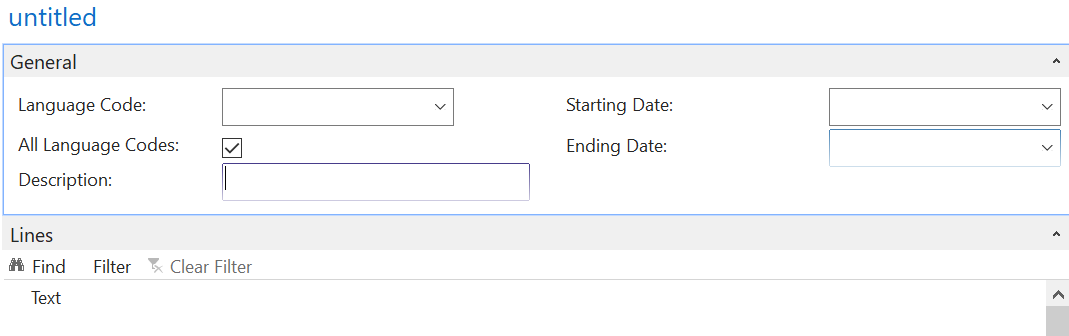
pastedimage1637293232477v1.png

Language Code: What is this used for, and isn't the language in Navision according to the language that we already assigned?

Description: Where does this description appears? I don't see it appearing in all the Orders or invoices that I have checked. Only the descriptions in the Lines appears.

Starting Fate and Ending Date: Why do we need a Starting and Ending Date? What would happen if we don't put any date, will the Extended Text be in the item forever?

Thank you !

I have the same question (0)
  • Suggested answer
    Katrin Kinau Profile Picture
    Microsoft Employee on at

    Hi Josh,

    Language Code: When the language code is left empty, the extended text is added for every customer / vendor. When a language code is specified, the extended text is only used for those customers / vendors that have this specific language code setup on the customer / vendor card. When you e.g. setup an extended text for language code DEU, this extended text will only be added for customers / vendors that have language code DEU on the card, but not for other customers / vendors.

    Description: The description is shown only on the extended text itself and on the list of extended texts. When you have more than one extended text per item (e.g. for different languages) the description will help to identify the texts:

     4064.extended-text.jpg

    Starting Date and Ending Date: When no date is specified, the extended text will always be used. In case the extended texts should only be used for a specific period, this could be managed with the Starting and Ending Date

  • Suggested answer
    RZF Profile Picture
    5 on at

    Hi there,

    My vendor card has Language code.

    My Ext text on vendor card has Language code.

    Yet it still will not print on my Purchase order for that specific vendor?

    please advise, what am I missing?

    Thanks

    Robyn

  • Suggested answer
    Community Member Profile Picture
    on at

    Robyn,

    You will need your Partner to check to make sure the Document is reading the Language Code of the Vendor to print correctly. Here is an overview about Customer, but it applies to Vendor too...

    Running Multiple Document Languages - If you have documents that you want to print in the language of the recipient rather than in your own working language, you can add a single line of code in the document to handle this. This functionality is already enabled for most reports in the standard Microsoft Dynamics NAV database. The document is printed in the language that is specified in the Language Code field in the Customer Card window.

    In reports that need the multiple document languages functionality, you must insert the following C/AL code as the first line in the OnAfterGet Record() trigger:

    CurrReport.LANGUAGE := Language.GetLanguageID("Language Code")

    For each of these reports, you must create a new variable, Language, with the data type Record pointing to the Language table (table 8). When you have compiled the object, it will no longer print in the user’s working application language if another language has been specified in the Customer Card window.

    Hope this helps.

    Thanks,

    Steve

  • Suggested answer
    YUN ZHU Profile Picture
    101,787 Super User 2026 Season 1 on at

    Hi, The instructions from several experts above are already very detailed, just add some documents.

    https://docs.microsoft.com/en-US/dynamics365/business-central/ui-how-define-ext-text

    https://yzhums.com/13060/

    https://archerpoint.com/how-use-extended-text-feature-microsoft-dynamics-nav/

    Thanks.

    ZHU

Under review

Thank you for your reply! To ensure a great experience for everyone, your content is awaiting approval by our Community Managers. Please check back later.

Helpful resources

Quick Links

Season of Sharing Community Challenge Launch!

Jump in, show your community spirit, and win prizes!

Women in Power Builds Momentum

Expanding mentorship, skilling, and AI innovation

Congratulations to the April Top 10 Community Leaders

These are the community rock stars!

Leaderboard > Small and medium business | Business Central, NAV, RMS

#1
OussamaSabbouh Profile Picture

OussamaSabbouh 2,497 Super User 2026 Season 1

#2
YUN ZHU Profile Picture

YUN ZHU 1,778 Super User 2026 Season 1

#3
AndrewThomas81 Profile Picture

AndrewThomas81 1,507

Last 30 days Overall leaderboard

Featured topics

Microsoft Training Manuals

Product updates

Dynamics 365 release plans



