web
You’re offline. This is a read only version of the page.
close
Skip to main content

Notifications

Announcements

No record found.

Community site session details

Community site session details

Session Id :
Customer experience | Sales, Customer Insights,...
Answered

Score leads for a form submission embedded on a specific website page

(0) ShareShare
ReportReport
Posted on by 7

Hi Experts, 

I've reached an impasse!

I have a marketing form that will be embedded in different product web pages, to achieve better reusability than creating a new form for every page. 

Goal: To identify  and score leads based on the form submission from the specific product page. 

For this I have set up separate Lead scoring models - where the Form is same but the page address is different.

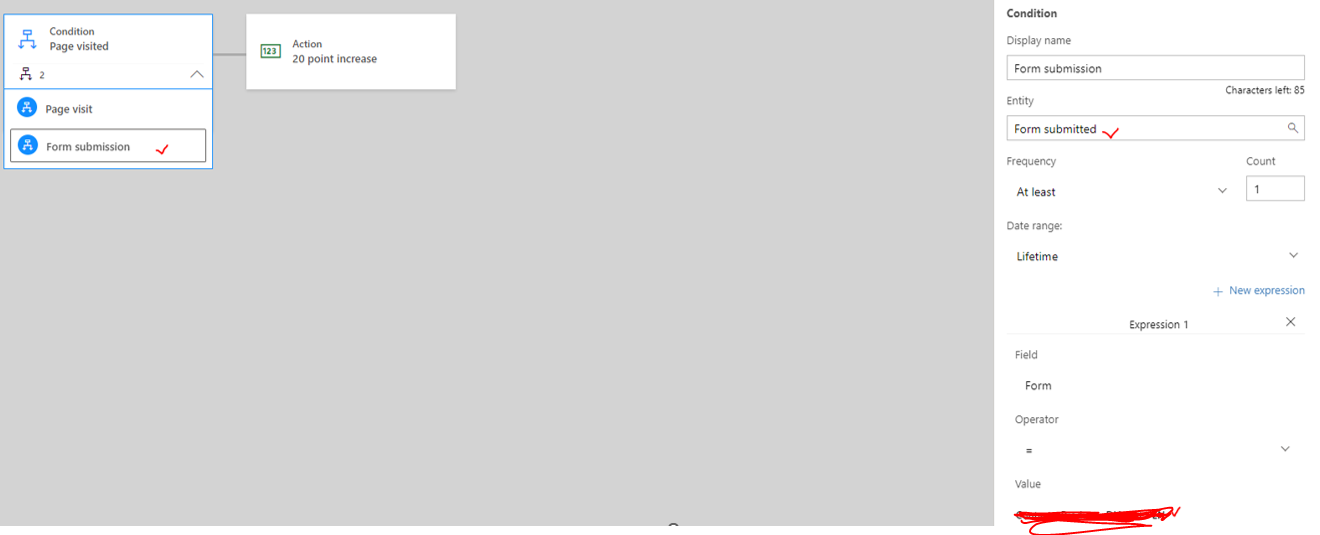
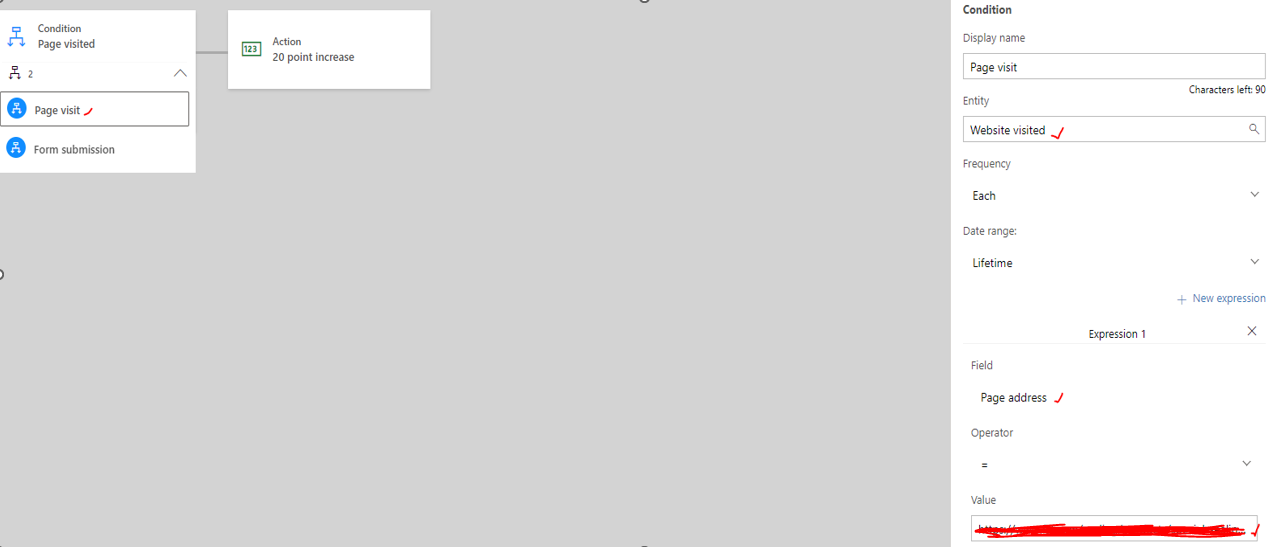
Lead score model: I have used a coupled condition as follows:
pastedimage1676912723682v1.png

pastedimage1676912792398v2.png

As per documentation the Conditions & Expressions form an 'AND' relation. So it make sense to couple it in this case. 

However, I do not get the expected results. The result is an empty lead score. 

On the other hand, if I separate these conditions the scoring works , but it doesn't help my use case. 

Note: I do not have a redirect url in the form submission so I cannot leverage that. 

Any ideas on how this scenario can be achieved?

Thank you in advance.

I have the same question (0)
  • Suggested answer
    Eiken Profile Picture
    on at

    Hi,

    The page address means the address of a Marketing Page.

    Please check you page address in the insight of page address.

    pastedimage1676956377960v1.png

  • Dsouza_28 Profile Picture
    7 on at

    Hi Eiken,

    Thanks for clarifying that part. 

    Do you see any alternative to get the Page visits from the website:

    pastedimage1676972081005v1.png

  • Dsouza_28 Profile Picture
    7 on at

    You can vote for this idea:

    experience.dynamics.com/.../

  • Suggested answer
    # Mikko Profile Picture
    15 on at

    Hi Roy,

    I created a similar rule as you have and it seems to work fine.

    The only difference is that I used operator Contains for the page address:

    pastedimage1677239880210v1.png

    pastedimage1677240000905v2.png

    - Mikko

  • Dsouza_28 Profile Picture
    7 on at

    Hi Mikko,

    thanks for investigating.

    I see that the standalone condition of page visit works as you mentioned.

    But did you also check it with a coupled Form submission condition?

  • Suggested answer
    # Mikko Profile Picture
    15 on at

    Hi Roy,

    Yes, exactly the same way you did.

    pastedimage1677242161165v1.png

    pastedimage1677242349585v1.png

    - Mikko

  • Dsouza_28 Profile Picture
    7 on at

    Hi Mikko,

    I can confirm this worked for me as well. It seems like a bug in the deisgner.

    Anyways, thank you very much.

Under review

Thank you for your reply! To ensure a great experience for everyone, your content is awaiting approval by our Community Managers. Please check back later.

Helpful resources

Quick Links

Responsible AI policies

As AI tools become more common, we’re introducing a Responsible AI Use…

Neeraj Kumar – Community Spotlight

We are honored to recognize Neeraj Kumar as our Community Spotlight honoree for…

Leaderboard > Customer experience | Sales, Customer Insights, CRM

#1
Tom_Gioielli Profile Picture

Tom_Gioielli 137 Super User 2025 Season 2

#2
#ManoVerse Profile Picture

#ManoVerse 57

#3
Jimmy Passeti Profile Picture

Jimmy Passeti 50 Most Valuable Professional

Last 30 days Overall leaderboard

Product updates

Dynamics 365 release plans