web
You’re offline. This is a read only version of the page.
close
Skip to main content

Notifications

Announcements

No record found.

Community site session details

Community site session details

Session Id :
Service | Customer Service, Contact Center, Fie...
Suggested Answer

Invoice created from Work Order Name Fail

(0) ShareShare
ReportReport
Posted on by 40

Hi,

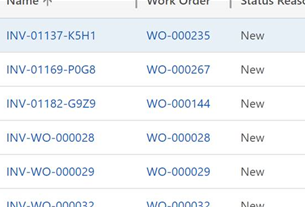
I haven't seen this issue before BUT about 30% of the time (in Field Service 8.8.42.55) when a Work Order's system status is changed to Closed-Posted and an invoice is created everything works well except the name.  I expect to see a value in the new Invoice's name field like: INV-WO-####, instead the Invoice ID is in that column.

Why?!  Any idea where to start troubleshooting, before I ask Microsoft Support for help? Especially curious, because it doesn't happen every time. 

Any thoughts / ideas / advice is very much appreciated.  Thanks for reading. 

Here's a pic of some generated invoices - specifically name and related WO columns - to show you what I mean:
pastedimage1622128108072v2.png

I have the same question (0)
  • Suggested answer
    Thomas David Dayman Profile Picture
    11,323 on at

    Im not sure what the main cause of your problem is, but you can always create a workflow to replace the name of the Invoice on creation of Invoice?

  • Lindsay Marrin Profile Picture
    40 on at

    Thanks - can't replicate the issue in any other environment, but while I keep searching for the cause a workaround workflow helps :-)

Under review

Thank you for your reply! To ensure a great experience for everyone, your content is awaiting approval by our Community Managers. Please check back later.

Helpful resources

Quick Links

Responsible AI policies

As AI tools become more common, we’re introducing a Responsible AI Use…

Neeraj Kumar – Community Spotlight

We are honored to recognize Neeraj Kumar as our Community Spotlight honoree for…

Leaderboard > Service | Customer Service, Contact Center, Field Service, Guides

#1
Tom_Gioielli Profile Picture

Tom_Gioielli 61 Super User 2025 Season 2

#2
Siv Sagar Profile Picture

Siv Sagar 52 Super User 2025 Season 2

#3
Daniyal Khaleel Profile Picture

Daniyal Khaleel 31 Most Valuable Professional

Last 30 days Overall leaderboard

Featured topics

Product updates

Dynamics 365 release plans



