web
You’re offline. This is a read only version of the page.
close
Skip to main content

Notifications

Announcements

No record found.

Community site session details

Community site session details

Session Id :
Microsoft Dynamics AX (Archived)

Double click list page get the detail form and can move to next and previous record by arrow button

(1) ShareShare
ReportReport
Posted on by

Hi all,

I have a question about how to build two forms like hcmworker and hcmworkerlistpage;

When double click a record in form hcmworkerlistpage, the hcmworker detail form with corresponding record will show, and I can get the next or previous record by the arrow button in the bottom of the form.


I tried to build two similar forms, but I do not know how to set the "detail form" so that it will display the record I just clicked in the "listpage".

To get the correct record pool, I used ...query().addRange... in the ""detail form" init method. Now I detail question is:

After I double clicked the "listpage", I get the correct pool of record in the "detail form" and the => and <= is worked but the current display is always the first record of the pool. I want to get the record i just clicked in "listpage". It should be the same as hcmworker. How can I do that? Thank you very much!

My current situation is
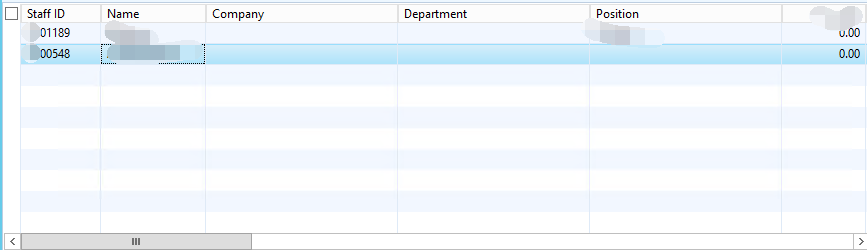
6840.001.png

In form gird, I double click the second record, 548, then as I have set a menuitembuuton, a new form with a record will display. But the displayed record is always the first one not the exact person I double click in the former form. How can I get the record in the second form according to the employee I selected in the first form, please? Besides, I also need to use the  blue => and <= button at the bottom of the second form so that I can choose back and forth in the personnel pool. Thank you!
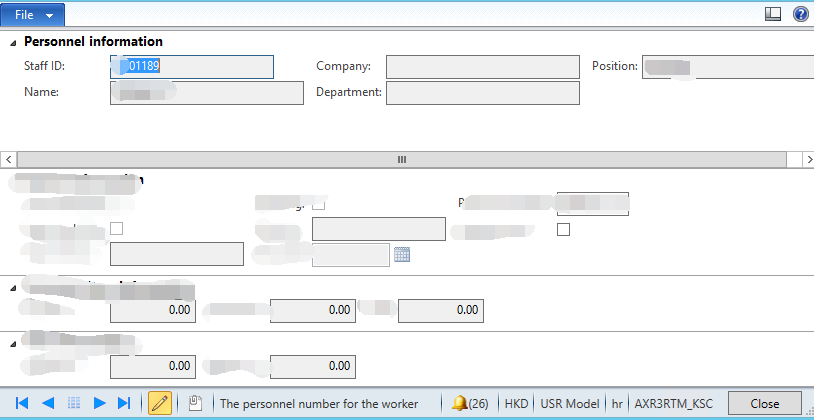
4382.002.png

*This post is locked for comments

I have the same question (0)
  • Suggested answer
    Denis Macchinetti Profile Picture
    16,444 on at

    Hi Samuel

    The new forms refer to the same tables?

    If not, you have to handle the correct relation, so on the child table create the relation with the parent table.

    Finally, on the MenuItem button of the parent form, set the DataSource Property to the parent table.

  • Community Member Profile Picture
    on at

    Hi Demis,

    Thank you for your apply. The two forms' datasource is the same table. And in menuitembutton DataSource property, I have set to the correct table. As I have built some filter in the parent form, I also did the same in the init() method in the child form. But the child form is always show the first record in my pool...

  • Suggested answer
    Rohin Profile Picture
    4,624 on at

    Hello Samuel,

    You can get the detail form by double click on list page by doing following on list page :

    list page >design>Grid>Grid properties>Default Action = Your Details Form.

    Try this once , i hope it will help you.

    thanks.

  • Denis Macchinetti Profile Picture
    16,444 on at

    Hi Samuel

    Please, send here the print screen of the Query Tab of the Child Form.

  • Community Member Profile Picture
    on at

    Hi Denis,

    Sorry for reply so late. I have updated the posting with print screen. Could you please provide some suggestion?

  • Community Member Profile Picture
    on at

    Hi Visvash,

    Thank you! I used the method as you said, but my problem is that the record I get in the second form is not the record I select in the first form. They are not match.

  • Suggested answer
    Vilmos Kintera Profile Picture
    46,149 on at

    The record passed in to your child form probably has the reference in element.args().record(), please verify.

    If yes, then you just have to add a dynalink in the formdatasource.init() after the super() call.

    There is a code snipper here, in which they link the sales order header to production orders dynamically, you only need the relevant part:

    community.dynamics.com/.../92436

  • Community Member Profile Picture
    on at

    Hi Vilmos,

    Thanks for your reply. After I followed your solution, I still found I cannot use the blue <= and  => button to choose record back and forth in the second form? Do you have any suggestion?

  • Vilmos Kintera Profile Picture
    46,149 on at

    Check your filters (control+f3), or right click - personalize - query, to understand if you have 1 or more records returned on the child form. Arrows only work if you have more than 1 records. Alternatively add a grid to the form to see how many you have exactly. Your filtering must be too narrow.

Under review

Thank you for your reply! To ensure a great experience for everyone, your content is awaiting approval by our Community Managers. Please check back later.

Helpful resources

Quick Links

Responsible AI policies

As AI tools become more common, we’re introducing a Responsible AI Use…

Neeraj Kumar – Community Spotlight

We are honored to recognize Neeraj Kumar as our Community Spotlight honoree for…

Leaderboard > 🔒一 Microsoft Dynamics AX (Archived)

#1
Martin Dráb Profile Picture

Martin Dráb 4 Most Valuable Professional

#1
Priya_K Profile Picture

Priya_K 4

#3
MyDynamicsNAV Profile Picture

MyDynamicsNAV 2

Last 30 days Overall leaderboard

Featured topics

Product updates

Dynamics 365 release plans
