web
You’re offline. This is a read only version of the page.
close
Skip to main content

Announcements

No record found.

News and Announcements icon
Community site session details

Community site session details

Session Id :
Service | Customer Service, Contact Center, Fie...
Answered

Tab Icon Selection option in Interactive Experience forms

(0) ShareShare
ReportReport
Posted on by 10

Hi All, While checking the Case Interactive Experience Form in Customer Service Hub App, I came across the functionality to switch between related records using icons as shown below.
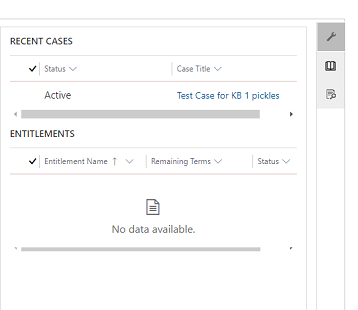
pastedimage1604004220505v1.png

While validating these options in form editor I can see options to add icons to Tabs but this is only available on the interactive experience form. Same feature is not available on other main forms which are custom created.
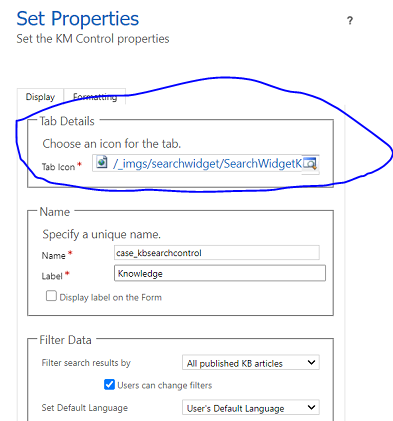
pastedimage1604004416980v2.png

For me its a very good interactive feature as we can add multiple related record sections and switch between them on click of icon.

Is there any way to Enable or Configure this functionality for all main forms?

I have the same question (0)
  • LeoAlt Profile Picture
    16,331 Moderator on at

    Hi Partner,

    Sorry that this is OOB function and only available in Case Interface form, it is by design.

    We recommend you to use the related tab to transfer to other entities.

    You could also raise an idea to Microsoft about this requirement here.

    https://experience.dynamics.com/ideas/categories/?forum=b68e50a6-88d9-e811-a96b-000d3a1be7ad&forumName=Dynamics%20365%20for%20Customer%20Service

    Best Regards,

    Leo

  • Verified answer
    Bipin D365 Profile Picture
    28,985 Moderator on at

    Hi,

    This is available for all entities and all main forms even custom form as well. Check below article.

    nishantrana.me/.../

    Check below video tutorial

    Please mark my answer verified if i were helpful

Under review

Thank you for your reply! To ensure a great experience for everyone, your content is awaiting approval by our Community Managers. Please check back later.

Helpful resources

Quick Links

Introducing the 2026 Season 1 community Super Users

Congratulations to our 2026 Super Stars!

Meet the Microsoft Dynamics 365 Contact Center Champions

We are thrilled to have these Champions in our Community!

Congratulations to the March Top 10 Community Leaders

These are the community rock stars!

Leaderboard > Service | Customer Service, Contact Center, Field Service, Guides

#1
11manish Profile Picture

11manish 36

#2
Mallesh Deshapaga Profile Picture

Mallesh Deshapaga 32

#3
ManoVerse Profile Picture

ManoVerse 30 Super User 2026 Season 1

Last 30 days Overall leaderboard

Featured topics

Product updates

Dynamics 365 release plans
