web
You’re offline. This is a read only version of the page.
close
Skip to main content

Notifications

Announcements

Community site session details

Community site session details

Session Id :
Finance | Project Operations, Human Resources, ...
Suggested Answer

Print multiple records using SSRS report

(1) ShareShare
ReportReport
Posted on by 10
Hi guys,
 
As part of a development task i have created a SSRS Report to create labels for a car key tag. In my project i have created the Contract Class, the Data Provider Class and the Controller class. Additionally, i have created the Temp table with all the necessary fields for the label. Then i created the report and added the dataset coming from the Data Provider class. This dataset contains 5 fields that will be displayed on my report for each record chosen on the UI. I created then the below precision design with a static field and 5 fields coming from the DP class. I don't have any row groups or column groups.
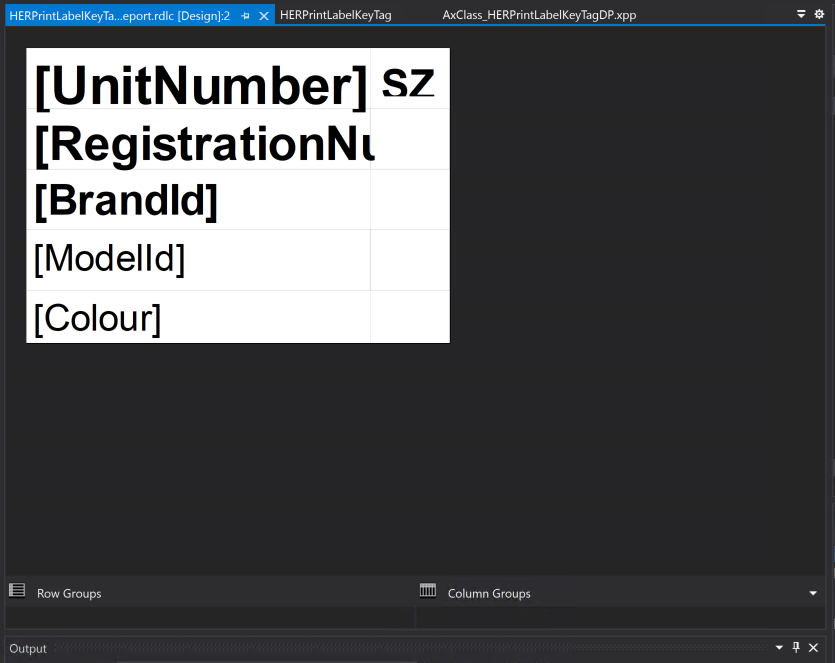
Then i built the project and deployed the report on my DEV environment. I tested it but i am facing a problem which i am unable to fix. Basically, if on F&O i select only 1 record the report is printed correctly on PDF and Word as below:
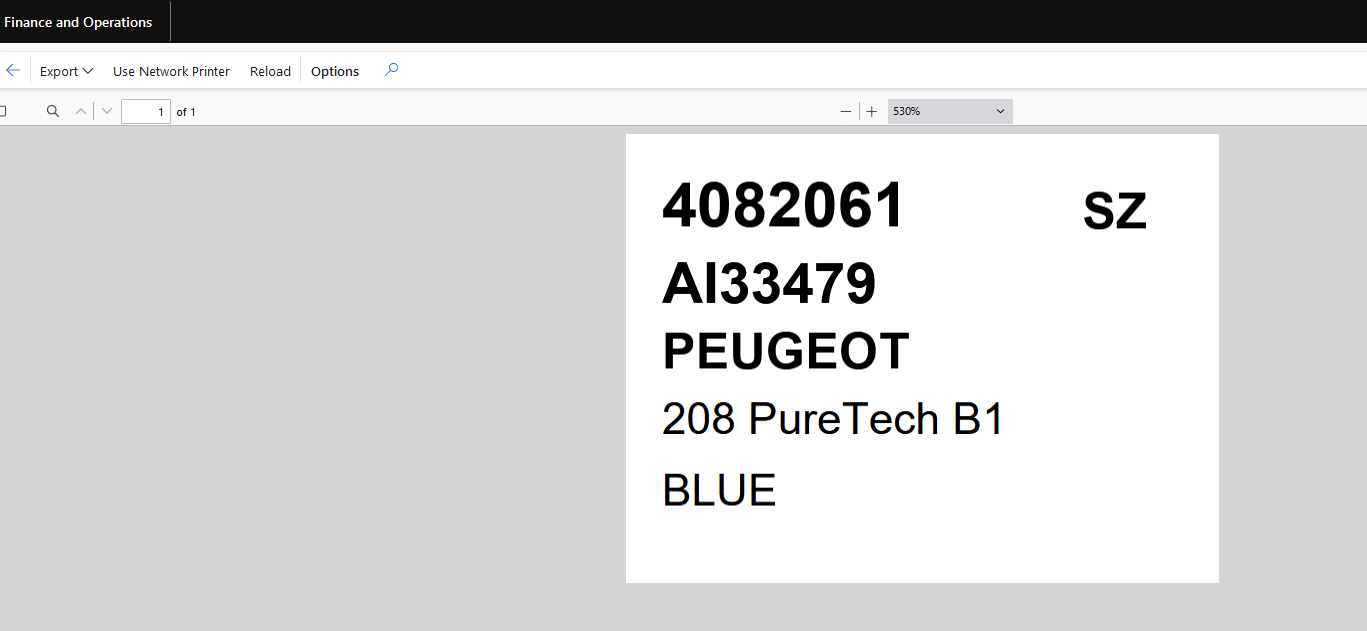
However, if i select more than 1 record i am still getting the same result of only showing 1 record (sometimes it's the first one and others it's the last one). 
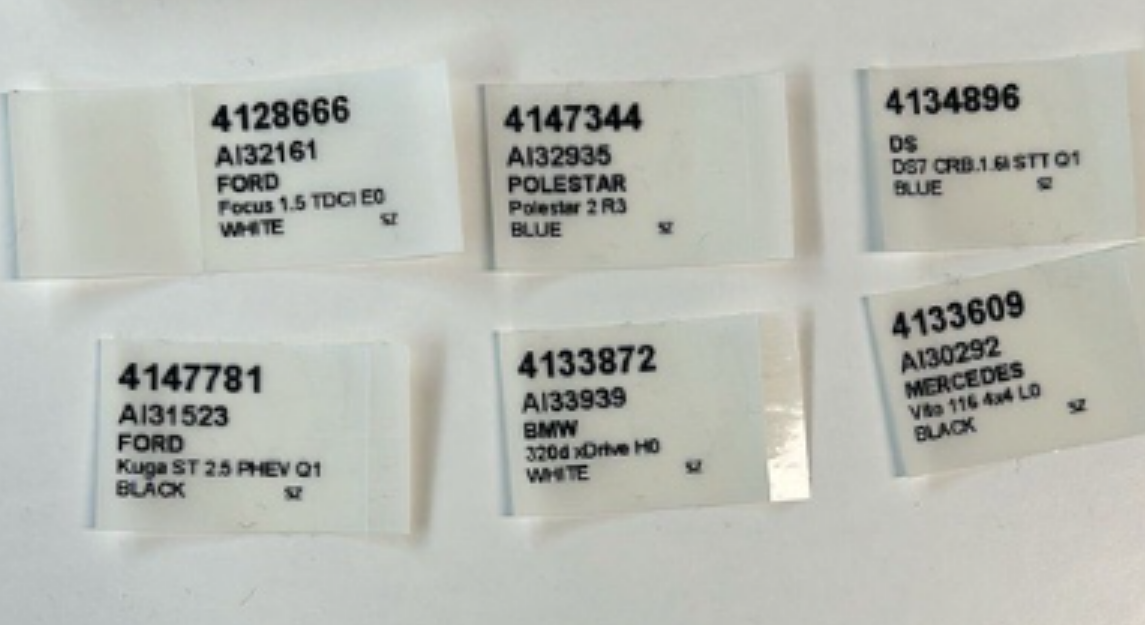
Do you have any idea of how i can surpass this issue and print in separate pages the Tag for each selected record? 

Example:
Please find my DP class below:
 
/// <summary>
/// HERPrintLabelKeyTagDP
/// </summary>
[
    SRSReportQueryAttribute(queryStr(HERPrintLabelKeyTag)),
    SRSReportParameterAttribute(classStr(HERPrintLabelKeyTagContract))
]
    public class HERPrintLabelKeyTagDP extends SrsReportDataProviderPreProcess
    //SrsReportDataProviderBase
{
    HERPrintLabelKeyTagContract                contract;
    public HERPrintLabelKeyTagTmp              printLabelKeyTag;
    /// <summary>
    /// HERPrintLabelKeyTagTmp
    /// </summary>
    /// <returns>HERPrintLabelKeyTagTmp</returns>
    [SRSReportDataSetAttribute(tablestr(HERPrintLabelKeyTagTmp))]
    public HERPrintLabelKeyTagTmp getTmpTable()
    {
        select printLabelKeyTag;
        return printLabelKeyTag;
    }
    /// <summary>
    /// insertTmpTable
    /// </summary>
    /// <param name = "_amDeviceId">_amDeviceIds</param>
    private void insertTmpTable(AMDeviceId _amDeviceId)
    {
        AMDeviceTable                   amDeviceTable;
        AMDeviceTableMaster             amDeviceTableMaster;
        AMRentDevice                    amRentDevice;
        AMDeviceFuel                    amDeviceFuel;
        AMDeviceTransmission            amDeviceTransmission;
        //HERPrintLabelKeyTagTmp          printLabelKeyTag;
        select firstonly amDeviceTable
            where amDeviceTable.DeviceId == _amDeviceId
            join amDeviceTableMaster
            where amDeviceTableMaster.MasterId == amDeviceTable.MasterId;
        if (amDeviceTable)
        {
            select firstonly amRentDevice
                where amRentDevice.DeviceId == amDeviceTable.DeviceId;
        }
        if (amDeviceTableMaster)
        {
            select firstonly amDeviceFuel
                where amDeviceFuel.FuelId == amDeviceTableMaster.FuelId;
            select firstonly amDeviceTransmission
                where amDeviceTransmission.TransmissionId == amDeviceTableMaster.TransmissionId;
        }
        ttsbegin;
        printLabelKeyTag.clear();
        printLabelKeyTag.UnitNumber                 = amDeviceTable.HERUnitNumber;
        printLabelKeyTag.ModelId                    = amDeviceTableMaster.DeviceName;
        printLabelKeyTag.FuellDescription           = amDeviceFuel.Description;
        printLabelKeyTag.DriveTrainId               = amDeviceTableMaster.DriveTrainId;
        printLabelKeyTag.TransmissionDescription    = amDeviceTransmission.Description;
        printLabelKeyTag.RegistrationNumber         = amDeviceTableMaster.RegistrationNumber;
        printLabelKeyTag.Colour                     = amDeviceTableMaster.ExteriorId;
        printLabelKeyTag.BrandId                    = amDeviceTableMaster.BrandId;
        printLabelKeyTag.ClassId                    = amRentDevice.ClassId;
        printLabelKeyTag.HERSnowSock                = amDeviceTableMaster.HERSnowSock;
        printLabelKeyTag.insert();
        ttscommit;
    }
    public void setTableConnections()
    {
        printLabelKeyTag.setConnection(this.parmUserConnection());
    }
    /// <summary>
    /// Process report data.
    /// </summary>
    public void processReport()
    {
        AMDeviceTable                       amdeviceTable;
        List                                list = new List(Types::String);
        Query                               queryDeviceId;
        QueryRun                            queryRunDeviceId;
        QueryBuildDataSource                qbdsDeviceId;
        ListIterator                        deviceIdListIterator;
        contract = this.parmDataContract() as HERPrintLabelKeyTagContract;
        list = contract.parmDeviceId();
        if(list != null)
        {
            deviceIdListIterator = new ListIterator(list);
            queryDeviceId = new Query(queryStr(HERPrintLabelKeyTag));
            qbdsDeviceId = queryDeviceId.dataSourceTable(tableNum(AMDeviceTable));
            
            while(deviceIdListIterator.more())
            {
                //qbdsDeviceId.clearRanges();
                qbdsDeviceId.addRange(fieldNum(AMDeviceTable, DeviceId)).value(deviceIdListIterator.value());
                deviceIdListIterator.next();
            }
            queryRunDeviceId = new QueryRun(queryDeviceId);
            while(queryRunDeviceId.next())
            {
                amdeviceTable = queryRunDeviceId.get(tableNum(AMDeviceTable));
                this.insertTmpTable(amdeviceTable.deviceId);
            }
        }
    }
}
I have the same question (0)
  • Martin Dráb Profile Picture
    238,149 Most Valuable Professional on at
    If you tested that your RDP class returns the right records, than the code above isn't relevant, because the problem isn't there. It's in your report. Please tell us more about it. A suspicious thing is that you said you used a static field instead of a tablix linked to your data source.
  • FS-16071301-0 Profile Picture
    10 on at
    Hi Martin, my report contains a Tablix with 2 columns and 5 rows. The first column contains the fields coming from the DP class dataset. The second column just contains the 'SZ' hardcoded value on the first row because this is a static information for all the labels, please see below.
    I didn't create any column or row groups, please see the design below:

    It seems that the design is not being able to handle more than one record. If i select just one record on the UI the label is being printed correctly as below:

    Should i modify my design?
  • Martin Dráb Profile Picture
    238,149 Most Valuable Professional on at
    Yes, your report design does not support multiple records.
     
    Start with something simple - create a tablix with a row for each record, showing a single field (e.g. UnitNumber). Do you know how to do that?
     
    Later you will replace the single field with another tablix representing an individual label.
  • FS-16071301-0 Profile Picture
    10 on at
    Hi Martin,
    I think i understood your point, however i am still not able to handle more than one record. I created a simple tablix with 2 rows, both for the unit number but if i select 2 records on the UI it is still printing the same one on both rows. I am not sure what i am missing here.
  • Martin Dráb Profile Picture
    238,149 Most Valuable Professional on at
    Showing the same information twice in your tablix is indeed useless. You shouldn't create another row; you should have a single row, but your tablix must be connected to the data source returning multiple records, and the cell must use an expression taking a value from the currently processed record.
     
    Finding the bug in your implementation is difficult without any information about the implementation. First of all, please show us how you've defined the data source of the tablix and the expression you're using.
  • Suggested answer
    Alireza Eshaghzadeh Profile Picture
    14,738 Super User 2025 Season 2 on at
    Hi,
    In addition to Martin's feedback, you can create configurations via Electronic Reporting using either RDP or Query (Table records). This method is much easier to debug without needing Visual Studio and can be done directly from the D365FO UI.

Under review

Thank you for your reply! To ensure a great experience for everyone, your content is awaiting approval by our Community Managers. Please check back later.

Helpful resources

News and Announcements

Season of Giving Solutions is Here!

Quick Links

Responsible AI policies

As AI tools become more common, we’re introducing a Responsible AI Use…

Neeraj Kumar – Community Spotlight

We are honored to recognize Neeraj Kumar as our Community Spotlight honoree for…

Leaderboard > Finance | Project Operations, Human Resources, AX, GP, SL

#1
Abhilash Warrier Profile Picture

Abhilash Warrier 732 Super User 2025 Season 2

#2
André Arnaud de Calavon Profile Picture

André Arnaud de Cal... 413 Super User 2025 Season 2

#3
Martin Dráb Profile Picture

Martin Dráb 289 Most Valuable Professional

Last 30 days Overall leaderboard

Product updates

Dynamics 365 release plans
