web
You’re offline. This is a read only version of the page.
close
Skip to main content

Announcements

News and Announcements icon
Community site session details

Community site session details

Session Id :
Supply chain | Supply Chain Management, Commerce
Unanswered

ReleasedProductsV2 error in PowerAutomate - curious behaviour

(0) ShareShare
ReportReport
Posted on by 57

Hi there,

I want to import items in d365FO from Excel via PowerAutomate and I see some curious behaviour. Maybe somebody can explain.

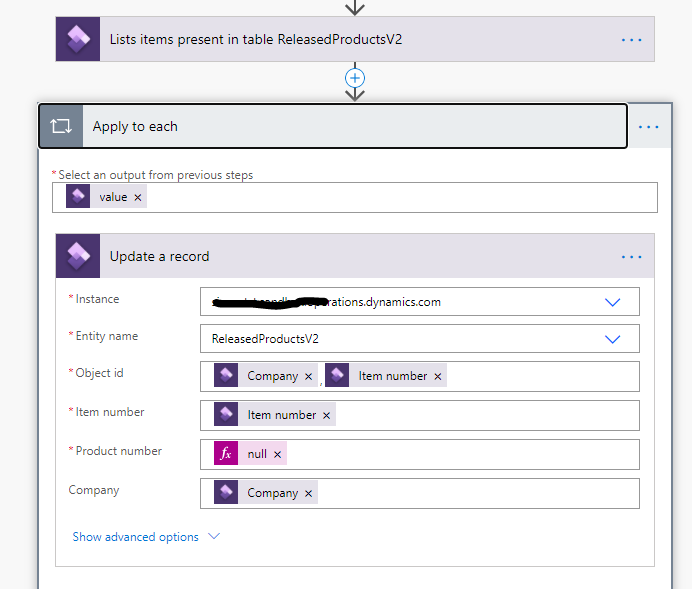
When I use the Get a record action in ReleasedProductsV2 I receive an error "not found", wheras when I use the List Items Present in action for ReleasedProductsV2 I can loop through the records and update them.

My flow is:
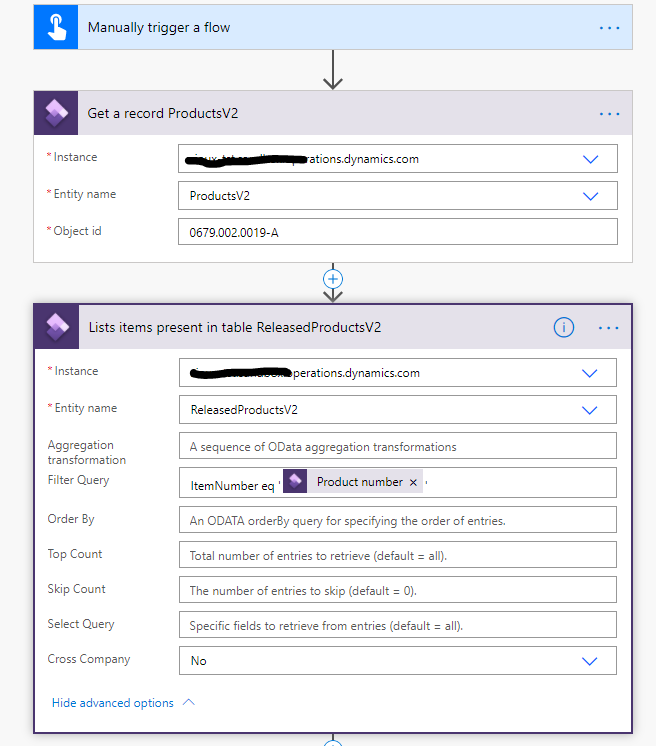
3858.pastedimage1599285323638v1.png

6404.pastedimage1599285367030v2.png

When I run this flow, the flow runs fine.

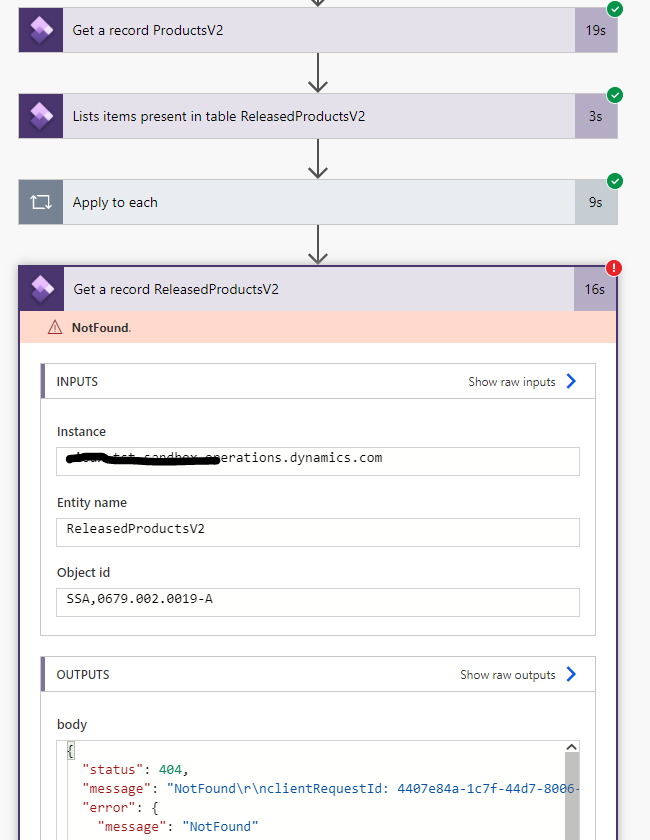
But when I create a flow which uses the Get a Record From ReleaseProductsV2, I receive an error "not found".
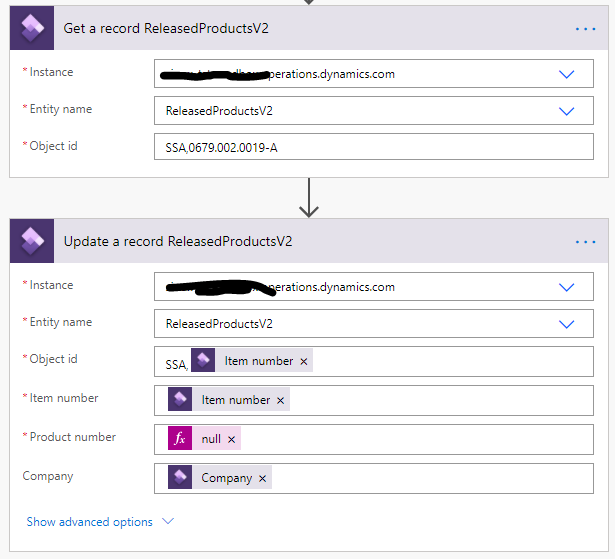
4667.pastedimage1599285591007v3.png

Error

6560.pastedimage1599285809401v4.png

Btw, I am a user in the system and my default company is SSA

Hope somebody can explain what is happening.

I have the same question (0)
  • André Arnaud de Calavon Profile Picture
    305,659 Super User 2026 Season 1 on at

    Hi Marc,

    When it lists the items in the table using the Released Products V2 entity, does it actually process records?

    What settings are used for the Dynamics 365 connector? Is there a fixed connection or is it using your credentials?

  • André Arnaud de Calavon Profile Picture
    305,659 Super User 2026 Season 1 on at

    Moved to the Dynamics 365 SCM forum.

  • Marc Claasen - HSO Profile Picture
    57 on at

    Hi Andre,

    thanks for your answers.

    1) Yes, the the list the items in the table step processes the records fine. That's why I find this strange behaviour;

    2) I use my own credentials to connect to the D365 connector. My default company is SSA (from which I want to get the records).

    Marc

  • André Arnaud de Calavon Profile Picture
    305,659 Super User 2026 Season 1 on at

    Hi Marc,

    Are you a system administrator in this environment?

    Can you also verify if the item ID is exactly like you entered in the flow action?

    PS. I have tried to reproduce your issue, but I'm not getting your error. I even did create the item with number '0679.002.0019-A' in a demo USMF company. It's just working fine at my side...

  • Marc Claasen - HSO Profile Picture
    57 on at

    Hi André,

    Yes, I am a system administrator in the system.

    Even stranger: when I removed the Apply to each in my flow and re-ran my test flow, all went well!

    pastedimage1599805390110v1.png

    Even more curious.

    Let's assume this was an incident. And when it re-occurs I know how to workaround it (via the List Items action).

    Thanks for your help.

Under review

Thank you for your reply! To ensure a great experience for everyone, your content is awaiting approval by our Community Managers. Please check back later.

Helpful resources

Quick Links

Season of Sharing Community Challenge Launch!

Jump in, show your community spirit, and win prizes!

Women in Power Builds Momentum

Expanding mentorship, skilling, and AI innovation

Congratulations to the May Top 10 Community Leaders

These are the community rock stars!

Leaderboard > Supply chain | Supply Chain Management, Commerce

#1
André Arnaud de Calavon Profile Picture

André Arnaud de Cal... 169 Super User 2026 Season 1

#2
Abhilash Warrier Profile Picture

Abhilash Warrier 102 Super User 2026 Season 1

#2
Laurens vd Tang Profile Picture

Laurens vd Tang 102 Super User 2026 Season 1

Last 30 days Overall leaderboard

Product updates

Dynamics 365 release plans