web
You’re offline. This is a read only version of the page.
close
Skip to main content

Announcements

News and Announcements icon
Community site session details

Community site session details

Session Id :
Microsoft Dynamics 365 | Integration, Dataverse...
Answered

Email templates - amending the text by "standard" users and also giving certain users permission to view and use them

(0) ShareShare
ReportReport
Posted on by

Hi everyone

We intend to set up and use email templates for our 25 different departments, all of which are separate Business Units within our Dynamics set-up.

Is it possible to set these templates up as personal templates for each user, in a similar way to Word templates? The alternative would seem to be that all users can see everyone's email templates which would create a very long list!

Also, am I correct in thinking that only users with Sys Admin rights can amend email templates?

Many thanks
Jon

I have the same question (0)
  • Verified answer
    Leah Ju Profile Picture
    Microsoft Employee on at

    Hi JonClay,

    Is it possible to set these templates up as personal templates for each user? 

    Is each user a separate template? Or do different business units have different templates and users in the same business unit share one template?

    (1)If you want users to see only the email templates they have created themselves, you can make users select 'Individual' permission level:
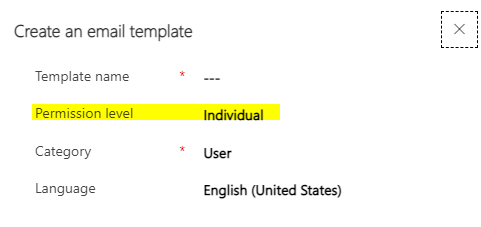
    pastedimage1666580238951v1.png

    (2)If you want to use 'business unit' level email template:

    Select 'organization' permission level to create email template and set privilege of the 'Email template' of security roles that assigned to users.

    Settings > Security > Security roles:

    You can refer to the following thread to set correct permission:


    only users with Sys Admin rights can amend email templates:

    --Remove the "write" permission of email template from all security roles assigned to the user (except the administrator role) 

  • JonClay Profile Picture
    on at

    Thank you SO much!

Under review

Thank you for your reply! To ensure a great experience for everyone, your content is awaiting approval by our Community Managers. Please check back later.

Helpful resources

Quick Links

Season of Sharing Community Challenge Launch!

Jump in, show your community spirit, and win prizes!

Women in Power Builds Momentum

Expanding mentorship, skilling, and AI innovation

Congratulations to the May Top 10 Community Leaders

These are the community rock stars!

Leaderboard > Microsoft Dynamics 365 | Integration, Dataverse, and general topics

#1
Subra Profile Picture

Subra 136

#2
André Arnaud de Calavon Profile Picture

André Arnaud de Cal... 95 Super User 2026 Season 1

#3
BillurSamdancioglu Profile Picture

BillurSamdancioglu 85 Most Valuable Professional

Last 30 days Overall leaderboard

Product updates

Dynamics 365 release plans



