web
You’re offline. This is a read only version of the page.
close
Skip to main content

Notifications

Announcements

No record found.

Community site session details

Community site session details

Session Id :
Customer experience | Sales, Customer Insights,...
Suggested Answer

Getting an error while registering Plugin in trial version

(0) ShareShare
ReportReport
Posted on by 15

Hi, 

I am trying to register a plgin on trial version but the dll is not getting registered and I am getting the following error
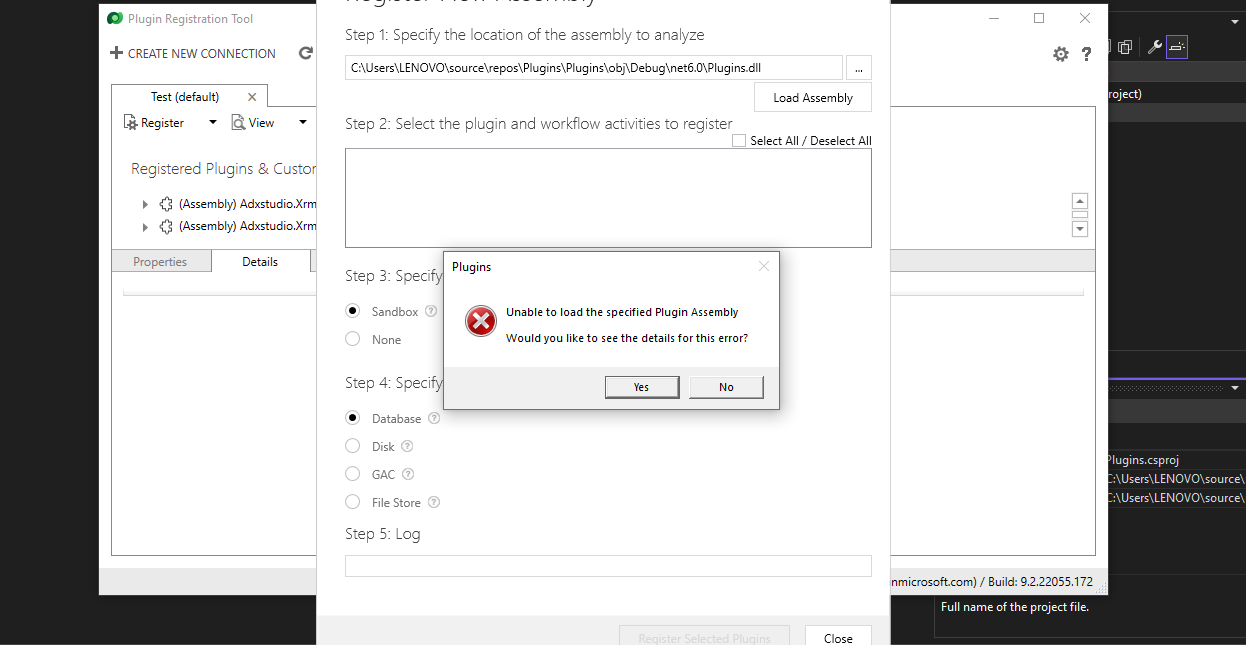
pastedimage1655796663763v2.png

and in the error detail I am getting this-

Unhandled Exception: System.IO.FileLoadException: Could not load file or assembly 'Plugins, Version=1.0.0.0, Culture=neutral, PublicKeyToken=01950ae073ba5909' or one of its dependencies. Strong name validation failed. (Exception from HRESULT: 0x8013141A)

Inner Exception: System.Security.SecurityException: Strong name validation failed. (Exception from HRESULT: 0x8013141A)

I have created strong name key but it is failing and I am using Visual Studio 2022. I have referred following article while creating strong name key-

docs.microsoft.com/.../sign-strong-name

I have the same question (0)
  • Community Member Profile Picture
    on at
  • Ram Prakash Duraisamy Profile Picture
    2,287 on at

    Hi,

    You need to use STRONG NAME

    Steps to Follow

    1. Select VS Solution --> Right Click --> Select Properties --> Select Signing --> Select NEW SIGNING --> INPUT NAME --> REMOVE PASSWORD

    Click OK and BUILD IT AND DEPLOY :)

    That's it :)

    Please find my video for Step by Step on How to Register Plugins :)

    www.youtube.com/watch

    Please mark as Answer if it is helpful and provide Kudos

    Subscribe : www.youtube.com/.../UCnGNN3hdlKBOr6PXotskNLA

    Follow me on Twitter : @rampprakashd

    Blog : microsoftcrmtechie.blogspot.com

  • Suggested answer
    Bipin D365 Profile Picture
    28,983 Moderator on at

    Hi,

    Make sure you are not using any external DLL.

    And you have not set copy to local property of oob DLL to true

  • Suggested answer
    Amit Katariya007 Profile Picture
    10,409 Super User 2025 Season 2 on at

    Hello,

    Have you sign the assembly ?

    Like In order to register a plugin assembly in dynamics CRM, you need to have a strong name which will be obtained after signing the assembly in Visual Studio.

    Select the Project containing the plugin. Click on Properties. On the tab Signing, you can sign in your plugin assembly.

    Refer the link below.

    community.dynamics.com/.../assemblies-containing-plugins-must-be-strongly-signed-sign-the-assembly-using-a-key-file-error

    Thank you,

    Amit Katariya

Under review

Thank you for your reply! To ensure a great experience for everyone, your content is awaiting approval by our Community Managers. Please check back later.

Helpful resources

Quick Links

Responsible AI policies

As AI tools become more common, we’re introducing a Responsible AI Use…

Neeraj Kumar – Community Spotlight

We are honored to recognize Neeraj Kumar as our Community Spotlight honoree for…

Leaderboard > Customer experience | Sales, Customer Insights, CRM

#1
Tom_Gioielli Profile Picture

Tom_Gioielli 96 Super User 2025 Season 2

#2
Jimmy Passeti Profile Picture

Jimmy Passeti 50 Most Valuable Professional

#3
Gerardo Rentería García Profile Picture

Gerardo Rentería Ga... 49 Most Valuable Professional

Last 30 days Overall leaderboard

Product updates

Dynamics 365 release plans



