web
You’re offline. This is a read only version of the page.
close
Skip to main content

Notifications

Announcements

No record found.

Community site session details

Community site session details

Session Id :
Small and medium business | Business Central, N...
Suggested Answer

API in business central

(0) ShareShare
ReportReport
Posted on by 60

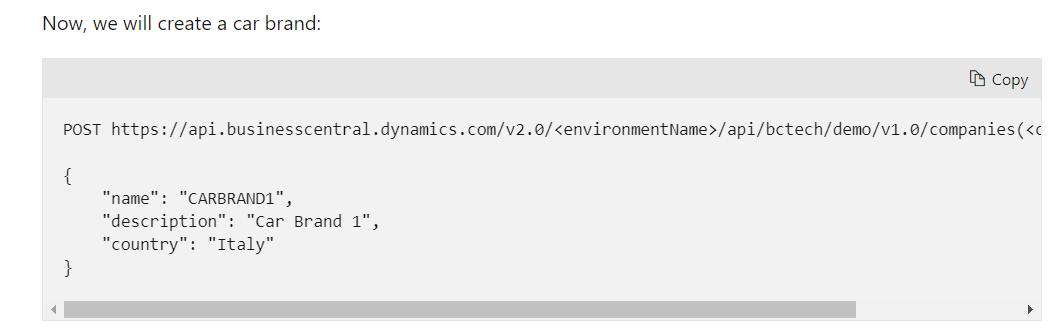
I have created two tables Car Model and Car Brand and for these two tables i have create pages of API type respectively, now i am stuck how to POST and GET data through API call? 

i try it using postman where repeatedly asking for username and password. 
 api-post.PNG

Where to write this snip of code and where to find environment name and company Id ??

I have the same question (0)
  • Suggested answer
    Bilal Haider Profile Picture
    414 on at

    Hi,

    If your version of Dynamics BC is SaaS then basic auth will not work and you cannot access API using username and password.

    You need to follow the link to use OAuth to authenticate

    docs.microsoft.com/.../authenticate-web-services-using-oauth

  • baltistan115 Profile Picture
    60 on at

    Thanks for you help.

    okay i will check that but can you tell me after creating API type pages from where post given in above sereen shot

  • Suggested answer
    Bilal Haider Profile Picture
    414 on at

    As I wrote in other answer, you can use Postman or SoapUI or any other software that an consume webservice or API.

    If you are a developer in C# you can create a small application to consume the API.

  • Suggested answer
    Suresh Kulla Profile Picture
    50,243 Super User 2025 Season 2 on at

    You can still use Basic Authentication for API, you don't need OAuth but basic will be deprecated in 2022.  You need to select in the Authorization tab as Basic and enter the username and web service access key as the password.

  • baltistan115 Profile Picture
    60 on at

    To post below data

    3731.api-post.PNG

    Below are my Postman Screen shot

    post with Environment name "test" and Company Id as given in URL

    7180.p1.png

    and post Body with below data

    7652.p2.png

    and my vs code screenshot are

    4812.p3.png

    0172.p4.png

    I used Basic authentication with user name given in user and web service key as password.

    but still get unauthorized status.

    6787.p5.png

  • Suggested answer
    Suresh Kulla Profile Picture
    50,243 Super User 2025 Season 2 on at

    Username and password is case sensitive so make sure you enter them as they are in BC. Can you see all your custom API ?

  • baltistan115 Profile Picture
    60 on at

    https://docs.microsoft.com/en-us/dynamics365/business-central/dev-itpro/developer/devenv-develop-custom-api

    I just followed the above documentation and create those custom API in documentation.

    I just copy paste user name and password (Web Services Access Key) 

    Still getting unauthorized error ?

Under review

Thank you for your reply! To ensure a great experience for everyone, your content is awaiting approval by our Community Managers. Please check back later.

Helpful resources

Quick Links

Responsible AI policies

As AI tools become more common, we’re introducing a Responsible AI Use…

Neeraj Kumar – Community Spotlight

We are honored to recognize Neeraj Kumar as our Community Spotlight honoree for…

Leaderboard > Small and medium business | Business Central, NAV, RMS

#1
OussamaSabbouh Profile Picture

OussamaSabbouh 2,785

#2
Jainam M. Kothari Profile Picture

Jainam M. Kothari 1,007 Super User 2025 Season 2

#3
YUN ZHU Profile Picture

YUN ZHU 948 Super User 2025 Season 2

Last 30 days Overall leaderboard

Featured topics

Product updates

Dynamics 365 release plans



