web
You’re offline. This is a read only version of the page.
close
Skip to main content

Notifications

Announcements

No record found.

Community site session details

Community site session details

Session Id :
Small and medium business | Business Central, N...
Answered

How to show inventory from only 1 location on Role Centre Chart 'My Items'

(0) ShareShare
ReportReport
Posted on by 29

Hello everyone!

I would like to ask, how to show inventory from only 1 location on Role Centre Chart 'My Items'?

For example here the number shown is including all inventory including that which is drop shipped and will not come to the warehouse.

I would like to show only inventory in our main warehouse for those few items I am responsible for

Even better would be to slit this into three, inventory which is already here, that which is on pending purchase orders, and that which is on upcoming sales orders.

Can anyone suggest a good way to do this?
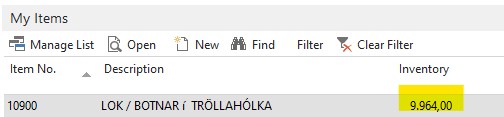
Screenshot-2022_2D00_05_2D00_31-143808.jpg

I have the same question (0)
  • Verified answer
    Community Member Profile Picture
    on at

    Hi,

    For showing Inventory for specific location add Flow Filter in My Item table, and through setup pickup a user location and then filter your inventory.

    If you want to show inventory for multiple location then create a separate table with flow filters for different locations, create a ListPart page and attach it to the respective Role Center.

    2nd point is little trickier and lengthy to do but in long run it will pay off

    Thanks,

    Anwar Shaikh

  • Lovisa LH Profile Picture
    29 on at

    Thank you, this is nearly what I have figured out actually. I made a separate chart, and attached it t Role Center.

    Now I want to have more than one item showing on the chart; do you have any advice on this?

    Screenshot-2022_2D00_05_2D00_31-152939.jpg

    Screenshot-2022_2D00_05_2D00_31-153102.jpg

  • Verified answer
    Community Member Profile Picture
    on at

    Try entering the filter value like

    Filter Field Name = "No."

    Filter Value = 10380|10376  (You can define range too).

    Thanks

    Anwar Shaikh

  • Suggested answer
    Lovisa LH Profile Picture
    29 on at

    Thank you Anwar! Such a simple step I was missing

    Appreciate your input

  • Community Member Profile Picture
    on at

    I am glad, I was able to help you.

    Thanks,

    Anwar Shaikh

Under review

Thank you for your reply! To ensure a great experience for everyone, your content is awaiting approval by our Community Managers. Please check back later.

Helpful resources

Quick Links

Responsible AI policies

As AI tools become more common, we’re introducing a Responsible AI Use…

Neeraj Kumar – Community Spotlight

We are honored to recognize Neeraj Kumar as our Community Spotlight honoree for…

Leaderboard > Small and medium business | Business Central, NAV, RMS

#1
OussamaSabbouh Profile Picture

OussamaSabbouh 2,917

#2
Jainam M. Kothari Profile Picture

Jainam M. Kothari 1,161 Super User 2025 Season 2

#3
YUN ZHU Profile Picture

YUN ZHU 1,025 Super User 2025 Season 2

Last 30 days Overall leaderboard

Featured topics

Product updates

Dynamics 365 release plans



