web
You’re offline. This is a read only version of the page.
close
Skip to main content

Notifications

Announcements

No record found.

Community site session details

Community site session details

Session Id :
Microsoft Dynamics AX (Archived)

Extract Customer invoices on PDF Format

(0) ShareShare
ReportReport
Posted on by 336

Hi All, 

I need a job to extract all Customer invoices, get them on PDF format, 

When i click Preview/Print, it's crash after 150 PDFs

Is there any way to extract all Customer invoices on PDF format, and get them saved on System Folder.
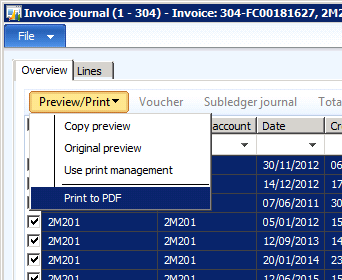
PDFInvoices.png

I've tried the following code, but it's not working.

I need each Customer invoice in separated folder , AND  the name of the invoice  = name of PDF File

static void Invoices2PDF(Args _args)
{
    CustInvoiceJour custInvoiceJour;
    SalesInvoiceJournalPrint salesInvoiceJournalPrint;
    Set set = new Set(Types::Record);
    SRSPrintDestinationSettings srsPrintDestinationSettings;
    while select custInvoiceJour
        where custInvoiceJour.dataAreaId == "303"
    {
        // Add record
         set.add(CustInvoiceJour::findRecId(custInvoiceJour.recId));

        // Set printer settings
        srsPrintDestinationSettings = new SRSPrintDestinationSettings();
        srsPrintDestinationSettings.fileFormat(SRSReportFileFormat::PDF);
        srsPrintDestinationSettings.fileName(strFmt(@'C:\temp\301\%1',custInvoiceJour.InvoiceId,".pdf"));
        //filename =strfmt('C:\\Temp\\Invoices\\%1%2',_custInvoiceJour.InvoiceId,".pdf");
        srsPrintDestinationSettings.printMediumType(SRSPrintMediumType::File);
        srsPrintDestinationSettings.numberOfCopies(1);
        srsPrintDestinationSettings.overwriteFile(true);
        // Initalize
        salesInvoiceJournalPrint = SalesInvoiceJournalPrint::construct();
        salesInvoiceJournalPrint.parmPrintFormletter(NoYes::Yes);
        salesInvoiceJournalPrint.parmUsePrintManagement(false);
        salesInvoiceJournalPrint.parmPrinterSettingsFormLetter(srsPrintDestinationSettings.pack());
        // Print
        salesInvoiceJournalPrint.printJournal(set);
        info(strFmt("Well saved on folder"));
    }
}

*This post is locked for comments

I have the same question (0)
  • Suggested answer
    Mea_ Profile Picture
    60,284 on at

    You should create Set inside of the loop, otherwise first iteration prints 1 report, second prints 2 : current and previous one, third iteration print 3 and so on. Maybe that's the reason ? 

  • AdnDalhi Profile Picture
    336 on at

    Can you please help with an example :)

    Thanks Ievgen :)

  • Mea_ Profile Picture
    60,284 on at

    Move "set = new Set(Types::Record);" inside of the loop and it should help.

  • AdnDalhi Profile Picture
    336 on at

    Hi Ievgen,

    Thanks for your reply appreciate,

    it's worked for one company and get the results on C\temp file, 

    Here i have 3 quick questions.

    1. Which field i can use to filter on cust invoices dates, ( i need to pull only Customer invoices from (31st July 2018) to (9th September 2019).
    2. Result of my extraction are all "Credit Note" see capture below, they are not invoices, which table i sould use in my query to get Invoices and not credit notes , is that Normal? 
    3. How can i add Company Logo in my code ? 
    4. When i execute my Job, each time AX crash and try to open PDF viewer for each Customer invoice, is there anyway in code to ignore this view 
    5.  custInvoice.PNG
    6. When i check the C\temp file, i got my files like this ( i would like to have 1 Pdf per Customer) , also i can't understand the file type extension (.HZK file / .QKD file) and sometimes folder with strange name generated.
    7. I get the result like this, and not One single PDF file per Invoice, 
    8. custInvoice2.PNG
    9. custInvoice1.PNG

    Thanks id advance for your reply :)

Under review

Thank you for your reply! To ensure a great experience for everyone, your content is awaiting approval by our Community Managers. Please check back later.

Helpful resources

Quick Links

Responsible AI policies

As AI tools become more common, we’re introducing a Responsible AI Use…

Neeraj Kumar – Community Spotlight

We are honored to recognize Neeraj Kumar as our Community Spotlight honoree for…

Leaderboard > 🔒一 Microsoft Dynamics AX (Archived)

#1
Martin Dráb Profile Picture

Martin Dráb 4 Most Valuable Professional

#1
Priya_K Profile Picture

Priya_K 4

#3
MyDynamicsNAV Profile Picture

MyDynamicsNAV 2

Last 30 days Overall leaderboard

Featured topics

Product updates

Dynamics 365 release plans



