web
You’re offline. This is a read only version of the page.
close
Skip to main content

Notifications

Announcements

No record found.

Community site session details

Community site session details

Session Id :
Microsoft Dynamics AX (Archived)

Filtering grid with outer join datasources fields

(0) ShareShare
ReportReport
Posted on by 10,796 User Group Leader

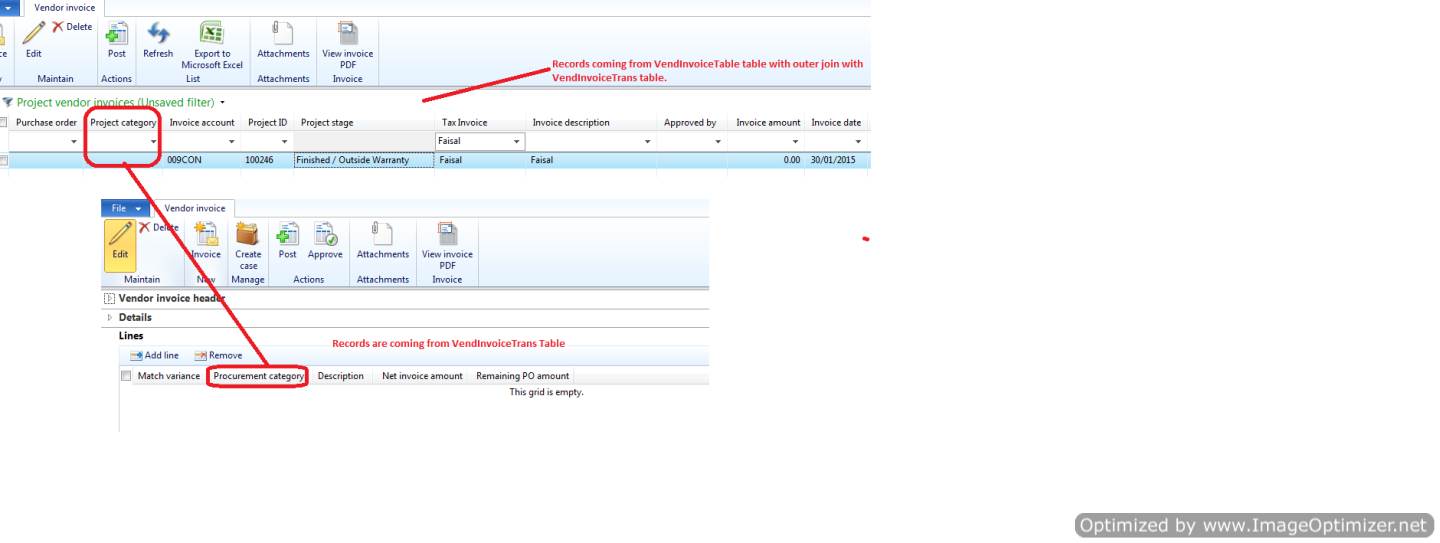
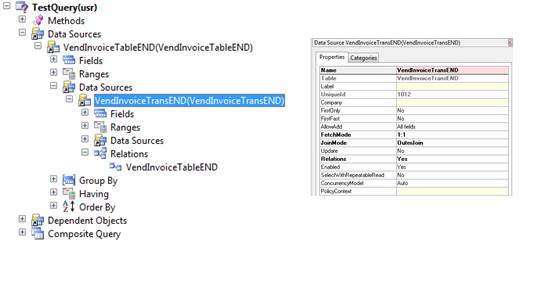
Created a new list page with two datasources VendInvoiceTable and VendInvoiceTrans by using a query with outer join between them.
2_2D00_Optimized.png

I added few fields from invoice lines table on grid as I want filter on lines fields. It does not work with “Blank” values in invoice lines table. As shown in first figure there is no record in Vendor Invoice lines grid which means “Blank”. Once I add a record in it even with no data just create a line it start showing with on list page by putting " " as filter.

Have anyone came across this issue with outer join or has any other way to implement it please do let me know. 

*This post is locked for comments

I have the same question (0)
  • Suggested answer
    Community Member Profile Picture
    on at

    As per my understanding this the by default behaviour of outer join

    as per outer join it show all record even though there is no related record in second table.

    in such case, it gets 0 for an integer and a zero length string for a string type field from second table in place of Blank

    so i suggest if you try to filter value specifying ""

    Please verify and update us if this helps you.

  • Suggested answer
    Community Member Profile Picture
    on at

    Please refer following link for more details

    msdn.microsoft.com/.../gg845763.aspx

    Please verify and update us if this helps you

  • Suggested answer
    Community Member Profile Picture
    on at

    What exactly is your requirement? When you are displaying outer joined *Table and *Trans data you will not only see *Table records without a related *Trans record, but you will also see the *Table record more than once, if there is more than one related *Trans record.

    I think you have to specify what you want to see from the *Trans table and then use a display method (or view if it's more field or complex select statements). I assume you want to see each *Table record only once, but then displaying *Trans data makes no sense, because basically each *Trans record can have a different project category. So you have to specifiy which project category of which *Trans record you want to see.

    A display Method could look like this:

    select maxof(projectCategory) from *Trans

    where *Trans.id == *Table.id;

    return *Trans.ProjectCategory;

  • Verified answer
    Faisal Fareed Profile Picture
    10,796 User Group Leader on at

    Hi Jens,

    Thanks for your input. Yes I know if I will add *trans datasource on table with outer join on a form and use fields from *trans table, there will be more than one related records. This was actually required by a client to see all in one list page (I know form's performance will be quite slow).

    Due to above mentioned reason I used outer join as client wanted to see all lines along with master records. There was a case when there is no line against master record (no transactions), list page will still show master (*Table) records with blank values for *Trans table column.

    Let me walk through the example to explain in more details, although It made sense to me and I have explained to my client and they are fine with it.

    Please have a look here.

    3252.Untitled.png 

    If I put "" or " " in Project Category field on list page to filter records it does not show any record as there is no line *trans table (as shown in Lines grid). Please be advised that the value for Project Category (Procurement category) is NULL as there is no record. However, this record will still show on list page grid due to outer join.

    Now I have added a record in *trans table (lines grid) and this time value for project category is "" or " " not NULL value. If I put "" or " " into Project category field records will get filtered in list page.

  • Faisal Fareed Profile Picture
    10,796 User Group Leader on at

    Thanks Nitesh for your response but there is a difference in "" and Blank values. Please have a look on my response below and do let me know if it makes sense to you?

  • Community Member Profile Picture
    on at

    Hi Faisal,

    I am not able to get your response,

    Appreciated if you please let me know if my suggestion helped you get your solution or not.

  • Faisal Fareed Profile Picture
    10,796 User Group Leader on at

    Hi Nitesh, Please have a look on my response I addressed to Jens which is quite explainatory. If you don't get any point please do let me know I would be more than happy to clear any confusion.

  • Community Member Profile Picture
    on at

    As I can read your post,

    you were able to solve your issue by using  "" in place of  " "  to filter the outer join record

    If so, then This is what I suggested you in my first post to this issue...

    Or otherwise please explain your solution...

  • Faisal Fareed Profile Picture
    10,796 User Group Leader on at

    I just updated my answer so please read it again.

    "" OR " " did not work otherwise I will mark your answer verified.

Under review

Thank you for your reply! To ensure a great experience for everyone, your content is awaiting approval by our Community Managers. Please check back later.

Helpful resources

Quick Links

Responsible AI policies

As AI tools become more common, we’re introducing a Responsible AI Use…

Neeraj Kumar – Community Spotlight

We are honored to recognize Neeraj Kumar as our Community Spotlight honoree for…

Leaderboard > 🔒一 Microsoft Dynamics AX (Archived)

#1
Martin Dráb Profile Picture

Martin Dráb 4 Most Valuable Professional

#1
Priya_K Profile Picture

Priya_K 4

#3
MyDynamicsNAV Profile Picture

MyDynamicsNAV 2

Last 30 days Overall leaderboard

Featured topics

Product updates

Dynamics 365 release plans
