web
You’re offline. This is a read only version of the page.
close
Skip to main content

Notifications

Announcements

No record found.

Community site session details

Community site session details

Session Id :
Finance | Project Operations, Human Resources, ...
Unanswered

Project does not allow for invoice proposals to be created for Fixed Price Project

(1) ShareShare
ReportReport
Posted on by 7

Hello Friends,

I am new to PMA module setup and managed to complete setup.

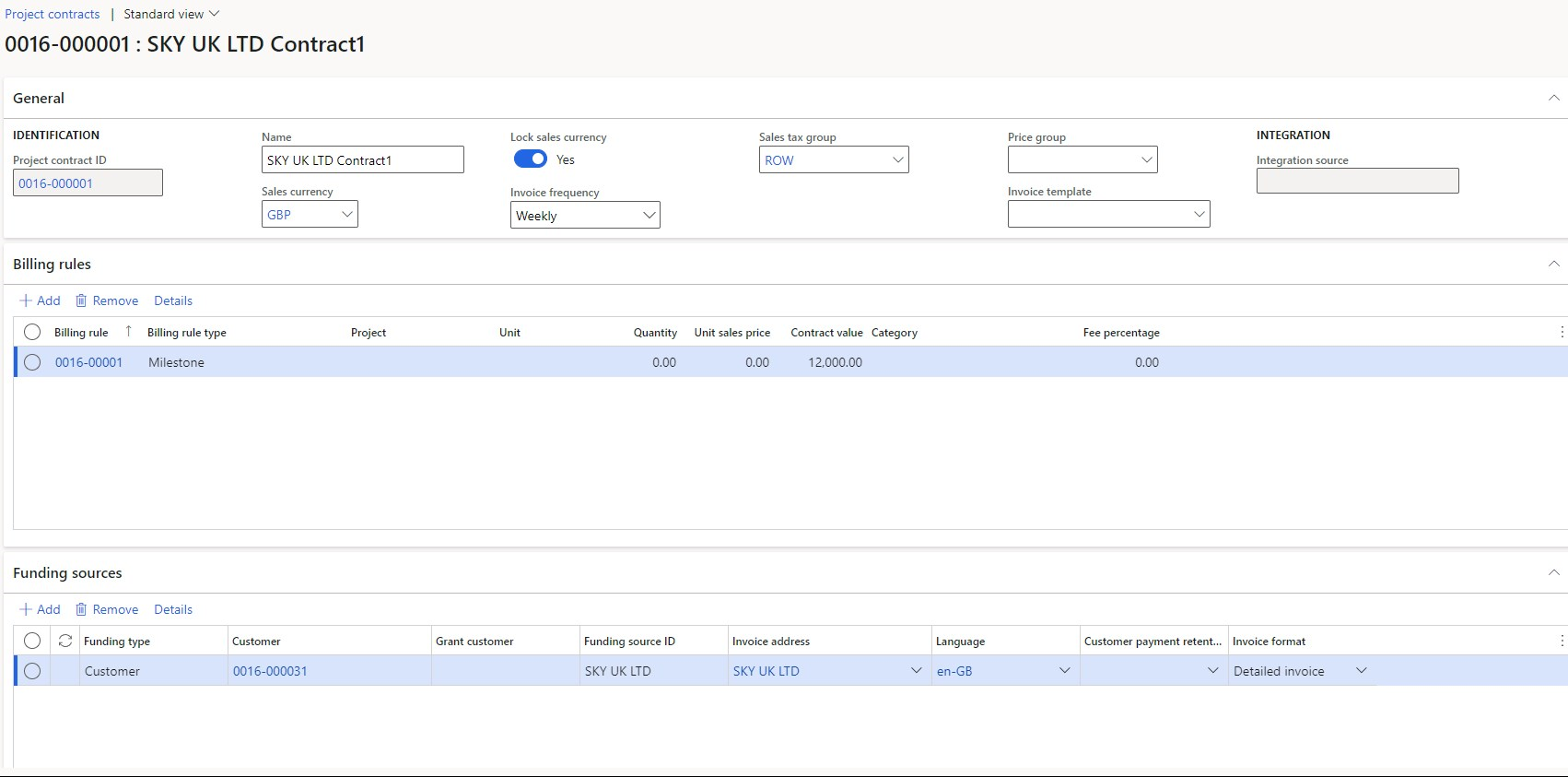
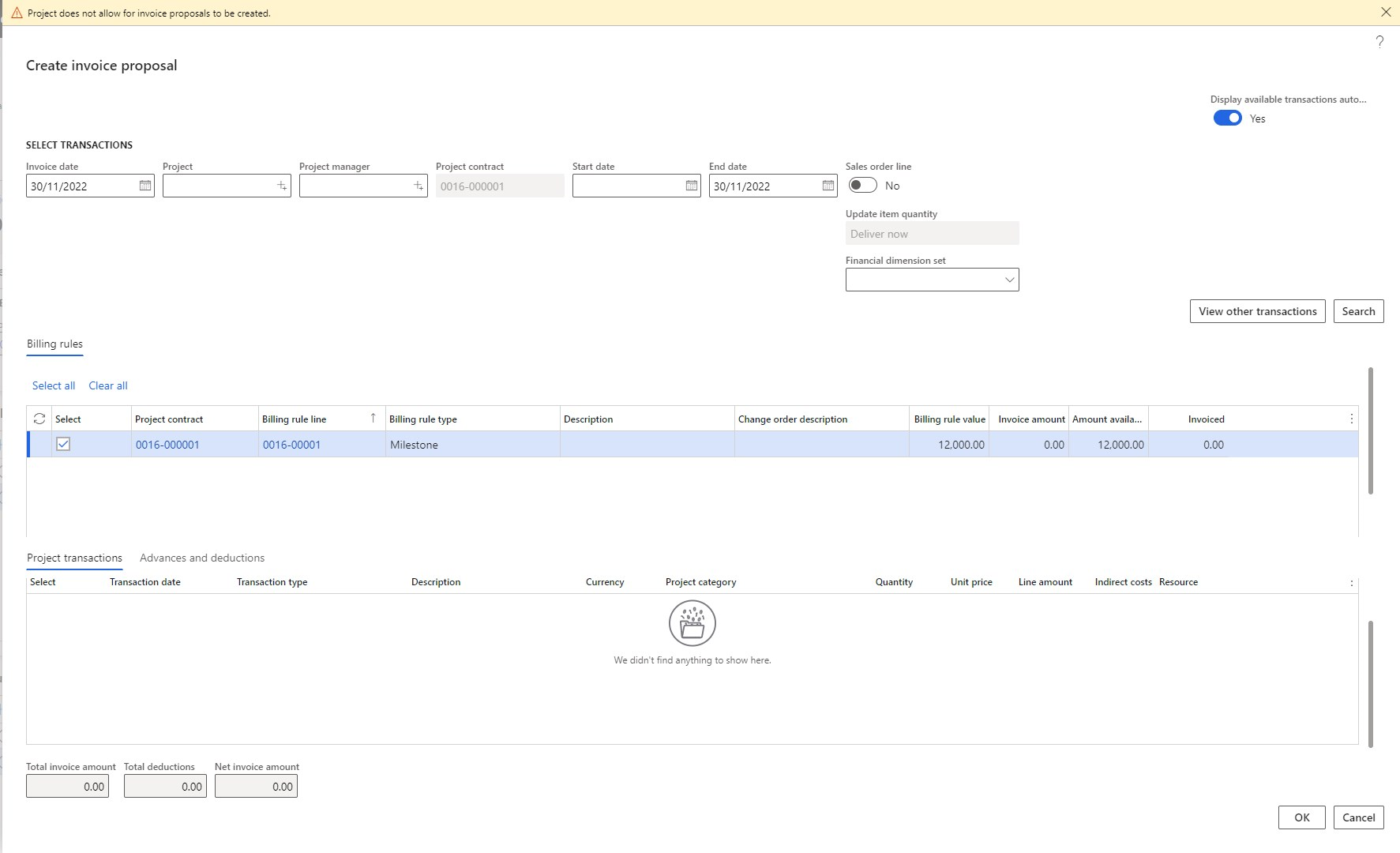
Created new contract and project and added billing rule on contract, also it appears on On account transactions. When I am trying create invoice proposal getting the error as "Project does not allow for invoice proposals to be created"

Could you pls check and advise if I am missing any setup in order to generate invoice?

Project Contract: 
pastedimage1669788415394v2.png

On Account Transactions:

pastedimage1669788484651v3.png

Generate Invoice proposal: Error message "Project does not allow for invoice proposals to be created" 
pastedimage1669788374949v1.png

I have the same question (0)
  • saurabh bharti Profile Picture
    15,039 Moderator on at

    Hi,

    Can you please check project stage setup 

    pastedimage1670234138209v1.png

  • Lingamurthi Parise Profile Picture
    7 on at

    Hi Saurabh,

    Thanks for quick reply.

    The project stage rules are already set as advised, however still not allowed to generate invoice.

    Could you check if I am missing any other parameter.

    pastedimage1670379301396v2.png

  • saurabh bharti Profile Picture
    15,039 Moderator on at

    Hi,

    This looks fine if project is in In progress it should allow you. May be try to create another project

  • Zuk Profile Picture
    61 on at

    Hi All,

    same error for a fixed price project with billing rules, Lingamurthi Parise did you understand how to solve this?

    best regards

  • mauro grillli Profile Picture
    12 on at

    was this solved? I am facing the same issue

  • mauro grillli Profile Picture
    12 on at

    I solved making two steps:

    1) mark the milestones as completed in the contract

    2) filling the START DATE in the invoce proposal form.

    Hope this help

  • GGR_AVC Profile Picture
    14 on at

    I agree with @maurogrillli steps.

    1) mark the milestones as completed in the contract

    2) filling the START DATE in the invoce proposal form.

    But, your situation may require additional steps.  In my situation, the problem was resolved when I filled in additional information on the form for "Create invoice proposal"

    I put in data for all of the following and it started to work.

    1) Project

    2) Project contract

    3) Start date (may want to avoid future dates)

    4) Financial dimension set

    5) Sales order line (set toggle to Yes - even if there's no sales order involved)

    FYI, it's a good sign if you select the Search button and data populates for both "Billing rules" and "Project transactions".  Be sure to select both.

Under review

Thank you for your reply! To ensure a great experience for everyone, your content is awaiting approval by our Community Managers. Please check back later.

Helpful resources

Quick Links

Responsible AI policies

As AI tools become more common, we’re introducing a Responsible AI Use…

Neeraj Kumar – Community Spotlight

We are honored to recognize Neeraj Kumar as our Community Spotlight honoree for…

Leaderboard > Finance | Project Operations, Human Resources, AX, GP, SL

#1
Martin Dráb Profile Picture

Martin Dráb 584 Most Valuable Professional

#2
André Arnaud de Calavon Profile Picture

André Arnaud de Cal... 499 Super User 2025 Season 2

#3
Sohaib Cheema Profile Picture

Sohaib Cheema 254 User Group Leader

Last 30 days Overall leaderboard

Product updates

Dynamics 365 release plans



