web
You’re offline. This is a read only version of the page.
close
Skip to main content

Notifications

Announcements

No record found.

Community site session details

Community site session details

Session Id :
Microsoft Dynamics AX (Archived)

Startup object property in D3FO

(0) ShareShare
ReportReport
Posted on by 30

Dear  all,

Can you please let me know when we are creating a object in VS. For example :

I am creating a new Table and saw the property it's showing default Startup Object = "Class"
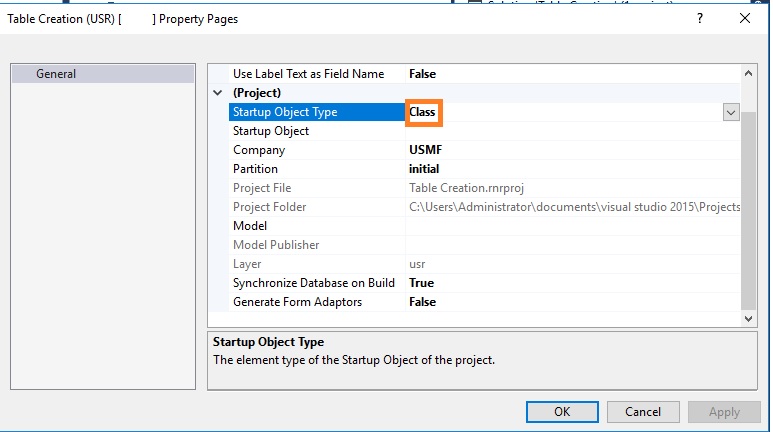
object.jpg

Can you please let me know what i need to select Startup Object for

Table, Form, Base Enum, EDT, Class etc...

Please give me more shed on this.

Thanks!

*This post is locked for comments

I have the same question (0)
  • Verified answer
    Chaitanya Golla Profile Picture
    17,225 on at

    Hi,

    Startup Object type will be used to specify the object when project is run.So, lookup contains Form, Class or menuItems where Form refers for UI, Class for any businesslogic and menuItems for Forms, Classes and reports. You cannot have tables, EDT, enums as startup object type.

  • @rp@n Profile Picture
    30 on at

    Thanks Chaitaya,

    So, for Table,EDT and Base enum what need to select Startup type?

    Because we can't make it as blank.

    Please give me more shed on this.

    Thanks!

  • Verified answer
    Chaitanya Golla Profile Picture
    17,225 on at

    Hi,

    Why you want to set Table, EDT and base enum for startup type. startup object type and startup object are used when you want to run and debug your project.If you want to test any table you can create a runnable class, include your code accessing table and test it.

    Refer below link to know about startup object:

    (Build and debug a project)

    docs.microsoft.com/.../build-debug-project

  • @rp@n Profile Picture
    30 on at

    I am creating a new Table in VS. and added some data in to that table.

    Now i am write a runnable class to test it.

    In AOT it's showing the table but in code "Runnable class" Table not populate. Why ??

    Please give me more shed on this.

    Thanks!

  • Verified answer
    Chaitanya Golla Profile Picture
    17,225 on at

    Hi,

    Runnable class serves the purpose of a job in AX2012. You can have to include your code/business logic to test the table data here.

    Refer below link which outlined the steps:

    (Runnable classes and table browser in Dynamics Ax (Dynamics AX 7).)

    community.dynamics.com/.../runnable-classes-and-table-browser-in-dynamics-ax-dynamics-ax-7

  • @rp@n Profile Picture
    30 on at

    I refer the above link. It's inserted data in to table through Runnable Class (Job) via code. Later browse the table.

    But i created a record in Table directly not through code. And now i tested through Runnable class the table.

    Then whats a wrong ???

    Please give me more shed ion this.

    Thanks!

  • Verified answer
    Chaitanya Golla Profile Picture
    17,225 on at

    Hi,

    There is no problem/wrong with your approach and I am also mentioning the same that you can validate your table data/business logic through runnable class by setting required class as startup object.

  • @rp@n Profile Picture
    30 on at

    Yeah , Got it thanks Chaitanya

    Now it's work

Under review

Thank you for your reply! To ensure a great experience for everyone, your content is awaiting approval by our Community Managers. Please check back later.

Helpful resources

Quick Links

Responsible AI policies

As AI tools become more common, we’re introducing a Responsible AI Use…

Neeraj Kumar – Community Spotlight

We are honored to recognize Neeraj Kumar as our Community Spotlight honoree for…

Leaderboard > 🔒一 Microsoft Dynamics AX (Archived)

#1
Martin Dráb Profile Picture

Martin Dráb 4 Most Valuable Professional

#1
Priya_K Profile Picture

Priya_K 4

#3
MyDynamicsNAV Profile Picture

MyDynamicsNAV 2

Last 30 days Overall leaderboard

Featured topics

Product updates

Dynamics 365 release plans



