web
You’re offline. This is a read only version of the page.
close
Skip to main content

Announcements

No record found.

News and Announcements icon
Community site session details

Community site session details

Session Id :
Customer experience | Sales, Customer Insights,...
Suggested Answer

Regarding Lead Table : to auto update lookup field "Parent Account for lead" & "Parent contact for lead"

(1) ShareShare
ReportReport
Posted on by 71

Hello All,

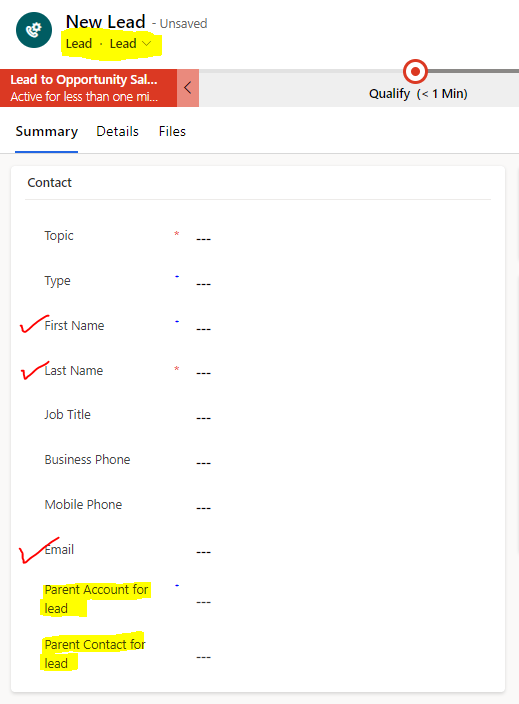
We use lead table and most of our leads are coming from existing accounts and contacts. We want to create a workflow/flow on lead table to auto populate/update lookup field "Parent Account for lead" &  "Parent contact for lead".

Condition : if the fist name ,last name , email id capture on lead form matches to existing contact then the  "Parent contact for lead" & "Parent Account for lead" should be updated with right records instead of user searching in those 2 lookup fields. 

Trigger : when new lead record is created OR  fist name ,last name , email id fields are updated.
pastedimage1683303948515v1.png

Do share SOP/Steps to achieve above requirement.

Thank you in advance

I have the same question (0)
  • Haig Liu Profile Picture
    Microsoft Employee on at

    Hi ekmode8483,

    You may need to use Dataverse search:

    https://learn.microsoft.com/en-us/power-automate/dataverse/search

    However, I think it would be better to use JS to edit the Onchange event.

  • Kamil Racki Profile Picture
    5 on at

    I think the best way to achieve this:

    1. create plugin on update, create step

    2. find contact based on first name ,last name , email id

    3. add this contact to target

    4. Register plugin

    Other way is to create flow, but creating flow for that simple logic is not good solution for me because after while you will have army of that flows.

  • ekmode8483 Profile Picture
    71 on at

    Hi

    Thank you for your reply.

    I am not expert in plugin, can you share a sample if any or link.

    Thank you

  • ekmode8483 Profile Picture
    71 on at

    Hi

    Thank you for your reply.

    I am not very familiar  with JS to make changes but will explore Dataverse, if you a sample for JS to achieve something similar can you share.

    Thank you

  • dynamikes365 Profile Picture
    69 on at

    An alternate approach that accomplishes almost all of this, but which requires no coding, is to put Lead and Opportunity sub-grids on the Account and Contact forms (or use the Related records tab). Then simply train your users to create new leads and opportunities from the respective regarding account or contact. This auto-populates most of the data you are looking for automatically.

  • Suggested answer
    Mohamed GRAIB Profile Picture
    2,504 Moderator on at

    Hi ekmode8483,

    If you don't need that the field will be filled in real time,

    You can use Power automate for your need.

    Reagrds,

  • Haig Liu Profile Picture
    Microsoft Employee on at

    Hi ekmode8483,

    Mike is right, an OOB approach without the use of JS and plugins is:

    1.Open an account or contact

    2.Click on Related -> select leads

    3.Create a new lead and the fields will be pre-populated.

    Regarding JS, I am not a professional developer,

    so this may take some time to find and modify.

Under review

Thank you for your reply! To ensure a great experience for everyone, your content is awaiting approval by our Community Managers. Please check back later.

Helpful resources

Quick Links

Introducing the 2026 Season 1 community Super Users

Congratulations to our 2026 Super Stars!

Meet the Microsoft Dynamics 365 Contact Center Champions

We are thrilled to have these Champions in our Community!

Congratulations to the March Top 10 Community Leaders

These are the community rock stars!

Leaderboard > Customer experience | Sales, Customer Insights, CRM

#1
11manish Profile Picture

11manish 170

#2
ManoVerse Profile Picture

ManoVerse 144 Super User 2026 Season 1

#3
Jimmy Passeti Profile Picture

Jimmy Passeti 59 Most Valuable Professional

Last 30 days Overall leaderboard

Product updates

Dynamics 365 release plans
