web
You’re offline. This is a read only version of the page.
close
Skip to main content

Notifications

Announcements

No record found.

Community site session details

Community site session details

Session Id :
Supply chain | Supply Chain Management, Commerce
Suggested Answer

Need to understand inventory transactions.

(0) ShareShare
ReportReport
Posted on by 84

Hi All,

If anyone can explain me how inventory transactions are split when there a quality order is created.
Scenario is such that the PO has quantity of 5 and I am creating quality order of 3 quantity so what I have seen till now is it is splitting inventory transactions like one transactions for 2 quantity and another for 3 quantity. I want to understand logic behind this split. Please note there is no customization done till now.

I am debugging code to understand this better, but if someone can explain this in an simple way it will be helpful.

Environment details : D365 F&O PU 31. 

Thank you in Advance.

I have the same question (0)
  • Suggested answer
    John Ray Patajo Profile Picture
    837 on at

    It will look like you have partial receiving of the items. Try doing the QA in full or quantity in 5?

  • MATTGUO Profile Picture
    22,349 Moderator on at

    Hi Shailee,

    Do not know the logic, but this could be controlled by the Full blocking parameter in item sampling. That distinguishes between blocked and unblocked quantities.

  • Suggested answer
    Rahul Mohta Profile Picture
    21,032 on at

    sometimes to keep blocking qty seperate from the main qty

  • André Arnaud de Calavon Profile Picture
    301,020 Super User 2025 Season 2 on at

    Hi Shailee,

    What is the exact background of your question? This is standard logic. Whenever there is another date, movement or some other trigger which could have impact on physical or financial updates, the transactions will be split. More simply: If you received 5 pieces, but get an invoice separately for 3 and 2 pieces, it will be split to have a financial date and voucher per transaction for traceability.

  • Suggested answer
    Rahul Mohta Profile Picture
    21,032 on at

    suggest if our response helped

    as Andre and others mentioned, any invent trans update could trigger a split to keep tracking

  • Shailee Shah Profile Picture
    84 on at

    Hi John Ray Patajo,

    Yes I am trying to create quality order partial. For full it works as expected.

  • Shailee Shah Profile Picture
    84 on at

    Hi Mattguo,

    You are right and this the reason why in Item sampling I do not have that parameter enabled. I have selected per quantity.

  • Shailee Shah Profile Picture
    84 on at

    Hi Rahul,

    That's what I am trying to find out.

  • Shailee Shah Profile Picture
    84 on at

    Hi Andre,

    The scenario here is that I am trying to do quality order pass partially. Like you have mentioned about Invoice. So what I am trying to understand is that in my Item sampling I have kept full blocking parameter value set to no and per quantity value set to yes.

    Now when even I try to manually create quality order for purchase order having quantity value of 5 I have option to change quantity value and and thus I am creating one quality order with quantity 3 and another one with quantity 2.

    In this scenario as per my understanding I should have inventory transactions like below which is not coming.

    1) PO -> Receipt Status -> Received -> Quantity 3

    2) PO -> Receipt Status -> Received -> Quantity 2

    3) Inventory Blocking -> Receipt Status -> Ordered -> Quantity 3

    4) Inventory Blocking -> Receipt Status -> Ordered ->Quantity 2

    For example lets say that the PO is created from SO then

    5) SO -> Issue Status -> Reserved Physical -> Quantity -3

    6) SO -> Issue Status -> Reserved Physical -> Quantity -2

    7) Inventory Blocking -> Issue Status -> Reserved Physical -> Quantity -3

    8) Inventory Blocking -> Issue Status -> Reserved Physical -> Quantity -2

    In the system I am splitting quantity 5 in to 4 and 1 and here is what I can see at inventory transactions level.
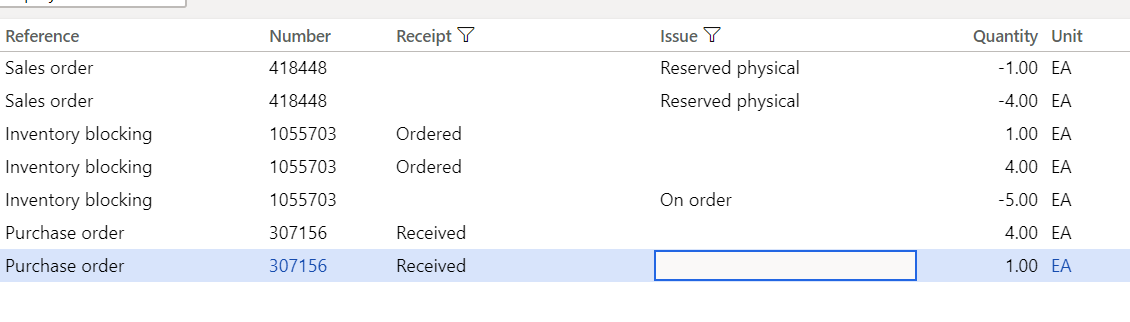
    InventTrans.png

  • Shailee Shah Profile Picture
    84 on at

    Rahul,

    Right, even in the inventory blocking when any quantity is reduce split is triggered.

Under review

Thank you for your reply! To ensure a great experience for everyone, your content is awaiting approval by our Community Managers. Please check back later.

Helpful resources

Quick Links

Responsible AI policies

As AI tools become more common, we’re introducing a Responsible AI Use…

Neeraj Kumar – Community Spotlight

We are honored to recognize Neeraj Kumar as our Community Spotlight honoree for…

Leaderboard > Supply chain | Supply Chain Management, Commerce

#1
Laurens vd Tang Profile Picture

Laurens vd Tang 271 Super User 2025 Season 2

#2
Siv Sagar Profile Picture

Siv Sagar 171 Super User 2025 Season 2

#3
André Arnaud de Calavon Profile Picture

André Arnaud de Cal... 130 Super User 2025 Season 2

Last 30 days Overall leaderboard

Featured topics

Product updates

Dynamics 365 release plans



