web
You’re offline. This is a read only version of the page.
close
Skip to main content

Notifications

Announcements

No record found.

Community site session details

Community site session details

Session Id :
Customer experience | Sales, Customer Insights,...
Answered

Removing Contacts with Undeliverable Email Address

(0) ShareShare
ReportReport
Posted on by 455

We just executed our first successful Email campaign out of Marketing Dynamics!  There are a number of undeliverable messages.  Is there any automated way to remove contacts who have invalid mailboxes?  

Thanks,

Tony 

I have the same question (0)
  • Suggested answer
    d_radulova Profile Picture
    2 User Group Leader on at

    Hi Tony,

    Did you knkw,that if you have received a hard bounce for a contact with a particular email address, the out of the box functionality is that the system  will not send any emails to that address for the next 6 months. It's to help with maininting your good spam domain score.

    Thanks, 

    -DD 

  • d_radulova Profile Picture
    2 User Group Leader on at

    Forgot to say, good job on the successful marketing campaign! I'm sure it will be the first out of many.

  • Verified answer
    cloflyMao Profile Picture
    25,210 on at

    Hi Anthony,

    That would be based on what these invalid mailboxes look like, for example:

    User 1 to 3 all have invalid mailbox.
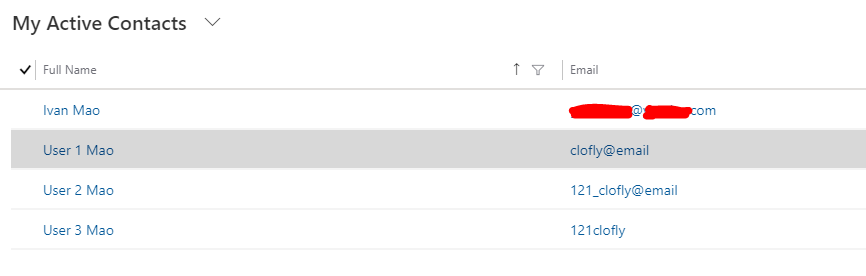
    pastedimage1576649494801v1.png

    -> A quick way to bulk remove these contacts is that building an on-demand workflow to clear email field and filter out contacts who have invalid mailbox with advanced find,

    however, as what we see, we should retrieve records three times:

    1. filter out contacts whose email field doesn't contain @

    2. filter out contacts whose email field contains illegal characters '_'

    3. filter out contacts whose email field doesn't contain .com

    -> Another way is that you could build a console app, filter out contact records with invalid mailbox by regex, then do bulk delete operation.

    Example:

    Retrieve contacts who have invalid mailbox and are owned by myself.
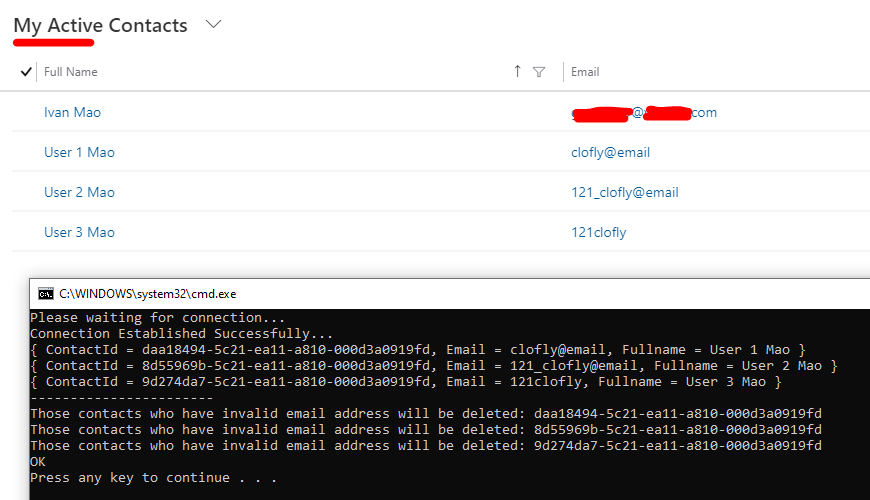
    pastedimage1576650039525v2.png

    using ConnectionCRM;
    using Microsoft.Crm.Sdk.Messages;
    using Microsoft.Xrm.Sdk;
    using Microsoft.Xrm.Sdk.Client;
    using Microsoft.Xrm.Sdk.Messages;
    using Microsoft.Xrm.Sdk.Metadata;
    using Microsoft.Xrm.Sdk.Query;
    using System;
    using System.Configuration;
    using System.Diagnostics;
    using System.Net;
    using System.Security.Cryptography;
    using System.ServiceModel;
    using System.ServiceModel.Description;
    using System.Linq;
    using System.Globalization;
    using System.Text;
    using System.Text.RegularExpressions;
    using System.Collections.Generic;
    
    namespace ConnectionForD365
    {
        class Program
        {
    
            static void Main(string[] args)
            {
    
                connectToCRMByOrg();
    
            }
    
            public static void connectToCRMByOrg()
            {
                IOrganizationService organizationService = null;
    
                try
                {
                    String username = "your or admin user email";
                    String password = "password";
                    String organizationUrl = "https://orgURL/XRMServices/2011/Organization.svc";               
                    ClientCredentials clientCredentials = new ClientCredentials();
                    clientCredentials.UserName.UserName = username;
                    clientCredentials.UserName.Password = password;
    
                    ServicePointManager.SecurityProtocol = SecurityProtocolType.Tls12;
    
                    Console.WriteLine("Please waiting for connection...");
                    organizationService = (IOrganizationService)new OrganizationServiceProxy(new Uri(organizationUrl),
                   
                     null, clientCredentials, null);
    
                    if (organizationService != null)
                    {
                        Guid userid = ((WhoAmIResponse)organizationService.Execute(new WhoAmIRequest())).UserId;
    
                        if (userid != Guid.Empty)
                        {
                            Console.WriteLine("Connection Established Successfully...");
    
                            OrganizationServiceProxy _serviceProxy = (OrganizationServiceProxy)organizationService;
    
                            _serviceProxy.EnableProxyTypes();
    
                            var pattern = @"\A(?:[a-z0-9!#$%&'* /=?^_`{|}~-] (?:\.[a-z0-9!#$%&'* /=?^_`{|}~-] )*@(?:[a-z0-9](?:[a-z0-9-]*[a-z0-9])?\.) [a-z0-9](?:[a-z0-9-]*[a-z0-9])?)\Z";
    
                            var list1 = GetContactsByEmail(pattern, organizationService);
    
                            var list2 = GetContactIdByEmail(pattern, organizationService);
    
                            foreach (var item in list1)
                            {
                                Console.WriteLine(item);
                            }
    
                            Console.WriteLine("-----------------------");
    
                            foreach (var item in list2)
                            {
                                Console.WriteLine("Those contacts who have invalid email address will be deleted: "   item);
                                // organizationService.Delete("contact", item);
                            }
    
                            Console.WriteLine("OK");
    
                        }
                    }
                    else
                    {
                        Console.WriteLine("Failed to Established Connection!!!");
                    }
                }
                catch (Exception ex)
                {
                    Console.WriteLine("Exception caught - "   ex.Message);
                }
            }
    
            private static IEnumerable GetContactsByEmail(String email, IOrganizationService organizationService)
            {
                QueryExpression query = new QueryExpression
                {
                    EntityName = "contact",
                    ColumnSet = new ColumnSet("contactid", "fullname", "emailaddress1")
                };
                query.Criteria.AddCondition("owninguser", ConditionOperator.Equal, "userid");
                IEnumerable entities = organizationService.RetrieveMultiple(query).Entities;
    
                return entities
                  .Where(element => element.Contains("emailaddress1"))
                        .Where(element => !Regex.IsMatch((string)element["emailaddress1"], email))
                          .Select(element => new {
                              ContactId = element["contactid"],
                              Email = element["emailaddress1"],
                              Fullname = element["fullname"]
                      });
            }
    
            private static IEnumerable GetContactIdByEmail(String email, IOrganizationService organizationService)
            {
                QueryExpression query = new QueryExpression
                {
                    EntityName = "contact",
                    ColumnSet = new ColumnSet("contactid", "fullname", "emailaddress1")
                };
                query.Criteria.AddCondition("owninguser", ConditionOperator.Equal, "userid");
                IEnumerable entities = organizationService.RetrieveMultiple(query).Entities;
    
                return entities
                  .Where(element => element.Contains("emailaddress1"))
                        .Where(element => !Regex.IsMatch((string)element["emailaddress1"], email))
                              .Select(element => element.Id);
            }
    
        }
    }

    You can run it directly in your environment, just replace

    -> username,

    -> password,

    -> org URL,

    -> record owner

    with your own data.

    Once you could confirm retrieved result is what you want to remove, then uncomment

    organizationService.Delete("contact", item);

    for bulk delete.

    Regards,

    Clofly

  • AnthonyUliano Profile Picture
    455 on at

    Hi Clofly,

    Thanks for the information.  Do you know if there's a way to automatically delete contacts from a Customer Journey Email Campaign that resulted in a hard bounce?  

    When I'm looking at the Insights for a marketing email, they are labeled as either bad-mailbox or bad-domain.  I'd love to get rid of them through part of the customer journey or as a workflow, etc.  

    Any idea how to accomplish this?  

    Thanks, Tony 

  • cloflyMao Profile Picture
    25,210 on at

    Hi Anthony,

    From beginning, do labels such as bad-mailbox or bad-domain could be regarded as factor to cause a hard bounce for a contact?

    and would you like to find contacts who have EmailHardBounced interaction and remove them?

    Because I havn't contacts who have hard bounce interaction type, while there are only contacts who have simple EmailOpened type in my test.

    So please add function below into previous .cs file to test whether you can get hard bounce record data from a specific contact,

    test for both contact who has hard bounce and contact who hasn't.

    public static void retrieveContactInteractionById(IOrganizationService organizationService)
    {
    		
        OrganizationRequest req = new OrganizationRequest("msdyncrm_LoadInteractionsPublic");
        req["InteractionType"] = "EmailHardBounced";
        req["ContactId"] = "b008d98c-a320-ea11-a810-000d3a0919fd";
    
        OrganizationResponse response = organizationService.Execute(req);
    		
    	if (response["Data"] != null)
        {
            File.WriteAllText("D:\\test.json", response["Data"].ToString());
        }
        else
        {
            Console.WriteLine("This contact hasn't hard bounce interaction.");
        }
    
    }

    If the function would work in your environment, then you could apply delete request to the contact record with his/her id.

    Please open a new thread if you had met any trouble, I'll reply you in it. Thanks.

    Regards,

    Clofly

  • Mauro Marinilli Profile Picture
    355 on at

    hi Anthony

    as replied earlier, you don't have to worry for hard bounces and such as they are managed automatically by the system.

    in case you want to act on these, you have various options.

    in terms of general steps you would need to:

    1. find them (are you after all ever hard bounces, or those for a given automation or even other types like blocked ones etc.)

    for this you can create a segment or if you are using PowerBI you can find them with a PBI query too

    2. once you found them you want to process them.

    to process them you can create a journey that consumes the segment you created in step 1., using the standard activities in the product or a workflow to process them the way you like

    You should be able to use Flow as well to perform the two steps above.

    HTH

    M

  • Mafe Profile Picture
    5 on at

    Hi

    Microsoft has given us a solution.

    Please take a look:

    Customer-Journey-_2800_Hard-Bounced_2900_.PNG

  • Francesco Dellendice Profile Picture
    10 on at

    How do you set the properties of the workflow?

    Francesco

    [quote user="AnthonyUliano"]

    We just executed our first successful Email campaign out of Marketing Dynamics!  There are a number of undeliverable messages.  Is there any automated way to remove contacts who have invalid mailboxes?  

    Thanks,

    Tony 

    [/quote]

  • Community Member Profile Picture
    on at

    Hi,

    maybe it could be useful: we found another way to delete contacts with hard bounced emails using Dynamics Marketing app.

    We created a dynamic segment with the behaviour block query "Email hard bounced" and "Contact contains data".

    Then we used advanced find to create a view for Contacts where SegmentMember contains data and Segment equals the segment I created for hard bounced emails.

    Then we scheduled a bulk delete of contacts selecting our Hard bounced view.

    It seems to work.

  • Suggested answer
    Shipu Miah Profile Picture
    50 on at

    Hi Anthony,

    You have two options:

    Option 1 - Create a workflow against the contact that does what you need. I remove the email, set the contact status to pending then email the account manager to inform them that the email bounced and they should review the record. The only problem with this approach is marketing users sometimes forget to add the "If" logic.(before anyone asks we have a template.

    pastedimage1615656979746v1.png

    Option 2 - Extract the analytics data and use flows to update the Dynamics contact

    1. We extract the marketing analytics data to a blob storage (guide on how to do this https://docs.microsoft.com/en-gb/dynamics365/marketing/custom-analytics)
    2. Create a flow to update the contact when a hard bounce entry is created
    pastedimage1615657369035v2.png

Under review

Thank you for your reply! To ensure a great experience for everyone, your content is awaiting approval by our Community Managers. Please check back later.

Helpful resources

Quick Links

Responsible AI policies

As AI tools become more common, we’re introducing a Responsible AI Use…

Neeraj Kumar – Community Spotlight

We are honored to recognize Neeraj Kumar as our Community Spotlight honoree for…

Leaderboard > Customer experience | Sales, Customer Insights, CRM

#1
Tom_Gioielli Profile Picture

Tom_Gioielli 170 Super User 2025 Season 2

#2
#ManoVerse Profile Picture

#ManoVerse 61

#3
Gerardo Rentería García Profile Picture

Gerardo Rentería Ga... 52 Most Valuable Professional

Last 30 days Overall leaderboard

Product updates

Dynamics 365 release plans
