web
You’re offline. This is a read only version of the page.
close
Skip to main content

Notifications

Announcements

No record found.

Community site session details

Community site session details

Session Id :
Microsoft Dynamics NAV (Archived)

After Windows Security updates an Access Denied error message pops up when using Dynamics NAV Web Client via Internet Explorer

(0) ShareShare
ReportReport
Posted on by

Hello,

You may not be able to logon to the Dynamics NAV  WebClient with Internet Explorer  after you installed a Windows 10 Security hot fix as described in KB4487044 on your Windows 10 device. We are aware of the issue and we are trying to resolve the scenario. While we are working on it to mitigate the scenario, there is no need to contact Microsoft CSS.

The following will be shown on the browser:
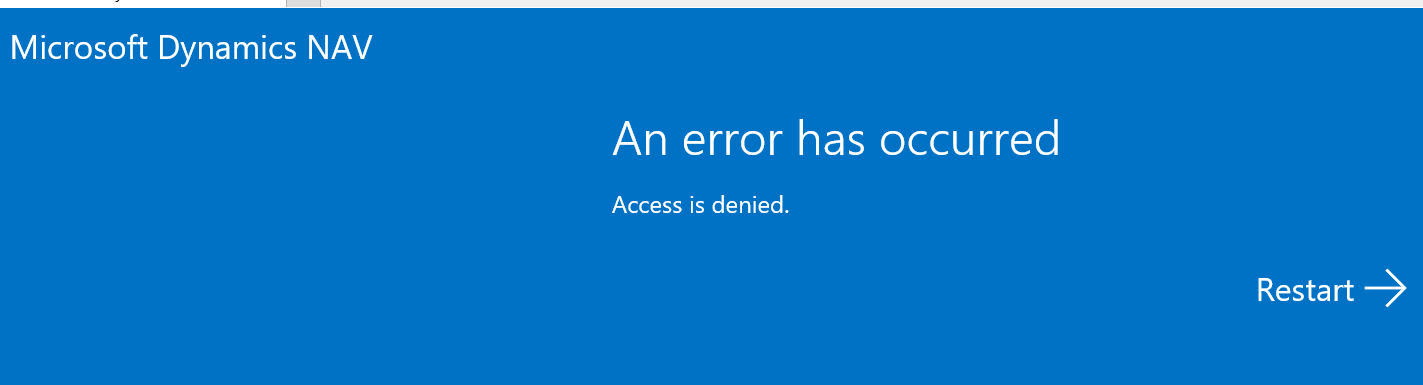
8585.ie.PNG

Other browsers like Chrome, Edge are not affected.

The error in the application event log file does show the following:
Error accessing Website Microsoft Dynamics NAV 2017 Web Client
Raw Url: /DynamicsNAV100/WebClient/logerror
Url: https://<<navserverinstance>>:port/<<dynamicsnavinstance>>/WebClient/logerror
Unhandled error occurred on a browser or device client:
{
  "clientInfo": {
    "cpuClass": "x86",
    "platform": "Win32",
    "userAgent": "Mozilla/5.0 (Windows NT 10.0; WOW64; Trident/7.0; .NET4.0C; .NET4.0E; rv:11.0) like Gecko",
    "browserLanguage": "en-US"
  },
  "message": "Access is denied.\r\n",
  "pageUrl": "https://<<navserverinstance>>:port/<<dynamicsnavinstance>>/WebClient/",
  "originalError": {
    "description": "Access is denied.\r\n",
    "number": -2147024891,
    "stack": "Error: Access is denied.\r\n\n   at DN.ActivityButton.prototype.render (

When we do know more, we will post it. 

UPDATE:

Universal App is not affected. Here we are using Edge WebView.
Dynamics NAV 2018 and later releases are not affected

Thank you.

*This post is locked for comments

I have the same question (0)
  • dhvr Profile Picture
    10 on at

    One of our customers has this issue and it is vital for their operation.

  • Seren S Profile Picture
    402 on at

    Hello,

    Do you have any progress? It is also the same for the Dynamics CRM area. Unified Interface applications does not work in IE.

  • Suggested answer
    Marco Mels Profile Picture
    on at

    Hello,

    We are currently working on a fix which will resolve the issue when connecting with Internet Explorer -using any supported release prior to Dynamics NAV 2018- to a WebClient instance.

    Thanks.

  • Suggested answer
    Marco Mels Profile Picture
    on at

    Hello,

    If the scenario does also fail when connecting to a specific release of Dynamics 365 for Sales, I would suggest you raise this with Dynamics 365 for Sales support.

  • Community Member Profile Picture
    on at

    Hi,

    and what about this issue:

    community.dynamics.com/.../310537

    This started happening after one of the latest updates of Chrome.

    Will this be fixed also?

  • Suggested answer
    Marco Mels Profile Picture
    on at

    Hi,

    We did have a look at this based on an open support request, but we were not able to reproduce with Chrome build 72.0.3636.109. The scenario you describe does only reproduce with build 72.0.3636.96 which is not the latest. When we know more, we will post information in that other forum posting.

    Thanks.

  • Community Member Profile Picture
    on at

    this is also an issue with KB4487044, KB4487000, KB4487017

  • Marco Mels Profile Picture
    on at

    Hello,

    For the Access Denied issue, we do have a fix in review after that we narrowed down root cause. For the other unrelated issue with Chrome, CSS was able to reproduce the scenario in-house. We do not have a fix for that scenario yet.

    Thank you. 

  • Community Member Profile Picture
    on at

    update, an issue with four different patch

    is this an NAV issue or IE/Microsoft issue

    Windows Server 2016       KB4487026 support.microsoft.com/.../windows-10-update-kb4487026

    Windows Server 2012R2   KB4487000 support.microsoft.com/.../windows-8-1-update-kb4487000

    W10 version 1803             KB4487017 support.microsoft.com/.../windows-10-update-kb4487017

    W10 version 1809             KB4487044 support.microsoft.com/.../windows-10-update-kb4487044

  • Community Member Profile Picture
    on at

    please let us know if the fix will apply to cumulative Win 7 64 security patch KB4486563 and KB4486474 (this IE KB is rolled up into KB4486563) as well. thanks

Under review

Thank you for your reply! To ensure a great experience for everyone, your content is awaiting approval by our Community Managers. Please check back later.

Helpful resources

Quick Links

Responsible AI policies

As AI tools become more common, we’re introducing a Responsible AI Use…

Neeraj Kumar – Community Spotlight

We are honored to recognize Neeraj Kumar as our Community Spotlight honoree for…

Leaderboard > 🔒一 Microsoft Dynamics NAV (Archived)

Last 30 days Overall leaderboard

Featured topics

Product updates

Dynamics 365 release plans



