web
You’re offline. This is a read only version of the page.
close
Skip to main content

Announcements

No record found.

News and Announcements icon
Community site session details

Community site session details

Session Id :
Customer experience | Sales, Customer Insights,...
Suggested Answer

Chart to display event joined in Account

(0) ShareShare
ReportReport
Posted on by 1,243

Hi,

Does anyone know how can I display the distinct number of event that the contact under the Account is joined in a chart? There is potential that 2 contact under the same account is joining same event, but the count should be distinct as 1 only. This chart required to be able to drill down to show which event is joined. 

I tried to create a chart under the account, but I can't see the event registration/check-ins entity. As the event registration is tied to contact and not account?

I also tried to create a view from contact and event registration/check-ins as well, but no luck.

Thanks.

Regards,
Teh

I have the same question (0)
  • Suggested answer
    cloflyMao Profile Picture
    25,210 on at

    Hi Teh,

    From your description, would you like to create an account-based event registration view?

    e.g:

    Event ID   Contact    Event   Contact Company  
    ER 1326 A01 XYZ Fabrikam
    ER 3357 A02 Contoso Reference   Fabrikam
    ER 0538 A03 XYZ Fabrikam
    ER 7465 A04 Contoso Reference   Fabrikam
    ER 6812 A05 Contoso Reference   Fabrikam
    ER 9176 A06 Contoso Reference   Fabrikam
    ER 6975 A07 Contoso Reference   Fabrikam

    You expected view:

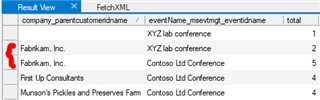
    Company Name  Event   Total  
    Fabrikam XYZ 2
    Fabrikam Contoso Reference   5

    Due to you need aggregation on attribute of linked entity(contact) and event registraion itself(count),

    which could be regarded as complex query, in this situation, you should build a custom fetchXML to achieve it.

    "


    To run above fetchXML, you should execute it in XrmToolBox with its FetchXML Builder plugin.(a free and useful 3rd party tool for Dynamics 365)

    From my test as so far, it seems that system view not supports aggregation function, but we can apply the fetchXml into chart with another Xrmtoolbox plugin: Advanced Chart Editor.

    Full demo: (Fabrikam, Inc)

    1. Raw records in Dynamics 365 Marketing
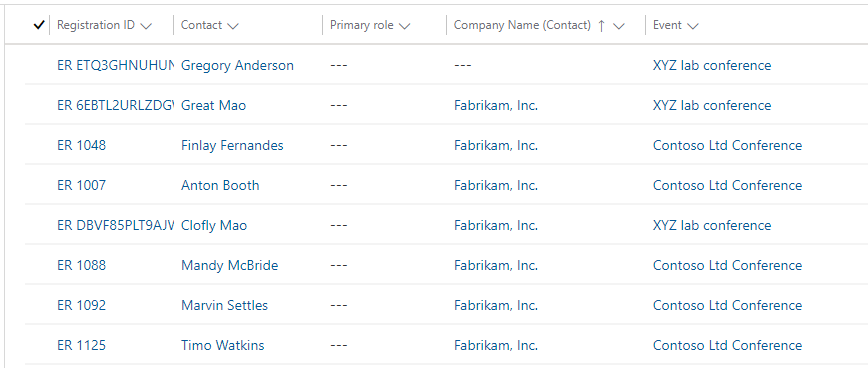
    pastedimage1583723905160v2.png

    2. Raw result in fetchXML builder

    pastedimage1583723921781v3.png

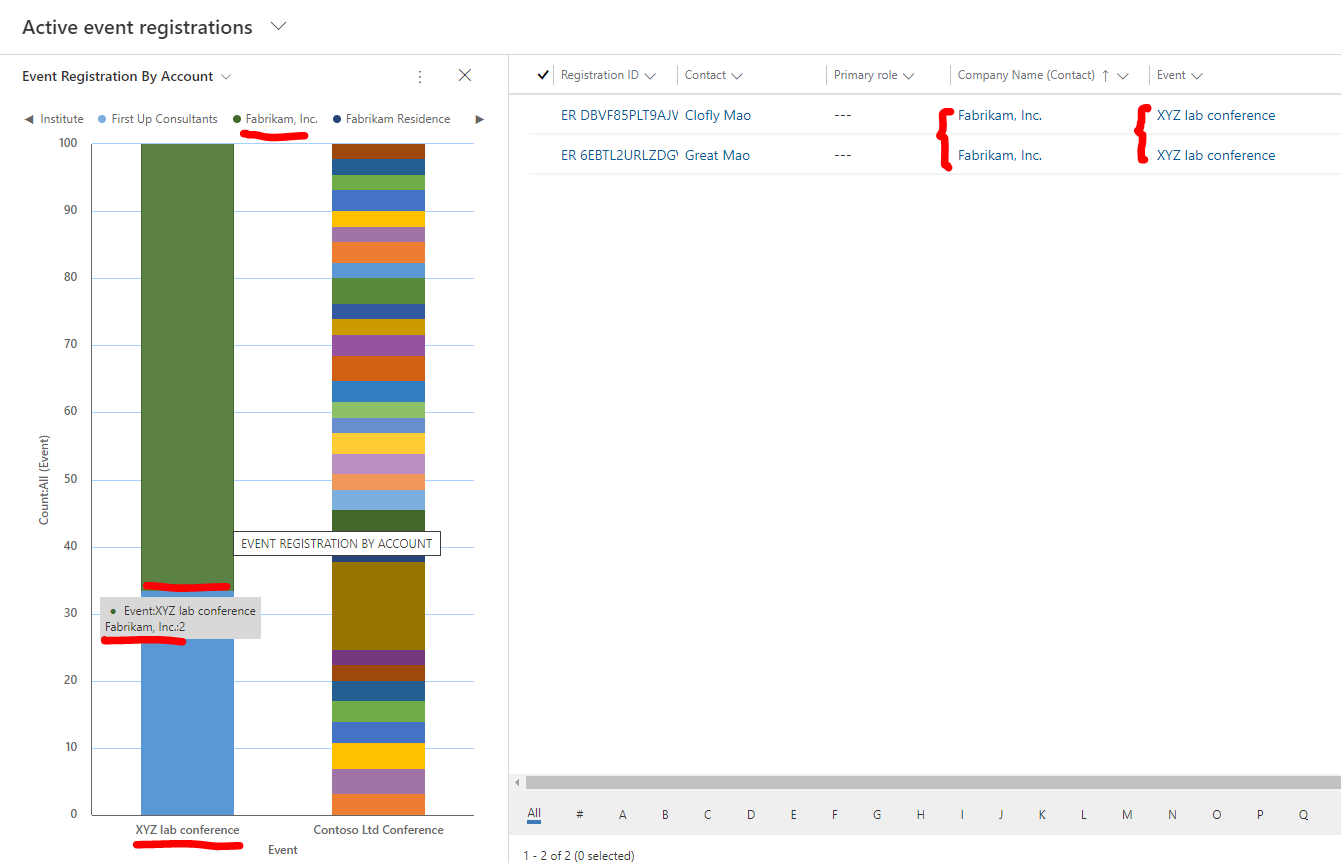
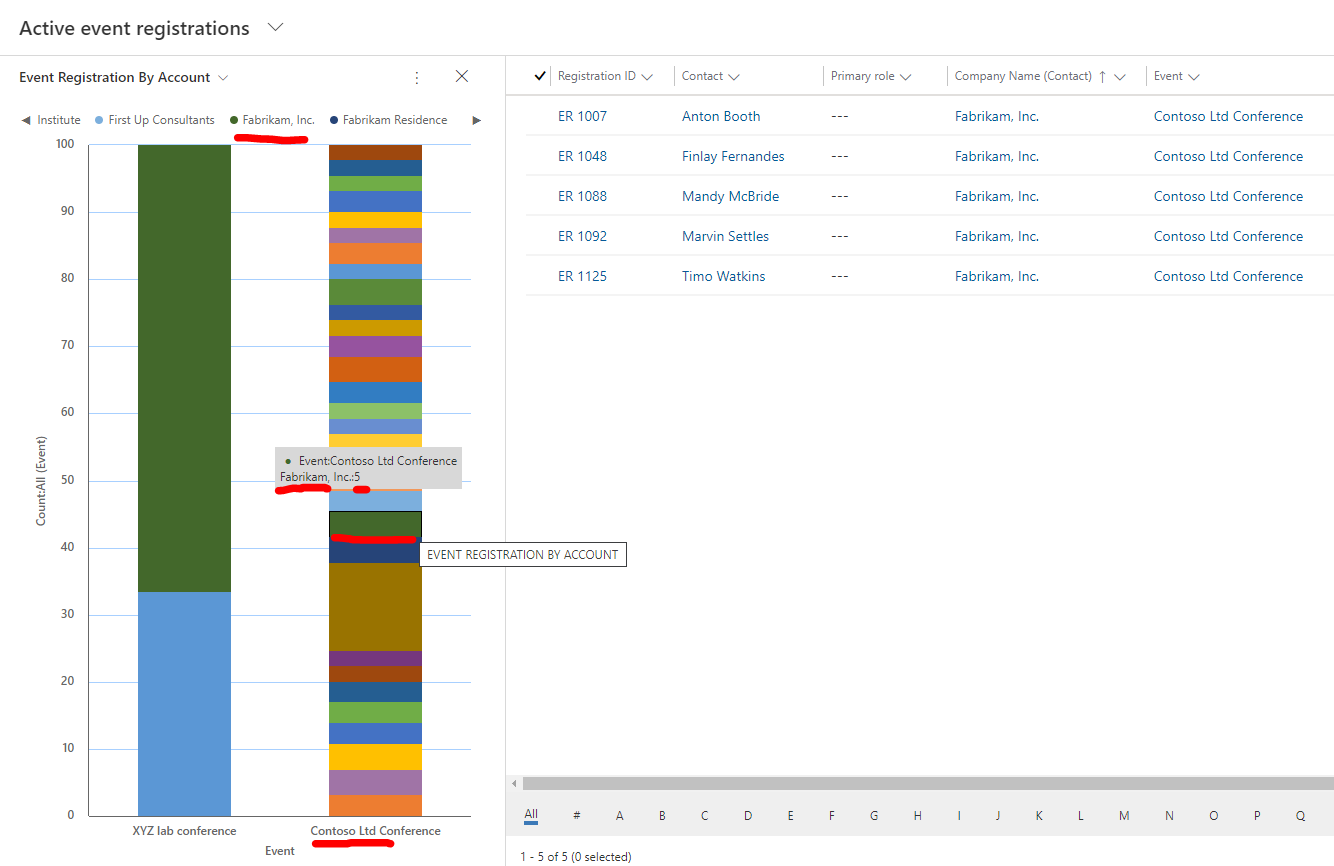
    3. Chart (Deep green block)

    pastedimage1583724477595v1.png

    pastedimage1583724529815v2.png

    Chart is stacked column chart.

    In a word,

    to build such chart with your requirement, you need follow items:

      * XrmToolBox

      * XrmToolBox plugin: Fetchxml Builder to test fetchxml result

      * XrmToolBox plugin: Advanced Chart Editor(Actually what we need to do is just replacing default fetchxml with our owns, see final screenshot)

      * Tutorial about advanced chart editor: https://crmchartguy.com/2018/04/25/use-the-fetchxml-builder-to-help-create-charts-in-dynamics-365/
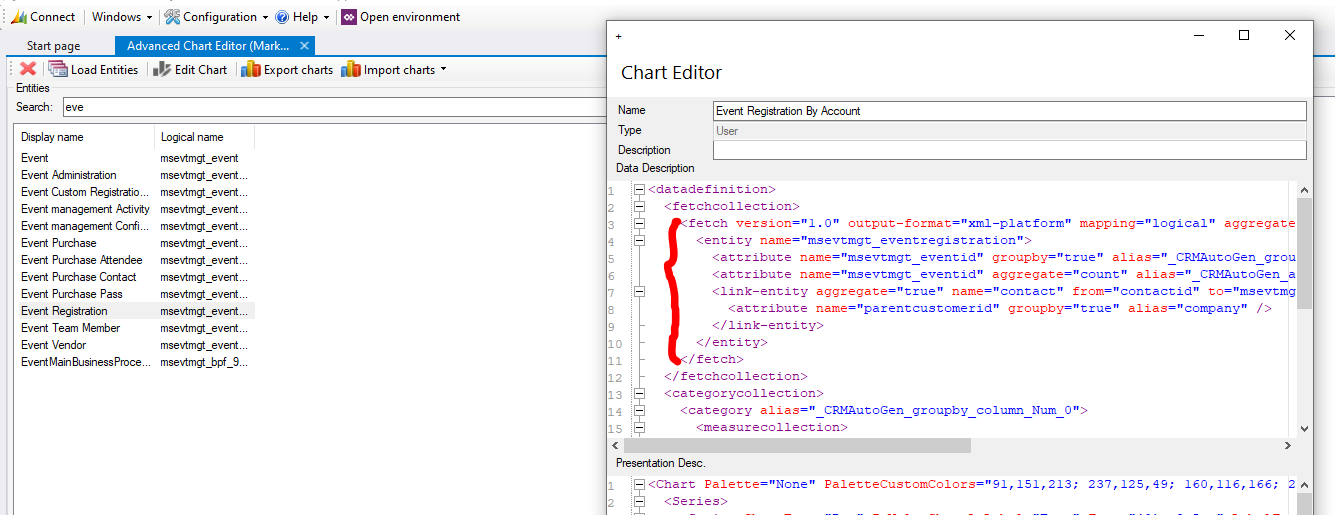
    pastedimage1583724695309v3.png

    Regards,

    Clofly

  • cloflyMao Profile Picture
    25,210 on at

    Hi Teh,

    Could you get correct statistic result from the fetchxml that I posted?

    Regards,

    Clofly

Under review

Thank you for your reply! To ensure a great experience for everyone, your content is awaiting approval by our Community Managers. Please check back later.

Helpful resources

Quick Links

Introducing the 2026 Season 1 community Super Users

Congratulations to our 2026 Super Stars!

Congratulations to our 2025 Community Spotlights

Thanks to all of our 2025 Community Spotlight stars!

Leaderboard > Customer experience | Sales, Customer Insights, CRM

#1
ManoVerse Profile Picture

ManoVerse 151 Super User 2026 Season 1

#2
Jimmy Passeti Profile Picture

Jimmy Passeti 51 Most Valuable Professional

#3
NeerajPawar Profile Picture

NeerajPawar 42

Last 30 days Overall leaderboard

Product updates

Dynamics 365 release plans