web
You’re offline. This is a read only version of the page.
close
Skip to main content

Notifications

Announcements

No record found.

Community site session details

Community site session details

Session Id :
Microsoft Dynamics AX (Archived)

Problem with AX printing

(0) ShareShare
ReportReport
Posted on by

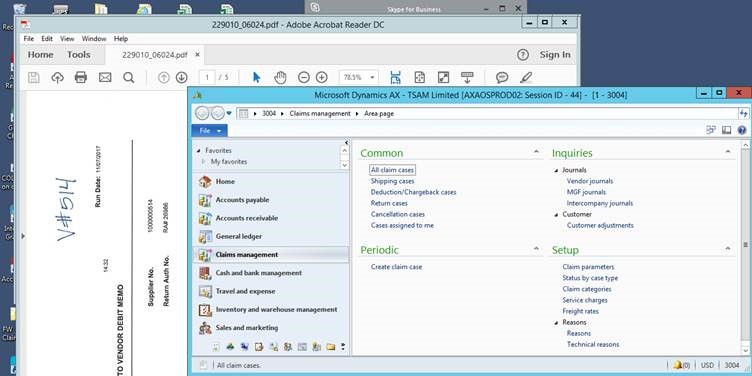
One of the users cannot print document from AX while printing it shows "this document cannot be printed" so our team created a new profile to her then she can print the document but problem is whenever she opens the AX the attachment is opening and it is not closing we tried to close with task manager but no luck, attachment is closing but when ax opens the attachment is opening.pegy-problem.jpg
*This post is locked for comments

I have the same question (0)
  • Verified answer
    BorisD Profile Picture
    2,826 Moderator on at

    If the user is using AX through a Remote session? If yes, the session most not be logging off. In AX go to System administration>Online users search for the user and see what Remote server they are connected to. Keep this window open.

    Log on to the Remote session server through RDP and click Ctrl + Alt + End, click task manager, click Users tab, select user and log them off.

    Now go back to your AX Online users windows and end all open session for that user.

  • Community Member Profile Picture
    on at

    Thanks Boris, for reaching I appritiate your help It works, we ended the program so we don't have the problem in the background now but she was unable to print the document while printing its taking but we are not getting printouts from the printer I checked status it is online. so can you help with this situation?

  • BorisD Profile Picture
    2,826 Moderator on at

    Is the AX Client running locally on the users computer? Is the user able to print other documents to that printer outside of AX?

  • Community Member Profile Picture
    on at

    User can able to print other documents but she cannot print documents from ax, client is running remote app desktop connection

  • BorisD Profile Picture
    2,826 Moderator on at

    Is the client using the redirected printer, or a printer that is installed on the remote desktop?

    I know you said you checked to make sure the printer was on line. If the printer is installed on the remote desktop server, you have to check on the server, not on the users computer.

  • Community Member Profile Picture
    on at

    Our client is using the redirected printer

  • Suggested answer
    BorisD Profile Picture
    2,826 Moderator on at

    When you click the print icon on the pdf, a list of printers will come up. are you sure the printer doesn't show up grayed out in this list? I recommend installing the printer on the RDS server and having the user print using the printer on the server instead of redirected. Any printer installed on the RDS server will be available through AX for the user. They will have to log off the session and back on to see the newly installed printer.

Under review

Thank you for your reply! To ensure a great experience for everyone, your content is awaiting approval by our Community Managers. Please check back later.

Helpful resources

Quick Links

Responsible AI policies

As AI tools become more common, we’re introducing a Responsible AI Use…

Neeraj Kumar – Community Spotlight

We are honored to recognize Neeraj Kumar as our Community Spotlight honoree for…

Leaderboard > 🔒一 Microsoft Dynamics AX (Archived)

#1
Priya_K Profile Picture

Priya_K 4

#1
Martin Dráb Profile Picture

Martin Dráb 4 Most Valuable Professional

#3
Ali Zaidi Profile Picture

Ali Zaidi 2

Last 30 days Overall leaderboard

Featured topics

Product updates

Dynamics 365 release plans
