web
You’re offline. This is a read only version of the page.
close
Skip to main content

Notifications

Announcements

No record found.

Community site session details

Community site session details

Session Id :
Microsoft Dynamics AX (Archived)

Batch Printing to Printer in Ax 09

(0) ShareShare
ReportReport
Posted on by 35

H0726.02.bmp"TEXT-ALIGN: justify">I am currently tryuing to print a report to Batch in Dynamics Ax 2009. In particular, I am trying to use the AOS Server as a batch server, and not have to run a Batch Client. I have used them extensivly in earlier AX versions, but having some slight issue in Ax 09.

When I try to save the report to file [ PDF ] as a batch job, the AOS server performs the batch task without issue. File saves where its supposed to, and at the right time. This is great. I dont need to have a batch client working.

When I try to print the same report again as a batch job, but to a printer direct, the batch status on the Batch Job changes from Waiting to Executing, but never gives a result / output. The only way I can get the report to run is if I use the batch client [ Basic > Periodic > Batch > Processing ]. I was hoping to phase this out [ saves maintaining a batch client and tyying up a licensed user ] and not use a batch client, and want to know if I am doing anything wrong.

Additional Notes:

  • I have set my AOS server as a Batch Server [ Admin > Setup > Server Configuration ]
  • I have set the Batch group to run from this server [ Admin > Setup > Batch Groups ]
  • I have set the Connect to printers on the server property against the Configuration Utility.
  • When I review the batch tasks, I see that for the instance where I output the report to a file, I see the run location as server [ first screenshot below ]. When I run them direct to a printer, this value changes to client [ see second screenshot below ]. I have no control over this field, and dont know how to change it. Is this a case where if a print is to occur, it can only run as a client job?
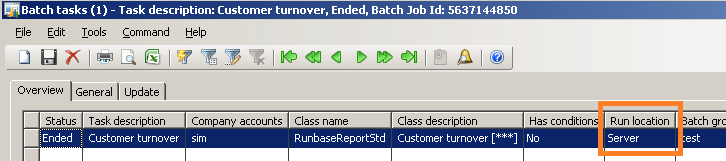
Feels more like I am missing something simple in my understanding on this. If anyone has any experience on this issue, it would be appreciated! 

Regards,

Nathan Aichinger

*This post is locked for comments

I have the same question (0)
  • Brandon George Profile Picture
    2,632 on at

    Its because your trying to print to a client side printer driver, and this will never work. You have already enabled use Printers on the AOS. Now for the printer you must select a printer driver that lives on the AOS to print too.

    This way when ran under the server context, it will use the server printer. This is why your seeing the client side context because it's trying to print to a client based printer and not one from the AOS.

    Also another word of advice, if you have image files in your report, for say an invoice or something, you can't do batch printing at the server context or AOS level. Other than that... this should work fine.

  • Community Member Profile Picture
    on at

    Hello Nathan,

    Can you share the code you used to accomplish this?

    "When I try to save the report to file [ PDF ] as a batch job, the AOS server performs the batch task without issue. File saves where its supposed to, and at the right time. This is great. I dont need to have a batch client working."

    I get the following message when I try to print to a file using a batch job that does not run on the client.

    "Will write job 'Confirmation - Report' to the Print archive instead of to the screen."

    Thanks

Under review

Thank you for your reply! To ensure a great experience for everyone, your content is awaiting approval by our Community Managers. Please check back later.

Helpful resources

Quick Links

Responsible AI policies

As AI tools become more common, we’re introducing a Responsible AI Use…

Neeraj Kumar – Community Spotlight

We are honored to recognize Neeraj Kumar as our Community Spotlight honoree for…

Leaderboard > 🔒一 Microsoft Dynamics AX (Archived)

#1
Martin Dráb Profile Picture

Martin Dráb 4 Most Valuable Professional

#1
Priya_K Profile Picture

Priya_K 4

#3
MyDynamicsNAV Profile Picture

MyDynamicsNAV 2

Last 30 days Overall leaderboard

Featured topics

Product updates

Dynamics 365 release plans
