web
You’re offline. This is a read only version of the page.
close
Skip to main content

Notifications

Announcements

No record found.

Community site session details

Community site session details

Session Id :
Customer experience | Sales, Customer Insights,...
Answered

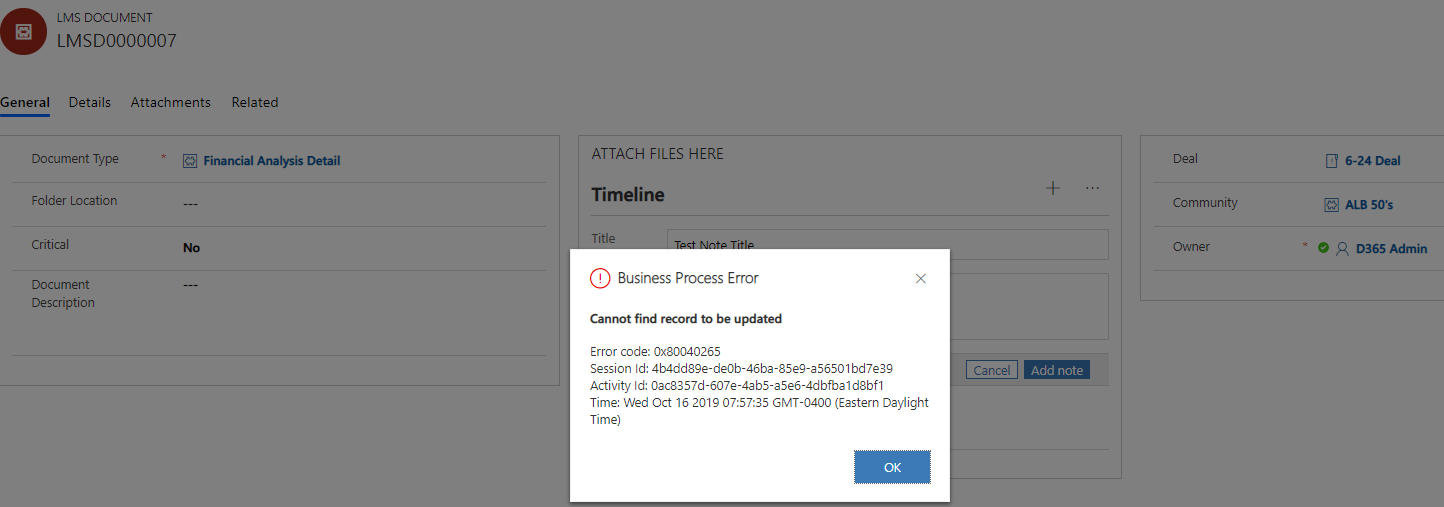
Workflow Issue - Business Process Error - Cannot find record to update - Need Suggestions

(0) ShareShare
ReportReport
Posted on by 175

Hi, 

I have a Real Time Workflow running On Create of a Note from the LMS Document record that needs to create a custom LMS Document Attachment record (this will hold the Version information from the LMS Document Version child record). 

It first checks that the Regarding LMS Document (which is the Parent record to the LMS Document Attachment') IS Document, then should create the LMS Document Attachment.  Here are the relationships. 

LMS Document : LMS Document Attachment 1:N

LMS Document Attachment : LMS Document Version 1:N

LMS Document : Note 1:N

LMS Document Attachment : Note 

The Workflow is currently not getting past the first step - and I am getting the above error.  It goes and performs some other steps as seen below. 

Here are some screenshots.  
pastedimage1571226987105v2.png

pastedimage1571227014510v3.png

pastedimage1571227077868v4.png

pastedimage1571227167507v5.png

Can anyone assist in what is wrong here?  Thanks so much in advance for your thoughts / suggestions.  

I have the same question (0)
  • Suggested answer
    Joana Pinto Profile Picture
    740 on at

    Hi,

    If I understood correctly, in your "IF" clause you are saying that the field "Regarding" of your Note is an entity LMS Document. But then, on your third step (the update step) you are trying to update the entity LMS Document Version on the regarding field.

    That is, on your IF you are saying and confirming that the regarding field points to LMS Document entity but in the third step you say that the entity on that field is LMS Document Version. Since what you have is a LMS Document , it will fail saying that there is no LMS Document Version entity to update. 

    I'm not sure if my reasoning is correct, but it was what I concluded with your explanation and screenshots.

    Regards,

    Joana

  • William Bradley Profile Picture
    175 on at

    Thanks for responding, Joana - I really appreciate it.  So, the first step is below.  It needs to check that the regarding is an LMS Document, and if so, Create a Document Attachment.  

    pastedimage1571236914321v1.png

    The second step then creates the Document Version, which is related to the Document Attachment that was just created.  

    Why I am confused is why it is failing on Step 1.  All the relationships should be there.  Which record cannot be found to be updated?

  • Suggested answer
    Joana Pinto Profile Picture
    740 on at

    Hi,

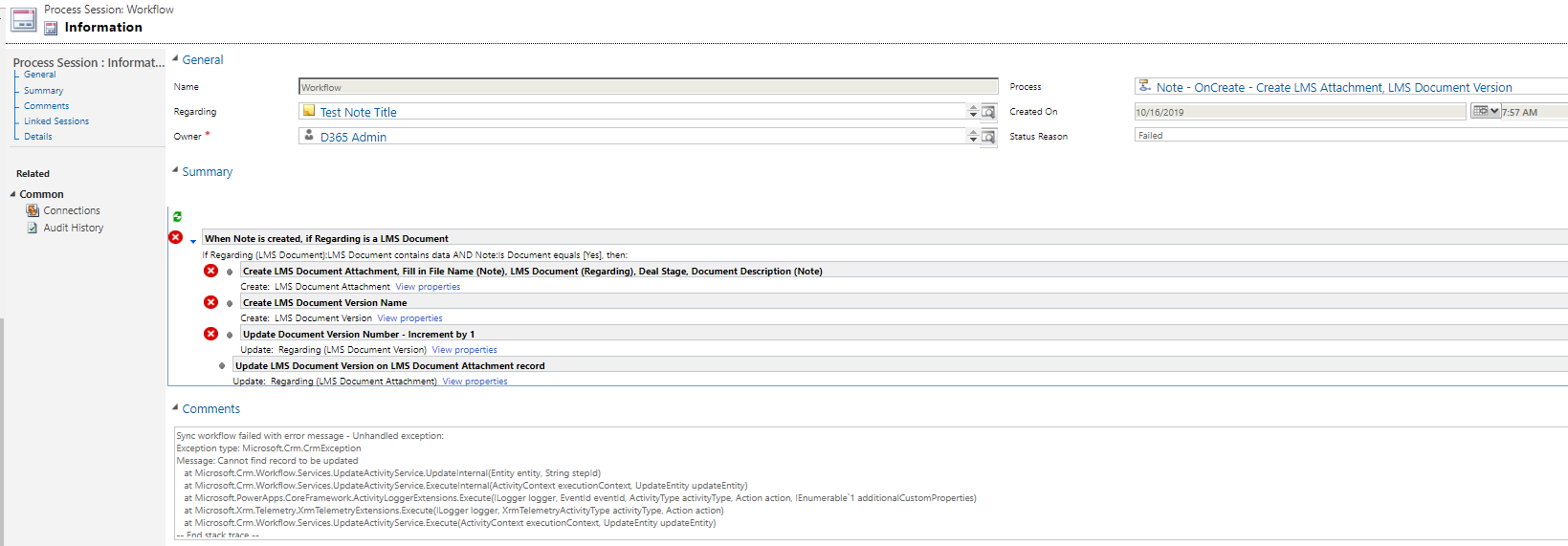
    It's not failing on step 1. In this image, you see that is failing on the update (as the error message itself says):

    pastedimage1571237763579v3.png

    Your IF is correct and it passes correctly by that IF. The record that cannot be found to be updated is the LMS Document Version (I signalized it on the image above). Your regarding field is a LMS Document record, not a LMS Document Version

  • William Bradley Profile Picture
    175 on at

    Thanks again!  OK...so if steps 1 and two (Create LMS Document Attachment and Create LMS Document Version are good, then maybe I do not need step 3?  But I need to update the LMS Document Version to increment by 1, and then put that value on the LMS Document Attachment field.  Suggestions?

  • Verified answer
    Joana Pinto Profile Picture
    740 on at

    It's hard to explain on written lol.

    You can update the LMS Document Version and increment by 1. The problem is you are accessing the field "Regarding" and saying that the entity in there is a LMS Document Version when it's not. On step 2 you are creating a LMS Document Version record but you are not associating it to the field "Regarding" on Notes entity. You've just created the record. To update, on the next step (3) you must update the record you've just created and not the "Regarding" field.

  • William Bradley Profile Picture
    175 on at

    Got it...had to update the 'Create' record - duhhh.  Thanks so much!  Huge help.  You made my morning.  

  • Joana Pinto Profile Picture
    740 on at

    Nice! Glad to help :) Cheers!

  • William Bradley Profile Picture
    175 on at

    Cheers to you!  Sorry - one other question...the Workflow is creating the LMS Document Attachment, and the LMS Document Version, but is not incrementing the Version No. (Decimal Field) on the Update step.  Any idea why this would be?  

  • Joana Pinto Profile Picture
    740 on at

    Hi again,

    Can you send some screenshots again? Thanks!

  • William Bradley Profile Picture
    175 on at

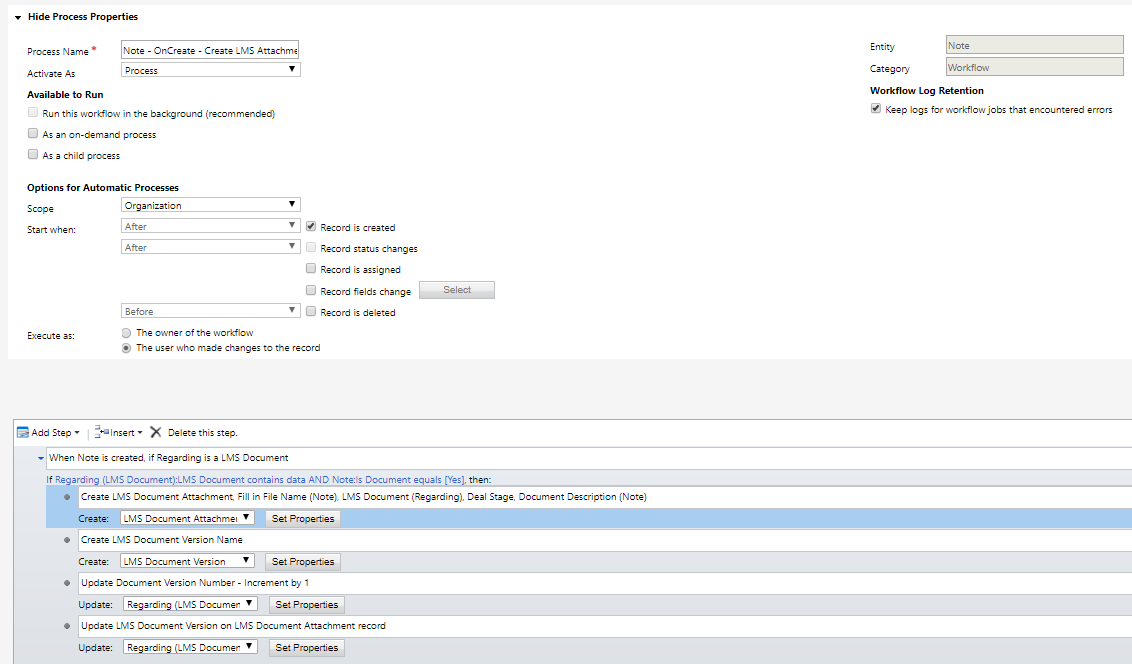
    Sure thing.  Here is the WF as it stands.  

    Process Steps:

    pastedimage1571253785354v1.png

    The 2 Create steps are working, but the 2 Update steps are not.  I have posted the 4 in order. 

    I also would like to set the Status of LMS Document Version to Inactive in another step, and also update 'Current Version' on the LMS Attachments

    Create LMS Document Attachment:

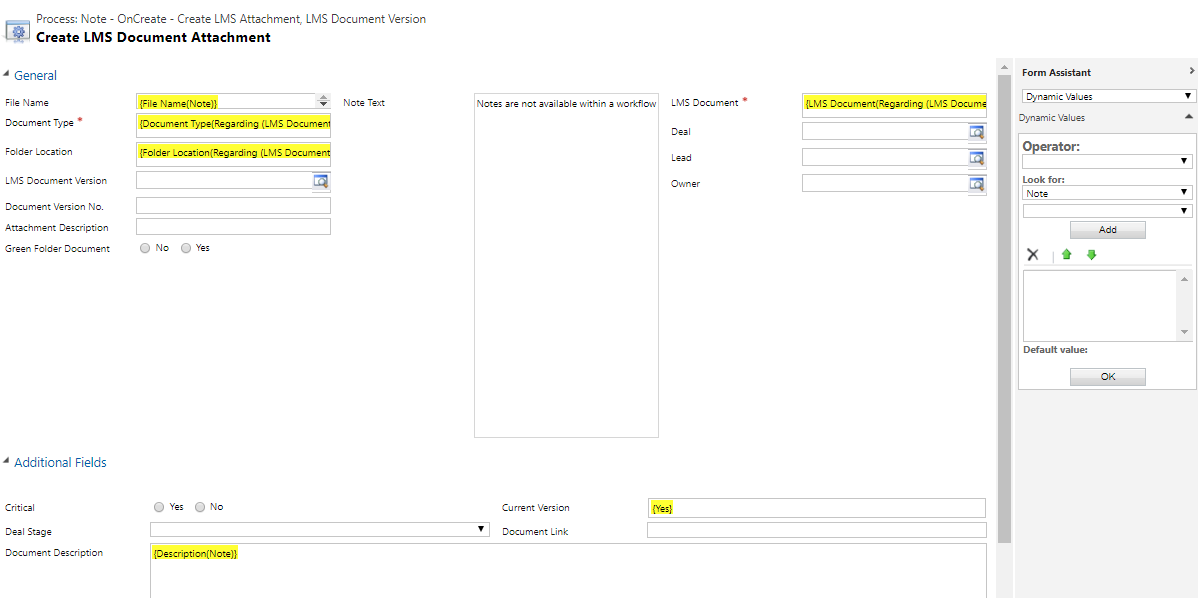
    pastedimage1571253984734v3.png

    Create LMS Document Version:

    pastedimage1571253951085v2.png

    Update (Create) LMS Document Version:

    pastedimage1571254033239v4.png

    Update (Create) LMS Document Attachment 

    pastedimage1571254086665v5.png

    Basically, on the LMS Document Entity, I want to show a Sub Grid for the related Attachments, with versions so the User can see all, and which ones are latest versions, etc.

    pastedimage1571254269429v6.png

    pastedimage1571254448635v7.png

    Thanks again for your help on this.  

Under review

Thank you for your reply! To ensure a great experience for everyone, your content is awaiting approval by our Community Managers. Please check back later.

Helpful resources

Quick Links

Responsible AI policies

As AI tools become more common, we’re introducing a Responsible AI Use…

Neeraj Kumar – Community Spotlight

We are honored to recognize Neeraj Kumar as our Community Spotlight honoree for…

Leaderboard > Customer experience | Sales, Customer Insights, CRM

#1
Tom_Gioielli Profile Picture

Tom_Gioielli 70 Super User 2025 Season 2

#2
Gerardo Rentería García Profile Picture

Gerardo Rentería Ga... 33 Most Valuable Professional

#3
Daniyal Khaleel Profile Picture

Daniyal Khaleel 32 Most Valuable Professional

Last 30 days Overall leaderboard

Product updates

Dynamics 365 release plans