Hi,
I have a workflow which updates a field on case form which is the lookup of the team. Most of the time this workflow works fine but sometime stuck in the waiting state and never get succeeded.
I am getting the error message as : The state transition requested is not valid for the current state. Current state: 2, current status: 22, target state: 3.
Also details as :
Plugin Trace:
[Microsoft.Xrm.Sdk.Workflow: Microsoft.Xrm.Sdk.Workflow.Activities.UpdateEntity]
[UpdateStep10]
[Microsoft.Crm.Service.ObjectModel: Microsoft.Crm.Service.ObjectModel.CasePostUpdatePlugin]
[4b723f64-b443-422b-a269-34ad739f19ee: CasePostUpdatePlugin]
Error Message:
Unhandled Exception: System.ServiceModel.FaultException`1[[Microsoft.Xrm.Sdk.OrganizationServiceFault, Microsoft.Xrm.Sdk, Version=7.0.0.0, Culture=neutral, PublicKeyToken=31bf3856ad364e35]]: The state transition requested is not valid for the current state. Current state: 2, current status: 22, target state: 3.Detail:
<OrganizationServiceFault xmlns:i="www.w3.org/.../XMLSchema-instance" xmlns="schemas.microsoft.com/.../Contracts">
<ErrorCode>-2147204763</ErrorCode>
<ErrorDetails xmlns:d2p1="schemas.datacontract.org/.../System.Collections.Generic" />
<Message>The state transition requested is not valid for the current state. Current state: 2, current status: 22, target state: 3.</Message>
<Timestamp>2015-08-11T12:44:35.2264965Z</Timestamp>
<InnerFault>
<ErrorCode>-2147204763</ErrorCode>
<ErrorDetails xmlns:d3p1="schemas.datacontract.org/.../System.Collections.Generic" />
<Message>The state transition requested is not valid for the current state. Current state: 2, current status: 22, target state: 3.</Message>
<Timestamp>2015-08-11T12:44:35.2264965Z</Timestamp>
<InnerFault i:nil="true" />
<TraceText i:nil="true" />
</InnerFault>
<TraceText>[Microsoft.Xrm.Sdk.Workflow: Microsoft.Xrm.Sdk.Workflow.Activities.UpdateEntity]
[UpdateStep10]
[Microsoft.Crm.Service.ObjectModel: Microsoft.Crm.Service.ObjectModel.CasePostUpdatePlugin]
[4b723f64-b443-422b-a269-34ad739f19ee: CasePostUpdatePlugin]
</TraceText>
</OrganizationServiceFault>
at Microsoft.Crm.Extensibility.OrganizationSdkServiceInternal.Update(Entity entity, CorrelationToken correlationToken, CallerOriginToken callerOriginToken, WebServiceType serviceType, Boolean checkAdminMode, Boolean checkForOptimisticConcurrency, Dictionary`2 optionalParameters)
at Microsoft.Crm.Extensibility.InprocessServiceProxy.UpdateCore(Entity entity)
at Microsoft.Crm.Workflow.Services.UpdateActivityService.<>c__DisplayClass1.<UpdateInternal>b__0(IOrganizationService sdkService)
at Microsoft.Crm.Workflow.Services.ActivityServiceBase.ExecuteInTransactedContext(ActivityDelegate activityDelegate)
at Microsoft.Crm.Workflow.Services.UpdateActivityService.UpdateInternal(Entity entity, String stepId)
at Microsoft.Crm.Workflow.Services.UpdateActivityService.ExecuteInternal(ActivityContext executionContext, UpdateEntity updateEntity)
at Microsoft.Crm.Workflow.Services.UpdateActivityService.Execute(ActivityContext executionContext, UpdateEntity updateEntity)
at System.Activities.CodeActivity.InternalExecute(ActivityInstance instance, ActivityExecutor executor, BookmarkManager bookmarkManager)
at System.Activities.Runtime.ActivityExecutor.ExecuteActivityWorkItem.ExecuteBody(ActivityExecutor executor, BookmarkManager bookmarkManager, Location resultLocation)
Any help on this would be helpful for me 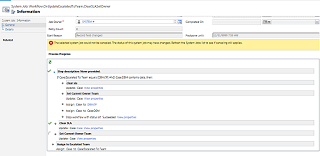
e.





