web
You’re offline. This is a read only version of the page.
close
Skip to main content

Notifications

Announcements

No record found.

Community site session details

Community site session details

Session Id :
Finance | Project Operations, Human Resources, ...
Suggested Answer

Notification workflow email

(0) ShareShare
ReportReport
Posted on by 95

Hello

We have setup the notification for the workflow when an action needs to be performed but also for approval or reject.

When someone reject (timesheet or purchase order) an email is sent by the system (image 1)

0434.image-1.PNG

but as we have activated the notification for reject action also we have another personalized email.
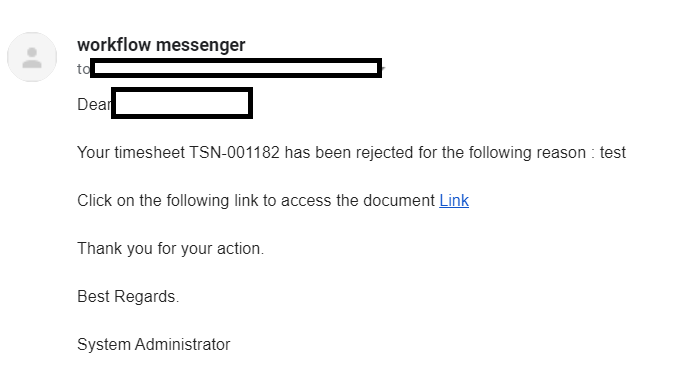
3513.image-2.PNG

Is it possible to disactivated the email generated by the systèm because on this one we don't have all the information we want to appears on the email

I have the same question (0)
  • Suggested answer
    Christoph Thaler Profile Picture
    5,442 on at

    Hi Meggie,

    you can define when an email is sent within the workflow configuration. Please check this setup. If you don`t want to send a mail when something is rejected, deactivate the tickbox

    pastedimage1594823884975v1.png

  • Meggie Profile Picture
    95 on at

    Hello

    thanks for the answer I have already activated this box but because I have activated this one we have 2 differents email that are sent: one by the system that is an automatique one and the other one because I have checked the box.

    I wonder if I can disactivated the email sent automatically by the system

  • Suggested answer
    Christoph Thaler Profile Picture
    5,442 on at

    Hi Meggie,

    there is some setup in „system email templates“ and „organization email templates“.

    in addition you can find some additional information here: https://www.linkedin.com/pulse/dynamics-365-finance-operations-workflows-e-mails-michael-winther.

    here there is a description how to link/unlink the email templates with the workflow

  • MATTGUO Profile Picture
    22,349 Moderator on at

    Hi Meggie,

    System will generate two emails, one for the person you selected and the other for the pervious work item owner automatically.

    There is no parameter to disable the automatic email.

  • Meggie Profile Picture
    95 on at

    ok thank you I will look at it

  • Meggie Profile Picture
    95 on at

    ok thanks

Under review

Thank you for your reply! To ensure a great experience for everyone, your content is awaiting approval by our Community Managers. Please check back later.

Helpful resources

Quick Links

Responsible AI policies

As AI tools become more common, we’re introducing a Responsible AI Use…

Neeraj Kumar – Community Spotlight

We are honored to recognize Neeraj Kumar as our Community Spotlight honoree for…

Leaderboard > Finance | Project Operations, Human Resources, AX, GP, SL

#1
Abhilash Warrier Profile Picture

Abhilash Warrier 669 Super User 2025 Season 2

#2
André Arnaud de Calavon Profile Picture

André Arnaud de Cal... 449 Super User 2025 Season 2

#3
Martin Dráb Profile Picture

Martin Dráb 384 Most Valuable Professional

Last 30 days Overall leaderboard

Product updates

Dynamics 365 release plans



